

- HOME
- Taxes & compliance
- How UAE eInvoicing works: the 5-corner model, end to end
How UAE eInvoicing works: the 5-corner model, end to end
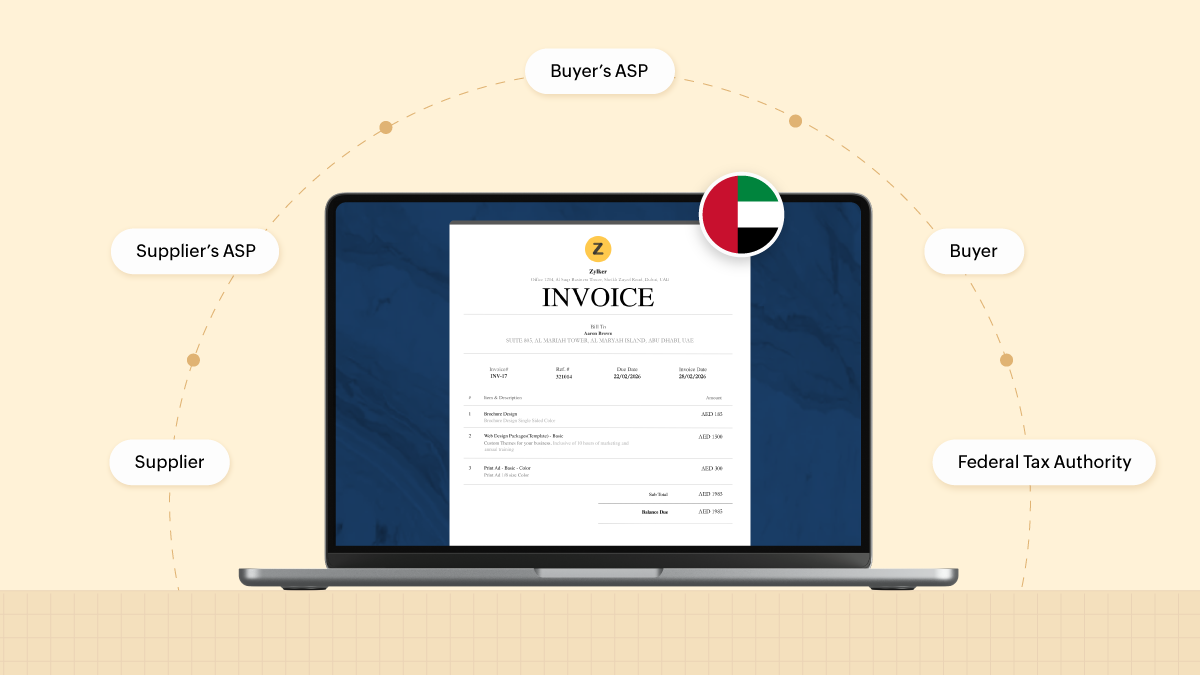
An eInvoice in the UAE doesn't move directly from a supplier's accounting system to the buyer. It passes through the Accredited Service Provider (ASP) each business has separately appointed. The supplier's ASP and the buyer's ASP validate and exchange the invoice, and each one separately reports the required tax data to the Federal Tax Authority (FTA). Together, the supplier, the two providers, the buyer and the FTA make up what the Ministry of Finance calls the 5-corner model.
For finance and IT teams, this model determines where validation happens, what the buyer actually receives, what the FTA receives, and which party needs to act when something goes wrong. This guide follows a single invoice through that sequence, built directly from the Ministry of Finance's own technical documentation.
In this guide, you'll find answers to:
• What is the 5-corner model?
• What does each of the five corners do?
• What is the invoice's journey between the five corners?
• What do the confirmation messages in the 5-corner model tell you?
• How does this differ from a clearance model?
• What does the 5-corner model mean for finance and IT teams?
• What are the most common misunderstandings about this model?
• Frequently asked questions
What is the 5-corner model?
The UAE's eInvoicing system runs on what the Ministry of Finance calls the DCTCE model: Decentralized Continuous Transaction Control and Exchange. Each part of that name describes something specific. "Decentralized" means there's no single central government system that every invoice passes through for approval. “Continuous” means reporting to the tax authority happens as transactions occur, not in a periodic batch filing. “Transaction Control and Exchange” names the two things happening at once: the invoice moving between trading parties, and tax-relevant data about it being reported to the authority. The tax reporting doesn't hold up the invoice—there's no government approval step the invoice has to clear before it can reach the buyer.
The model is built on the Peppol network, an international framework originally designed for cross-border e-procurement and later adapted by tax authorities for continuous transaction reporting. Peppol solved a specific problem: letting two businesses in different countries, running different systems, exchange structured documents without either side adopting the other's software. It does this through a network of accredited providers that all speak the same structured document language. That same network turns out to suit tax reporting well. A supplier's provider and a buyer's provider, who may never have dealt with each other before, can exchange a validated invoice reliably.
The UAE's implementation of this is commonly described as a “5-corner model” because five distinct parties, or corners, participate in the standard exchange. It extends Peppol's standard four-corner exchange model (supplier, supplier's access point, buyer's access point, buyer) with a fifth corner for tax authority reporting. The UAE didn't build a new architecture for this. It added tax-authority reporting as a fifth corner to a model Peppol already used. That's the structure this guide walks through corner by corner, before tracing the messages that move between them.
This article describes the standard case: an invoice moving between a supplier and a buyer who are both already onboarded. A handful of transitional and special scenarios change parts of this flow, and those are covered separately in the UAE eInvoicing use cases guide.
What does each of the five corners do?
• Corner 1: the supplier. This is the business issuing the invoice, using whatever system it runs (an ERP, an accounting platform, or another business system) to produce the invoice data. Corner 1's job is producing accurate, complete data in the first place.
• Corner 2: the supplier's Accredited Service Provider (ASP). Every business issuing eInvoices must appoint one. Corner 2 receives the data from Corner 1 and validates it. It then converts the data into PINT AE, the UAE's localization of the global Peppol International (PINT) standard, written as XML (Extensible Markup Language, a structured text format that software can read reliably). Corner 2 is also responsible for reporting tax data to the FTA, covered in detail in the next section.
• Corner 3: the buyer's Accredited Service Provider. This is the buyer's own ASP connection, appointed by the buyer rather than the supplier. It receives the validated invoice from Corner 2 and runs its own validation before delivering it to the buyer. Corner 3 also has its own tax-reporting responsibility to the FTA, independent of Corner 2's. Corner 2 and Corner 3 are two separately appointed roles, not necessarily two different companies. Nothing in Guidelines v1.1 requires the supplier and buyer to use different accredited providers, so the same company could, in principle, hold both appointments for a given transaction.
• Corner 4: the buyer. This is the business receiving the invoice, once Corner 3 has validated and delivered it in the agreed format between the two parties. Corner 4's role mirrors Corner 1's: it's where the invoice actually lands and gets used, whether in accounting, payment processing, or wherever the buyer's own workflow takes it.
• Corner 5: the Federal Tax Authority. The FTA doesn't sit in the invoice's delivery path between supplier and buyer. It receives tax-relevant reporting data from both ASPs, Corners 2 and 3, in parallel with the invoice actually being exchanged. Corner 5's function is tax reporting and record-keeping, not approving or blocking the transaction itself.
Two things about this structure are easy to miss on a first read. First, a single invoice touches two separately appointed ASP roles, not one. The supplier and the buyer each appoint their own connection, and neither business's ASP relationship covers the other side of the transaction. That said, the two roles don't have to sit with two different companies: nothing in the current guidelines stops a supplier and a buyer from independently choosing the same accredited provider. Second, the FTA is a fifth participant that receives reports alongside the exchange, not a final approval gate the invoice waits on. The next section covers how that plays out message by message.
What decides which corner a given business occupies on any one transaction is role, not a fixed identity. The same business is Corner 1 when it's issuing an invoice, and Corner 4 when it's receiving one from a different supplier. What stays constant is a business's own ASP relationship, appointed once and used whichever direction a given transaction runs. Which corner it occupies simply depends on whether it's issuing or receiving on that particular invoice.
What is the invoice's journey between the five corners?
The corners exchange more than the invoice itself. Confirmation messages and tax-relevant data travel around the model too, in a specific sequence. The diagram and the 11-step table below show where each one moves. The section after that explains what each message type is, since these terms are easy to mix up.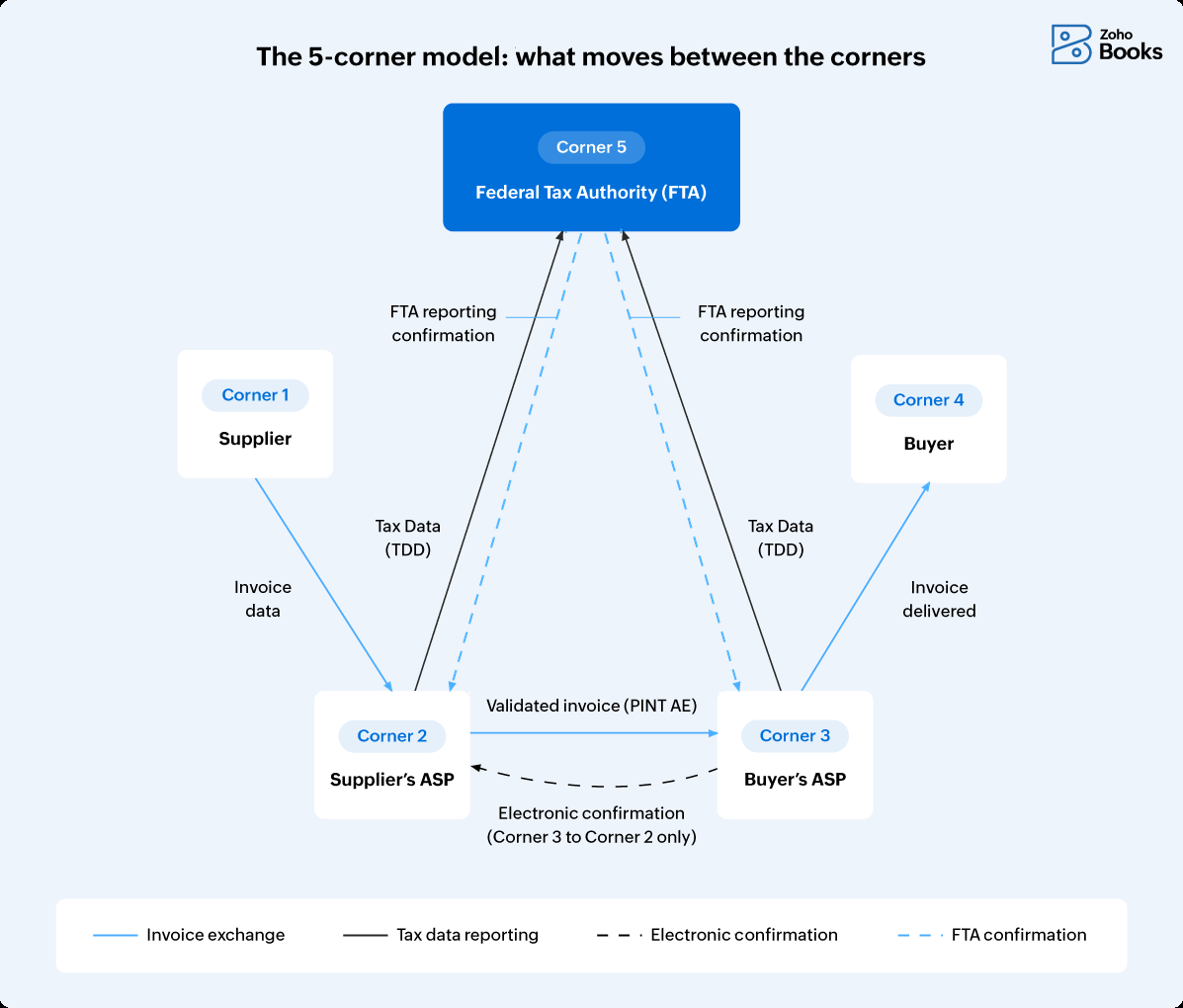
Based on the 11-step sequence in Guidelines v1.1, Section 5.1, here's what moves at each stage and what it means in practice:
Step | From → to | What moves | Practical meaning |
1 | Corner 1 → Corner 2 | Electronic Invoice data, in an agreed format | The supplier has produced the invoice in its own system |
2 | Corner 2 (internal) | Validation, and conversion into an XML invoice that follows the PINT AE specification | The data meets the required format before it goes further |
3 | Corner 2 → Corner 3 | The validated Electronic Invoice (XML) | The invoice is now in the buyer's ASP's hands for its own validation |
4 | Corner 2 → Corner 5 (in parallel with step 3) | Tax Data Document (TDD) | The supplier's ASP has reported this transaction to the FTA, while the invoice is still in transit to the buyer's side |
5 | Corner 3 → Corner 2 | Electronic confirmation | The buyer's ASP has successfully validated the invoice |
6 | Corner 3 → Corner 4 | The validated Electronic Invoice, in an agreed format | The buyer now receives the invoice through that agreed format |
7 | Corner 3 → Corner 5 | Tax Data Document (TDD) | The buyer's ASP submits its own tax data for the same transaction, independently of the supplier's ASP. |
8 | Corner 5 → Corner 2 | FTA reporting confirmation | The FTA confirms it has successfully received the supplier-side TDD |
9 | Corner 5 → Corner 3 | FTA reporting confirmation | The FTA confirms it has successfully received the buyer-side TDD |
10 | Corner 2 → Corner 1 | Forwarded confirmations (the electronic confirmation and the FTA reporting confirmation) | The supplier receives confirmation that Corner 3 validated the invoice, and that the FTA received its tax data |
11 | Corner 3 → Corner 4 | Forwarded confirmation (the FTA reporting confirmation) | The buyer receives confirmation that the FTA received its ASP's tax data |
A few parts of that sequence are easy to get backwards. Both ASPs report a TDD to the FTA independently, in steps 4 and 7, and each report is confirmed on its own timeline rather than once both have arrived. The buyer doesn't wait for the FTA before receiving anything either: the buyer gets the invoice at step 6, once the buyer's ASP has validated it and sent its electronic confirmation back to the supplier's ASP at step 5. And the confirmations that eventually reach the supplier and the buyer aren't symmetric. The supplier's ASP forwards both the electronic confirmation and the FTA reporting confirmation back to the supplier at step 10. The buyer only receives the forwarded FTA reporting confirmation at step 11. That's because the electronic confirmation at step 5 already went directly to the supplier's ASP, not to the buyer.
A rejection can happen at more than one point. A validation failure at Corner 2 stops the invoice before it ever leaves the supplier's own ASP. A failure caught at Corner 3 is different: per Guidelines v1.1, Corner 3 confirms the failure electronically to both Corner 2 and Corner 5, and in that case reports no Tax Data to Corner 5 for that invoice. Either way, this is the technical validation layer catching a data, format, or delivery problem, separate from a buyer disputing an invoice commercially later on.
What do the confirmation messages in the 5-corner model tell you?
Three different things move around this model, and they answer different questions.
The eInvoice itself is the document. The Tax Data Document (TDD) is the tax-relevant data an ASP reports to the FTA. The other two are status messages, and the difference between them is what each one reports on.
The electronic confirmation goes from the buyer's ASP to the supplier's ASP, and reports the outcome of validating the invoice. The FTA reporting confirmation goes from the FTA to an ASP, and reports that the ASP's tax data was received successfully. One tells you about the invoice's progress towards the buyer. The other tells you about your tax reporting. A positive electronic confirmation says nothing about whether your tax data was accepted, and a positive FTA reporting confirmation says nothing about whether the buyer has the invoice.
Both are called a Message Level Status (MLS) in the Ministry of Finance's own description of the model, which distinguishes them as the exchange MLS and the reporting MLS. Guidelines v1.1 uses the plainer phrase "electronic confirmation" for the first one. This guide uses the Guidelines' wording, since that's the document the 11-step sequence above comes from.
Neither message tells you the buyer agrees with the invoice. These technical messages do not confirm the buyer’s commercial acceptance or payment.
A technical note on status codes. OpenPeppol's own MLS specification, which the Peppol network uses generally, defines three outcome codes rather than a simple success-or-failure result. AP (“Approved”) means delivery to Corner 4 succeeded with a verifiable confirmation. AB (“Accepted”) means Corner 3 forwarded the document but has no way to verify it arrived, for example when delivery happens by email or postal service. RE (“Rejected”) means the document failed conformance checks, or delivery to Corner 4 failed outright. Only AP represents confirmed delivery; AB is a real gap between “sent” and “confirmed received,” worth knowing about before treating any positive status as proof the buyer has the invoice. These are OpenPeppol's codes for its own specification, and they describe delivery towards the buyer, not tax reporting. Ask your ASP which codes it surfaces to you and what each one requires your team to do.
Here's how the model's message types actually break down:
Message | Direction | What it establishes |
Electronic invoice | Corner 2 → Corner 3 | Transfers the structured invoice data |
Electronic confirmation | Corner 3 → Corner 2 | Reports whether the buyer's ASP validated the invoice |
Tax Data (TDD) | Corner 2 or Corner 3 → Corner 5 | Reports tax-relevant data to the FTA |
FTA reporting confirmation | Corner 5 → Corner 2 or Corner 3 | Confirms that specific TDD was received |
Is UAE eInvoicing a clearance model like other countries use?
If you've read about eInvoicing in other countries, you may have come across the term "clearance model". It describes a different design, and advice written for those systems sometimes gets applied to the UAE by mistake. In a clearance model, an invoice has to be submitted to a central government system and approved before it counts as valid and can be sent to the buyer. The government sits directly in the invoice's path, as a gate the transaction waits on.
The UAE's decentralized model doesn't work that way. There's no step where a government system has to approve an invoice before it can move from supplier to buyer. The exchange between Corners 1 through 4 and the tax reporting to Corner 5 happen in parallel. That's what “continuous” in DCTCE is describing: reporting alongside the transaction, rather than gating it. It also means there's no pre-clearance step baked into a UAE eInvoice. Guidelines v1.1 states that UAE eInvoices are exchanged as XML and don't carry a QR code or barcode, unlike the clearance-style systems used in some other countries. Advice written for those systems sometimes gets applied to the UAE incorrectly.
The practical difference shows up at the moment an invoice is issued. In a clearance model, a supplier typically can't treat an invoice as legally issued until the government system has approved it. That introduces a wait, however short, into the invoicing process itself. In the UAE's model, Corner 2's validation is what determines whether an invoice can move forward at all. The FTA's role at Corner 5 is receiving and confirming tax reporting data about a transaction that's already in motion. For anyone building or configuring a system around this, the design assumption to build against is continuous, parallel reporting. It isn't a synchronous approval call that a business has to wait on before an invoice is valid.
What does the 5-corner model mean for finance and IT teams?
The mechanics above settle a few practical questions that otherwise take longer to work out from scattered sources. A business doesn't wait for FTA approval before sending an invoice. The two are parallel processes. A business's relationship with its own ASP only covers its own side of a transaction, since the counterparty's ASP is a separate appointment entirely. A technical rejection or delivery failure is a separate thing from a buyer's later commercial dispute over the invoice. Each one can be traced to a specific corner in the sequence above, so the model helps identify where a failure occurred and which team should investigate first.
Once you know Corner 3's electronic confirmation reports its own validation outcome back to Corner 2, “why did this invoice get rejected” has a specific, checkable answer: which corner caught the problem, and why. The same applies to reconciling what the FTA has on record. Since both ASPs report their tax data independently, you can check each report separately instead of treating a discrepancy as an unexplained gap in the system as a whole.
A few real integration and ownership questions follow from this. Who inside a business manages the ASP relationship day to day? What should happen when an MLS comes back as a rejection? How do the corners above map onto ERP or accounting master data? Those questions are covered in depth elsewhere: see the roles and exception-ownership playbook and the ERP integration and field-mapping guide for that operational layer. This piece is about the model itself; those are about running it day to day.
What are the most common misunderstandings about this model?
• Assuming a UAE eInvoice carries a QR code or barcode. It doesn't. Guidelines v1.1 says so directly. This assumption shows up in third-party advice about UAE eInvoicing, apparently carried over from clearance-style systems used in other countries.
• Assuming the FTA validates or approves the commercial content of an invoice. It doesn't. Corner 5's role is receiving tax-relevant reporting data (the TDD) and confirming receipt, not approving prices, terms, or the transaction itself.
• Assuming the supplier’s ASP appointment also covers the buyer. Each business appoints its own ASP. A supplier's ASP relationship has no bearing on which ASP the buyer uses, and the two operate independently, each with their own validation and reporting responsibilities.
• Assuming one confirmation covers everything. It doesn't. The electronic confirmation tells you what happened to the invoice on the buyer's side. The FTA reporting confirmation tells you the FTA received your tax data. Neither tells you the buyer has accepted the invoice or will pay it. Your team needs to know which status it's looking at before deciding whether anything needs action.
Zoho Software Trading LLC is a Ministry of Finance-accredited eInvoicing service provider for the UAE, with accreditation number 121988. See the UAE eInvoicing compliance guide for the full requirements and timeline, or explore Zoho Books to see how it supports UAE eInvoicing.
Zoho Books also has a direct integration with EmaraTax for VAT return filing. That's a separate process from the eInvoice exchange and tax-data reporting described in this article.
Frequently asked questions
What does DCTCE stand for?
Decentralized Continuous Transaction Control and Exchange. It describes a model where invoice exchange between trading parties and tax reporting to the FTA happen in parallel, without a central government approval step gating the transaction.
How many parties are involved in a single UAE eInvoice?
Five roles: the supplier (Corner 1), the supplier's ASP (Corner 2), the buyer's ASP (Corner 3), the buyer (Corner 4), and the FTA (Corner 5). See the corner-by-corner breakdown above for what each one does, and why five roles don't always mean five different organizations.
Does the FTA approve invoices before they reach the buyer?
No. Delivery to the buyer doesn't depend on the FTA approving anything. The buyer's ASP validates the invoice and passes it to the buyer, while tax data is reported to the FTA alongside that exchange. The FTA's role is to receive and confirm tax data, not to clear the invoice before it can be sent.
Do both ASPs report to the FTA, or just one?
Both, and independently, when the exchange succeeds. The supplier's ASP (Corner 2) and the buyer's ASP (Corner 3) each report their own Tax Data Document for the same transaction, and the FTA confirms receipt to each one separately rather than sending one shared confirmation. If the buyer's ASP can't validate the invoice, it doesn't report tax data for it at all—it sends a negative status back instead.
Is this the same as a clearance model like some other countries use?
No. A clearance model requires government approval before an invoice can be issued; the UAE's model doesn't have that step. See the clearance-model comparison above for the practical differences this creates.
Why does a single invoice need two ASP connections, one for the supplier and one for the buyer?
Because each business appoints its own ASP to represent its own side of the transaction, the same way each business runs its own accounting system. This mirrors Peppol's standard four-corner design: a supplier's connection and a buyer's connection each handle their own party's link to the network, rather than one shared intermediary handling both sides. The two connections are independent appointments, not necessarily two different provider companies. A supplier and a buyer could each choose the same accredited ASP without changing how the model works.
Who operates the Peppol network for the UAE specifically?
The Ministry of Finance is the UAE's Peppol Authority, per OpenPeppol's own current list of Peppol Authorities. The MoF administers the UAE's eInvoicing system and accreditation process, and this Peppol Authority role sits alongside that broader function.
What happens if an invoice fails validation?
A failure caught at the buyer's ASP (Corner 3) is reported to both Corner 2 and Corner 5, per Guidelines v1.1. Corner 3 then reports no tax data for that invoice—though the supplier's ASP may already have submitted its own report by that point.