AI credits
Agents and AI features use credits when their AI vendor is connected through Zoho Key System (ZKS). The number of credits depends on the request.
Zoho Analytics has three types of credits: AI credits, add-on credits, and Zoho LLM credits. To learn more about each type, refer to <<Credit types>>.
To track your credit usage, refer to <<Monitor credit usage>>.
Credit allowance by plan
The number of credits you receive depends on your plan:
| Plan | AI credits (one-time, expires after 180 days) | Zoho LLM credits (per month) |
|---|---|---|
| Free | Not included | 5000 |
| Basic | 10,000 | 10,000 |
| Standard | 20,000 | 20,000 |
| Premium | 40,000 | 40,000 |
| Enterprise | 100,000 | 100,000 |
For pricing details, refer to the pricing page.
Credit types
| Credit type | Used by | Available on | Validity |
|---|---|---|---|
| AI credits | All AI vendors connected through ZKS, including Zoho LLM | Paid plans | A one-time credit that expires 180 days after it's added. It can't be used on the Free plan, and the 180 days keep counting while you're on it. |
| Add-on credits | All AI vendors connected through ZKS, including Zoho LLM | Paid plans, purchased separately | Renew every month and are billed separately from your plan. Unused add-on credits don't roll over. |
| Zoho LLM credits | Zoho LLM only | All plans, including the Free plan | Reset every month, including on annual subscriptions. Unused Zoho LLM credits don't roll over. |
To see how many days are left before your AI credits expire, refer to <<Monitor credit usage>>.
When AI credits are added
Your AI credits are added at one of the following times, and they expire 180 days later:
- If you create your organization on a paid plan, when the organization is created.
- If you move from the Free plan to a paid plan, the first time you use an agent or AI feature, or open Manage AI, after the purchase.
- If your organization existed before AI credits were introduced, the first time you use an agent or AI feature, or open Manage AI.
The number of AI credits you receive depends on your plan when they're added. To learn what happens to your AI credits when you change plans, refer to <<Credits when you change plans>>.
How credits are calculated
Credits link what you pay to what the AI vendors process:
- 1 USD = 1,000 credits
- Zoho LLM: 1 credit = 1,000 tokens
- OpenAI through ZKS: credits are deducted at OpenAI's pricing for the model used.
To see how many credits you've used, refer to <<Monitor credit usage>>.
How credits are used
All AI vendors connected through ZKS, including Zoho LLM, use credits in the following order:
- AI credits, including any add-on credits you've bought. Your plan's AI credits are used before add-on credits.
- Zoho LLM credits, used only by Zoho LLM
This means that while you have AI credits, Zoho LLM uses them too. Your Zoho LLM credits are used only after your AI credits and add-on credits run out or expire.
When credits run out or expire
When you have no AI credits or add-on credits left:
- Agents and AI features that use OpenAI through ZKS pause. They don't switch to Zoho LLM automatically.
- Agents and AI features that use Zoho LLM continue, using your Zoho LLM credits.
- In data centers where Optimization uses OpenAI, Optimization stops.
To keep using a paused agent or AI feature, do one of the following:
- If it supports Zoho LLM, select Zoho LLM as its AI vendor. To learn more, refer to <<Manage AI page: Select the AI vendor for an agent or AI feature>>.
- Connect OpenAI with your own API key (BYOK). To learn more, refer to <<Manage AI page: Connect OpenAI with your own API key>>.
- Buy add-on credits. To learn more, refer to <<Add-on credits>>.
When your Zoho LLM credits also run out, all agents and AI features that use ZKS pause until your Zoho LLM credits reset the next month, or until you buy add-on credits.
Expired AI credits can't be restored, even if you change your plan.
Add-on credits
Add-on credits are extra credits that you can buy on a paid plan. They aren't available on the Free plan. Add-on credits are prepaid. They're available as soon as you buy them, and they renew every month. For the rate, refer to <<How credits are calculated>>.
To buy, change, or cancel add-on credits, email support@zohoanalytics.com.
Credits on the Free plan
On the Free plan:
- Only Zoho LLM credits are included. AI credits and add-on credits aren't available.
- To use OpenAI, connect it with your own API key (BYOK). To learn more, refer to <<Manage AI page: Connect OpenAI with your own API key>>.
- AI credits from a previous paid plan are locked. To use them, upgrade to a paid plan before they expire.
Credits when you change plans
Your AI credits stay with your organization when you change plans, until they expire:
- When you move to another paid plan, you keep your remaining AI credits with the same expiry date. Changing plans doesn't add AI credits.
- When you move to the Free plan, your remaining AI credits are locked. To unlock them, upgrade to any paid plan before they expire. They keep the same expiry date.
- After your AI credits expire, they can't be used on any plan.
For example, an Enterprise organization receives 100,000 AI credits and uses 40,000. It then moves to the Free plan, and its remaining 60,000 AI credits are locked. A month later, it upgrades to Premium, and the 60,000 AI credits are unlocked with their original expiry date.
Usage with your own API key
When OpenAI is connected with your own API key (BYOK), its usage is billed to your OpenAI account and doesn't use your credits. BYOK usage doesn't appear on the Credit Usage tab. To see it, check Tokens Used This Month on the AI Vendors tab.
Monitor credit usage
- Access Manage AI. To learn more, refer to <<Manage AI page: Access Manage AI>>.
- Click the Credit Usage tab.
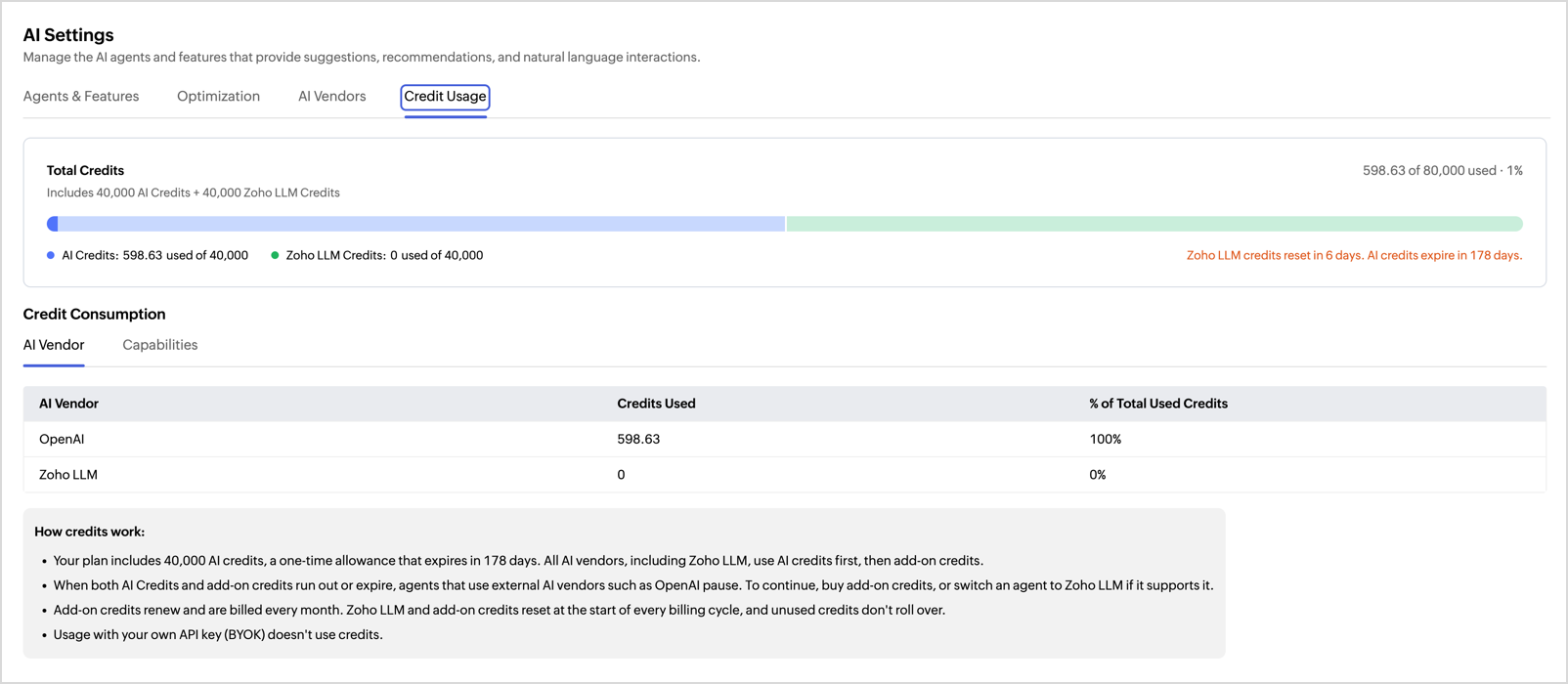
The Credit Usage tab shows:
- Total Credits: the credits you have of each type, how many you've used, the number of days until your Zoho LLM credits reset, and the number of days until your AI credits expire.
- Credit Consumption: the credits used by each AI vendor in the AI Vendor view, and by each agent or AI feature in the Capabilities view.
A banner appears on the tab when your credits run low, run out, or expire.
Frequently asked questions
Why is my AI credit balance going down when my agents use Zoho LLM?
Zoho LLM uses your AI credits first. It uses your Zoho LLM credits only after your AI credits and add-on credits run out or expire.
Why did an agent stop working even though I have Zoho LLM credits left?
The agent is configured to use OpenAI, and only Zoho LLM can use Zoho LLM credits. To continue, refer to <<When credits run out or expire>>.
Do unused credits roll over to the next month?
No. Zoho LLM credits and add-on credits reset every month. AI credits don't reset; they expire 180 days after they're added.
Can I get more AI credits?
Yes, you can buy AI credits as add-on credits.
What happens to my AI credits if I move to the Free plan?
Your remaining AI credits are locked. To unlock them, upgrade to any paid plan before they expire.