Zoho Calendar MCP Server
MCP Overview
Model Context Protocol (MCP) is an open protocol that establishes a standardized way for applications to interact with Large Language Models (LLMs). An MCP allows you to carry out your desired workflow on your preferred LLMs by providing instructions to an AI model in the proper context.
With an MCP, you can instruct popular AI agents or even custom AI agents to interact with native or third-party applications and complete complex workflows with little to no human intervention.
AI assistants such as Claude, ChatGPT, Gemini, and Copilot are built to interpret natural language and are designed to work together with external applications — helping you automate repetitive tasks and maintain context across the tools you use every day. Even so, they lack a native way to directly connect with these applications to fetch data or trigger actions. A common, well-defined protocol is what makes that bridge possible.
MCP serves as that bridge — a standardized communication layer that enables AI assistants to interface securely with external applications, supporting structured data exchange and reliable action execution across a wide range of tools and platforms. With MCP, users can run multi-step, cross-application workflows using nothing more than natural language prompts, with no coding knowledge or custom integrations required.
Zoho Calendar MCP Server
The Zoho Calendar MCP Server brings your schedules, events, and availability into the world of AI using the Model Context Protocol. This open protocol defines how AI agents can connect to real-world tools and data sources in a structured, predictable way.
The Zoho MCP Server provides a standard mode for AI assistants to connect with Zoho applications and understand context. MCP is built on JSON-RPC 2.0 — a lightweight protocol used by systems to communicate with each other over the network using JSON.
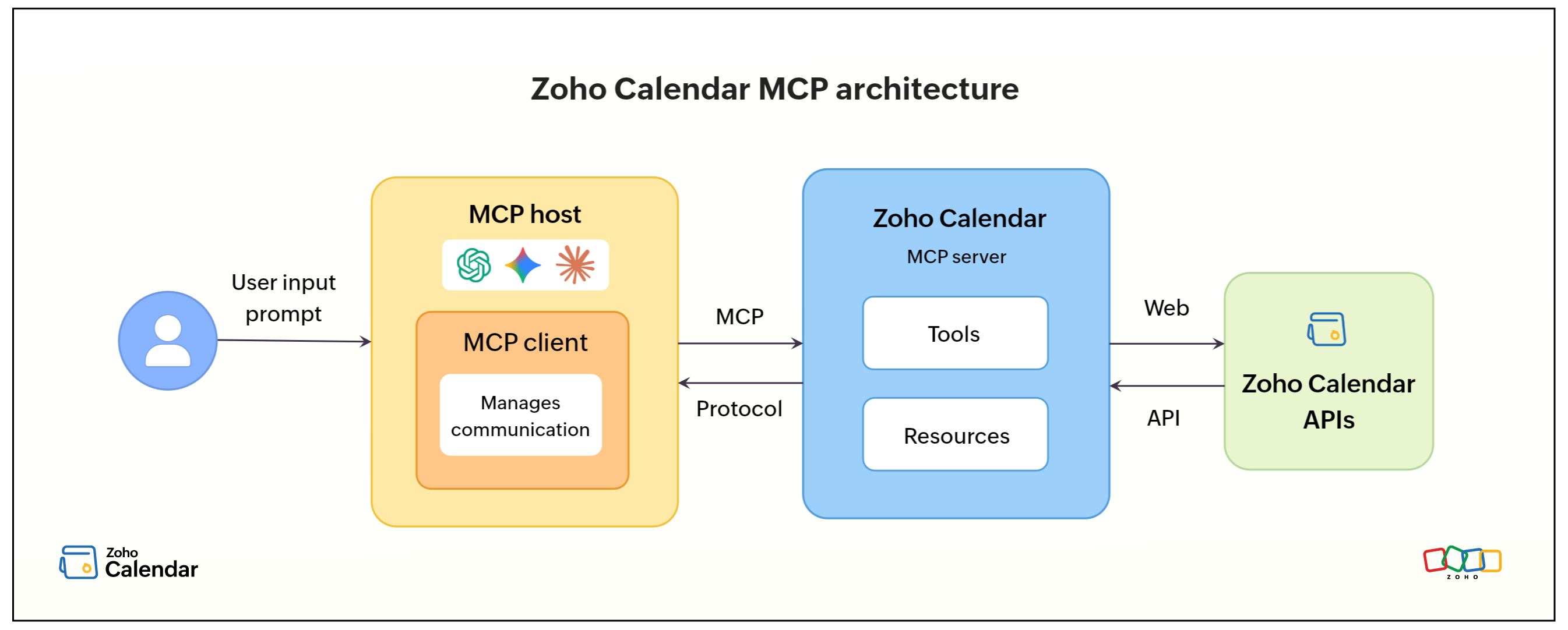
The Zoho Calendar MCPServer uses this protocol to access Zoho Calendar APIs hosted on a remote server. When AI agents like Claude, ChatGPT, and IDEs like VS Code and Windsurf integrate with MCP, they can securely access the Zoho Calendar APIs using the OAuth 2.0 protocol.
Any AI model or agent can use the official Zoho Calendar MCP server to access your calendar data and:
- Schedule smarter: Create, update, or delete events instantly — "Schedule a team sync every Monday at 10 AM for the next month" or "Move Friday's client call to Thursday 3 PM."
- Manage multiple calendars: Add, update, or remove calendars and share them with teammates — "Create a project calendar for the Q3 launch and share it with the design team."
- Check availability: Instantly query free/busy slots — "Find a time when both Alice and Bob are free next week for a 1-hour meeting."
- Search and retrieve events: Retrieve events across all calendars or a specific one — "Show me all events tagged 'client' this month."
- Configure settings: Update notification preferences and general calendar settings without navigating the UI — "Turn off email notifications for shared calendars."
Understanding MCP Components
Every MCP interaction involves three key components:
Host
The Host is the AI tool, agent, or application — such as Claude, ChatGPT, or Gemini — that the user interacts with. The host receives the user's natural language prompt and orchestrates the workflow.
Client
The Client acts as a bridge between the host and the server. When a user enters a prompt, the host initializes a client to forward the request to the appropriate server.
Server
The Server provides access to external resources — in this case, Zoho Calendar. The server contains internal components called primitives to process requests:
- Resources — Used to fetch read-only data. No write actions are performed.
- Tools — Performs actions to execute workflows, such as creating events or fetching calendars etc.,
- Prompts — Structured templates that are populated based on user input to process requests.
Zoho Calendar capabilities
The Zoho Calendar MCP server exposes Zoho Calendar API methods as tools for AI assistants, enabling users to perform everyday calendar management tasks through natural language prompts.
User tasks
- Create, view, update, and delete calendar events
- Add and manage multiple calendars
- Retrieve free/busy status for self or shared users
- Search events across all calendars or within a specific one
- Share calendars with other users and manage sharing permissions
- Configure notification settings and general calendar preferences
- Find available time slots for scheduling across participants
- Perform initial sync of calendar events
Note
Calendar tasks are performed in the context of the authenticated user's account. Shared calendar operations depend on the permissions granted by the calendar owner.