Connecting Zoho MCP with Windsurf
Integrate Zoho MCP directly within Windsurf IDE. Keep your Zoho Cliq workflow uninterrupted while your AI assistant handles actions and tools for you.
Configuring Zoho MCP in Windsurf
- First, ensure that you have created your Zoho MCP server and copied your MCP URL.
In Windsurf, click on your profile picture in the top-right corner and select Settings.

Under the Cascade section, click Manage MCPs.

Click View Raw Config to open the mcp_config.json file.

Paste the JSON configuration from Zoho MCP into the file, and set the mcp-remote key to your MCP URL.
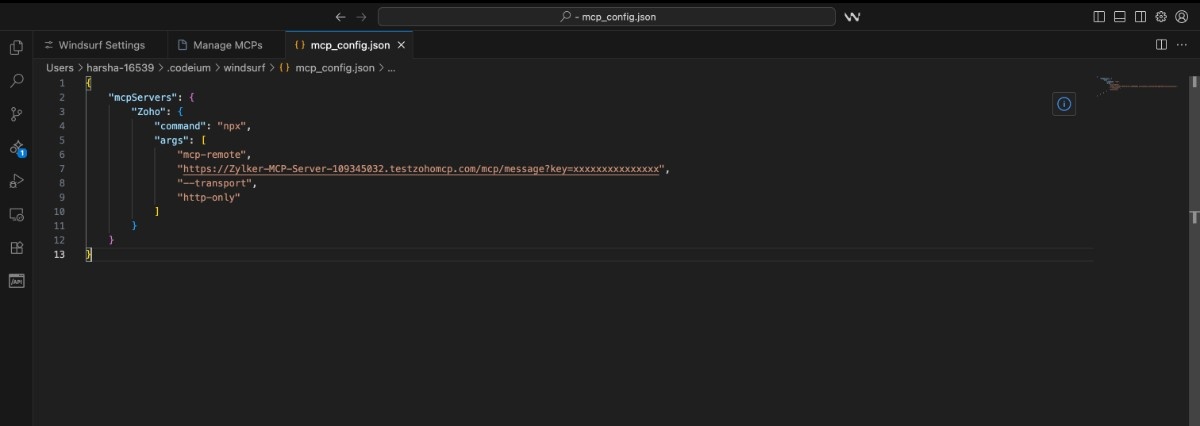
- Save the file. When prompted, authorize Zoho MCP by clicking Allow.


Accessing Zoho MCP Tools in VS Code
- To open the Windsurf chat panel, press Command + I (Mac) or Ctrl + I (Windows). You can then ask your assistant to use Zoho MCP tools directly.
You can also instruct the assistant to fetch or update data in Zoho Cliq to perform specific actions within your coding context.

