Agent Overview
The Overview section in the Agent provides a consolidated view of your transactional communication activity across all four channels — Email, SMS, WhatsApp, and Voice. Each channel has its own analytics panel that presents key delivery and engagement metrics over a selected time range.
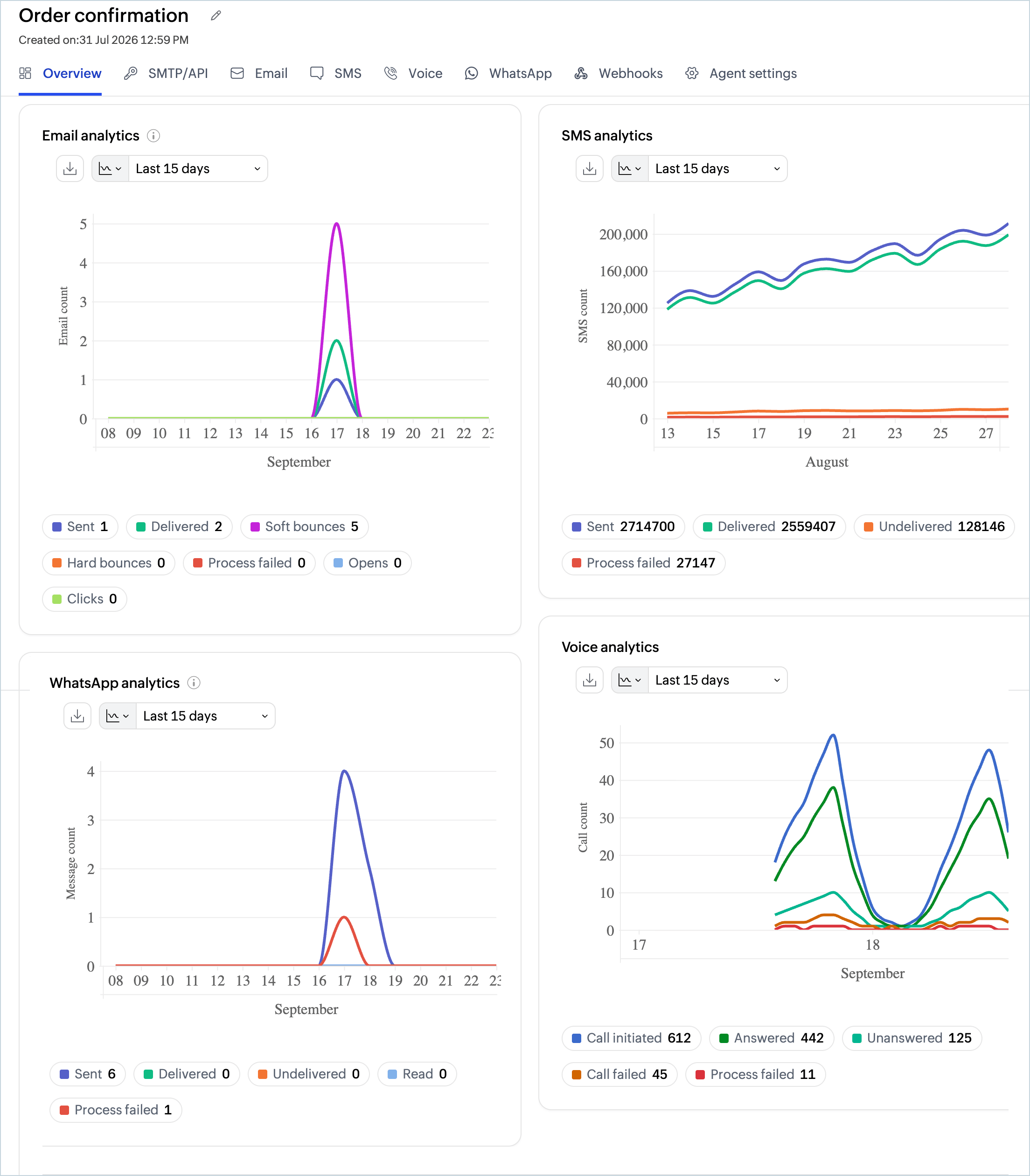
You can download each chart and adjust the time range using the options available at the top of each panel.
Email Analytics
The Email analytics panel illustrates the status of outgoing emails over a chosen time range. It is plotted for the following values:
- Sent: Total number of email recipients. If your email has 1 recipient in the To field, 1 in CC, and 1 in BCC, the total sent count is 3.
- Delivered: Number of emails successfully delivered to recipients.
- Soft bounces : Number of emails that failed to deliver due to temporary reasons, such as the recipient's server being down or the inbox being full.
- Hard bounces: Number of emails that failed to deliver due to permanent reasons, such as an invalid recipient address.
- Opens: Number of times recipients opened the emails.
- Clicks: Number of times links within an email were clicked.
- Process failed: Emails that were not sent due to processing errors.
Chart Options
- Download: Download the chart in your preferred format: JPEG, PNG, SVG, CSV, or PDF.
- Chart type: Switch between available chart styles for better visualization.
Bounce Category
Email bounces happen when an email is returned to the sender without being delivered to the recipient. The Bounce category chart gives insights into the reasons for undelivered emails, broadly classified as hard bounces and soft bounces. The reasons for each bounce are listed alongside the chart. You can adjust the time range using the drop-down menu.
For a detailed view of bounce activity, click Open detailed report. This takes you to the Bounce reports section where you can view:
- The exact date and time of each bounce event.
- The reason for the bounce.
- The email count.
The bounce report chart can be downloaded in the following formats: JPEG, PNG, SVG, CSV, PDF.
SMS Analytics
The SMS analytics panel displays the delivery status of outgoing SMS messages over a chosen time range. It is plotted for the following values:
- Sent: Total number of SMS messages sent.
- Delivered: Number of SMS messages successfully delivered to recipients.
- Undelivered: Number of SMS messages that failed to reach the recipient.
- Process failed: SMS messages that were not sent due to processing errors.
Chart Options
- Download: Download the chart in your preferred format.
- Chart type: Switch between available chart styles for better visualization.
WhatsApp Analytics
The WhatsApp analytics panel displays the status of outgoing WhatsApp messages over a chosen time range. It is plotted for the following values:
- Sent: Total number of WhatsApp messages sent.
- Delivered: Number of messages successfully delivered to recipients.
- Undelivered: Number of messages that failed to reach the recipient.
- Read: Number of messages that were read by the recipient.
- Process failed: Messages that were not sent due to processing errors.
Chart Options
- Download: Download the chart in your preferred format.
- Chart type: Switch between available chart styles for better visualization.
Voice Analytics
The Voice analytics panel displays the status of outgoing voice calls over a chosen time range. It is plotted for the following values:
- Call initiated : Total number of voice calls initiated.
- Answered: Number of calls that were answered by the recipient.
- Rejected: The recipient's device actively rejected the call.
- Unanswered: Number of calls that were not answered by the recipient.
- Call failed : Number of calls that failed to connect due to an error or network issue.
- Process failed: Calls that were not initiated due to processing errors.
- Unknown: The call status could not be determined.
Chart Options
- Download : Download the chart in your preferred format.
- Chart type: Switch between available chart styles for better visualization.
Note
Before you get started it is important to know that Zoho CPaaS supports transactional communications only. We do not support sending of bulk emails or promotional emails like newsletters or marketing campaign emails. If you are looking for a bulk email provider, you can visit Zoho Campaigns.