

The best integration platform balances your needs and justifies its pricing
Tray.io and Workato are excellent automation platforms, but only for the right customer: a large enterprise primarily running SAP, Workday, or ServiceNow, with an IT department, a six-figure budget, and enough time to work with sales before logging in.
Many businesses might go with a platform like Workato or Tray.io based on their extensive features, like connector count, extending connector steps, software development kit, and more. And six months later, they might be using less than 15% of what the platform offers and paying 100% anyway.
But choosing a lighter platform to avoid that problem often means sacrificing enterprise-grade capabilities altogether. Zoho Flow is built for that gap. It provides integration for 1,000+ apps, including SAP, ServiceNow, Oracle, and more, including on-premise applications, while also enabling easy-to-build integrations and being cost-efficient.
Talk to salesSupported apps: 1,200+
Talk to salesSupported apps: 700+
Free trial availableSupported apps: 1,000+
What we think of each platform
Tray.ioTray.io is one of the most flexible integration platforms we've seen that offers complete control for engineers. It provides embedded integrations that let you enable native integrations in your apps and agent development capabilities that can create, manage, and orchestrate integrations.
However, its learning curve is steep because it requires technical knowledge to build integrations, and the cost can be unpredictable, as they offer only enterprise plans.
Our verdict:
Tray.io is an excellent option for businesses with integration-specific IT teams that prefer custom connectors or embedding integrations directly into your product. For everyone else, it might be an overkill.
WorkatoWorkato is a popular enterprise-focused integration platform that's considered one of the best in the category. It provides 1,200+ connectors including enterprise apps like SAP, Oracle, and Workday, as well as API-led integrations across networks, internal systems, and custom apps. One area where it stands out is its support for legacy enterprise systems and role-based governance.
However, just like other integration platforms, Workato doesn't have transparent pricing plans, making pricing unpredictable. It supports data orchestration and transformation tools as well, but the real question is, "how much of it do you need?"
Our verdict:
Workato is the right call for organizations where the core stack is built around legacy app ecosystems and they require their own governance rules, compliance requirements, and audit trails. If not, you'll be paying a lot—mostly for features you're not going to touch.
Zoho FlowZoho Flow isn't built as an enterprise-first platform, but it supports integration for enterprise apps like SAP, Oracle, ServiceNow and more, letting you integrate them with 1,000+ business apps. Zoho Flow also provides on-premise integration support with a native on-prem agent, enabling smooth transfer of data across different networks, support to execute scripts like Python, Bash, and VBScript on your local network, all with transparent and affordable pricing.
If your team needs to build custom connectors with a full software development kit, embedded integrations, or automation governance management across dozens of departments, Tray.io and Workato are more optimized for that.
Our verdict:
Unless you specifically need role-based governance at Workato's scale or developer-grade embedded integration tools like Tray.io offers, Zoho Flow is the option that can meet all SMB needs and most enterprise needs.
Comparing key features
Below, we've listed the key capabilities of all three platforms and compared them accordingly to help you make the right decision.
| Feature | Tray.io | Workato | Zoho Flow |
|---|---|---|---|
| Free plan | 100 tasks/month | ||
| Transparent pricing | Quote only | Quote only | Published |
| Self-service signup | 15-day free trial | ||
| Entry price | Talk to sales | Talk to sales | Free plan; Standard plan $29/month |
| Prebuilt connectors | 700+ | 1,200+ | 1,000+ |
| Multi-step workflows | |||
| Conditional logic/branching | |||
| Custom code/functions | JavaScript | Ruby | Deluge |
| Webhooks | |||
| Real-time triggers | |||
| On-premises integration | Proxy-based | Proxy-based | Native agent |
| AI-powered flow creation | Merlin Agent | Recipe IQ | Zia |
| AI text utilities (summarize, rephrase) | Via connectors | Via connectors | Native |
| Agentic actions | Paid add-on | Workato One | Native (Free) |
| AI agents | |||
| GDPR compliance | |||
| SOC 2 Type II | |||
| Multi-factor authentication | All plans | ||
| Audit trail/logs | |||
| HIPAA (healthcare) | Paid add-on | ||
| Visual drag-and-drop builder | |||
| No-code friendly | Moderate learning curve | ||
| Prebuilt templates | |||
| Error branch handling | |||
| Subflows/reusable flows | |||
When to pick each
Integration platforms are the heart of your operations, so you should identify all your needs and evaluate all of the platform offerings before finalizing the right one for you. Here's our recommendation:
Tray.io
You have an IT team and need complete control.
- Your IT team can build and manage integrations.
- Your workflows need custom API logic.
- You want to build embedded integrations.
Workato
You're an enterprise looking for legacy app integrations.
- Legacy apps are core to your operations.
- You need automation under unified governance.
- Your IT team can manage a platform of this scale.
Zoho Flow
You want serious automation without the enterprise budget.
- You want to automate workflows of every scale.
- You want workflows that any team can build and manage.
- You want to integrate on-premises apps easily.
How this looks at a real business
Capabilities on a comparison table doesn't always paint the full picture. Here's how Zoho Flow handles workflows on different scales that most businesses run into.
The scenario
Let's say your business uses HubSpot as your CRM, Zoho Desk for customer support, QuickBooks for finance, SAP HANA hosted on-premise as your ERP, and a mix of tools across HR and marketing. However, you don't have an IT department dedicated to managing integrations.
As a result of that, your apps are spread across different streams and networks, and your only connection between them is a combination of manual data entry, cross-checking, and Slack messages.
At this point, if you have a Zoho Flow subscription, this is what you can do:
Sync contacts across apps based on closed deals in your CRM
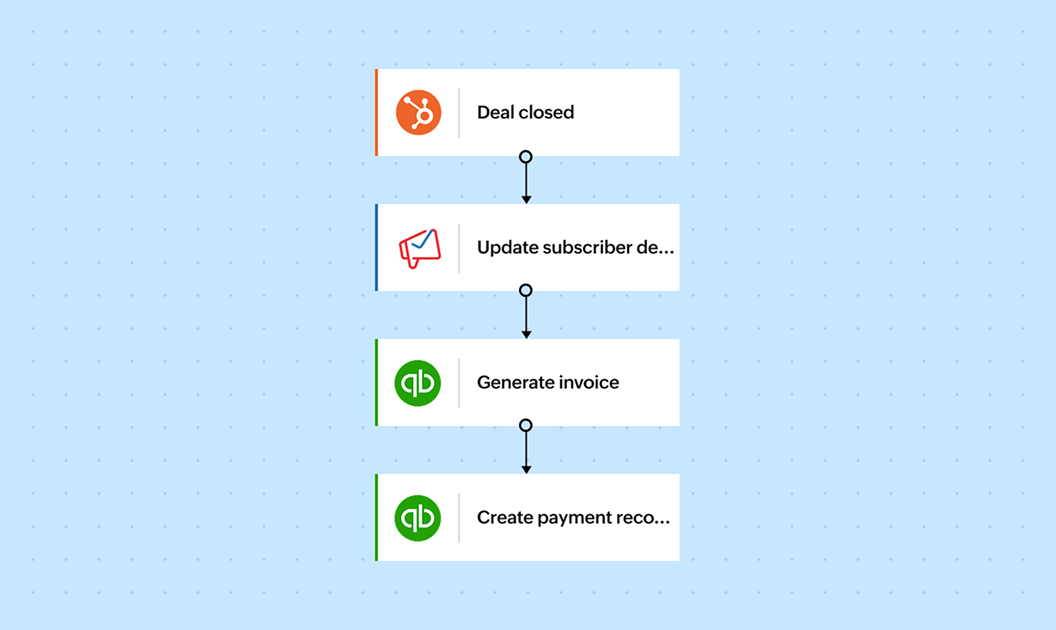
Every time a deal is marked "Closed Won" in HubSpot, Zoho Flow can automatically initiate a set of actions like adding the customer to your mailing list, updating the sale in QuickBooks, and generating an invoice.
This will happen automatically, eliminating manual handoffs, delays, and errors. This is a direct sync across your apps, which is critical across most active business. Zoho Flow helps you set this up in minutes and ensure every important action post closed deal happens seamlessly in the background.
Automate onboarding path based on deal value
Once a deal is closed and the necessary details are updated in the relevant apps, the customer has to move forward to onboarding. Many businesses offer different onboarding tier based on the deal value. To handle this, your workflow needs to bring in logic.
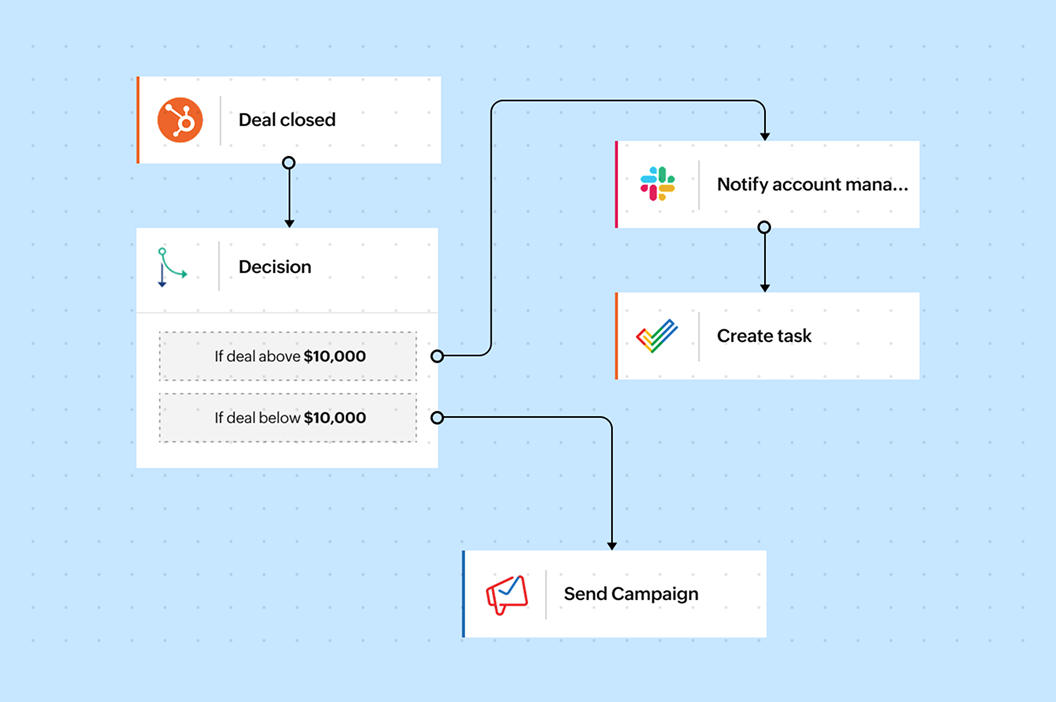
Zoho Flow offers conditional branching, which can route the onboarding path based on the deal value. Here's how you can set it up:
- If the deal is above $10,000: Assign a dedicated account manager and create a task in Zoho Projects, then notify the manager in Slack.
- If the deal is below $10,000: Trigger a self-serve onboarding flow with automated follow-ups at regular intervals in Zoho Campaigns.
Two different outcomes from a single trigger—and all of it running automatically, with no one manually deciding which path a customer goes down.
AI-based support ticket routing
Since the last use case only had two scenarios, you can have well defined decision blocks built into your workflow. But what if there are multiple scenarios? With Flow, you don't have to set up each of these scenarios manually. Instead, you can use AI agentic actions, which will decide the path based on the context of the workflow.
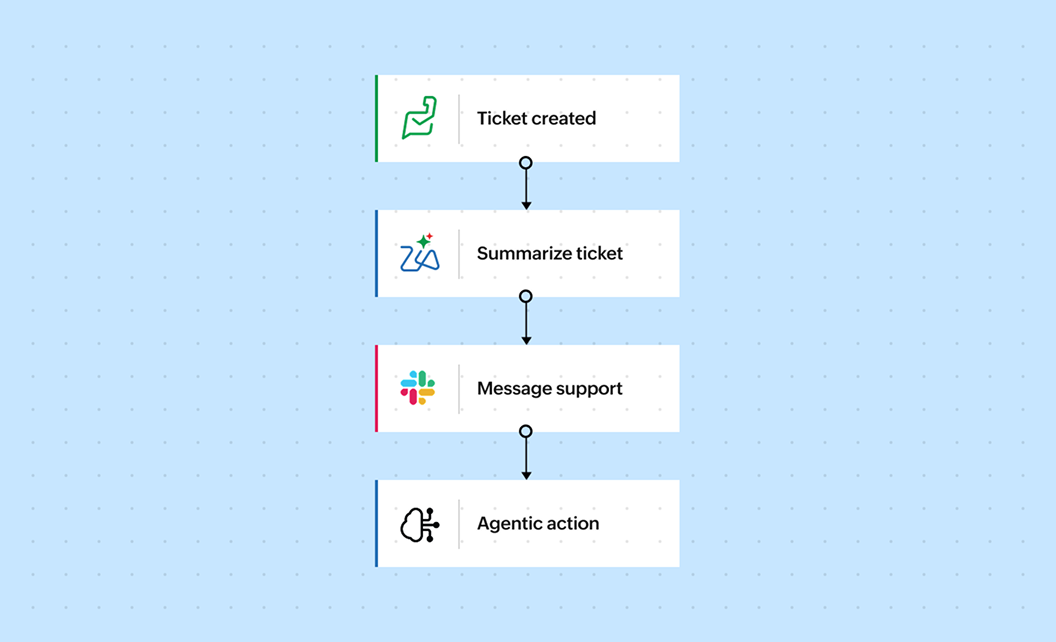
When a new support ticket arrives in Zoho Desk, you can pass it through an agentic action that will read the ticket content, classify it based on context, and route it to the right team or agent.
Further, Zia, Zoho's AI assistant, can summarize the ticket and share the summary as a message in the support team channel, offering them more context before they work on it.
Cross-system inventory update with on-premise support
SAP HANA is your system of record for financial data, inventory, and supply chain, but it lives on-premises and behind a firewall, separate from your cloud tools. Bridging that gap usually means a dedicated middleware layer or an expensive SAP-certified integration consultant. Most businesses just live with the disconnect.
With Zoho Flow's native on-prem agent, that bridge is already built. You can easily connect it with other cloud apps, automating seamless data transfer. When a sales order is confirmed in HubSpot, the on-premises agent connects directly to SAP HANA, updates inventory levels in real time, and checks if any items fall below the threshold.
If they do, the flow automatically raises a purchase order in SAP. If not, it sends a notification to the procurement team in Slack, all before anyone on the ops team has opened their laptop.
No proxy server. No custom middleware. No SAP consultant billing by the hour.
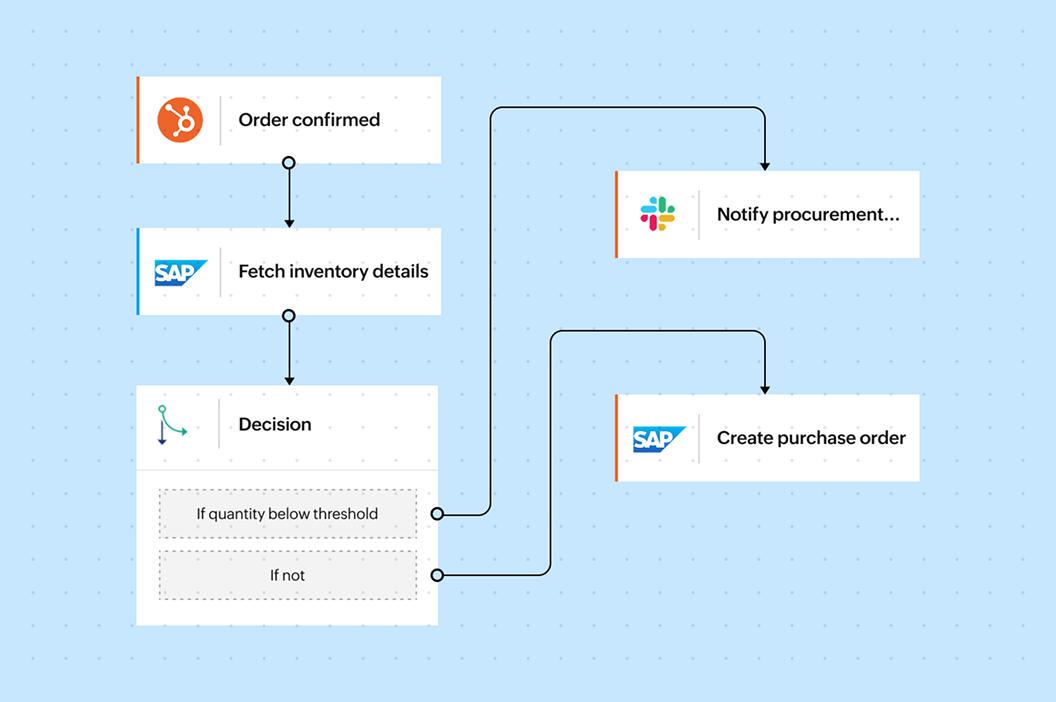
These four workflows cover extensive use cases that any small or mid-sized business (and most enterprises) need from an integration platform. None of these actions require a developer, and you can solve all these problems at a fraction of what Tray.io or Workato would charge you.
Check out Zoho Flow for yourself
We've laid out all the details for you. Now it's up to you to find the right fit for your business. If you think Zoho Flow is your best option, you can try it out here with our 15-day free trial.
Try Zoho Flow for freeFrequently asked questions
Is Zoho Flow suitable for enterprises?
Zoho Flow is built for any business that needs serious workflow automation without the overhead of a dedicated integration team or an enterprise-sized budget. It supports integration for enterprise apps like SAP, Oracle, and ServiceNow, connects to on-premises systems through a native agent, and scales to millions of tasks per month.
How does Zoho Flow's on-prem integration work?
Zoho Flow uses a native on-premises agent that creates a direct, secure connection between your on-prem systems and your cloud apps without exposing them to the internet. This means less setup, less maintenance, and no separate middleware layer to manage.
Why don't Tray.io and Workato publish their pricing?
Both platforms are built around enterprise sales cycles and prefer to negotiate contracts based on usage, team size, and the specific connectors you need. That's a reasonable model for very large organizations with procurement teams and legal review processes. But you can't evaluate the cost without talking to a salesperson first. Zoho Flow publishes all its pricing transparently—and you can start for free.
Can Zoho Flow handle complex, multi-step workflows with conditional logic?
Yes. Zoho Flow supports multi-step workflows, conditional branching, time delays, loops, error handling paths, custom functions, and reusable subflows. This enables your workflows to transfer data based on logic without writing a single line of code. For cases where logic alone isn't enough, AI-powered actions by Zia can help.
What happens if an app I need isn't in Zoho Flow's connector library?
Zoho Flow supports incoming and outgoing webhooks, which means you can connect to virtually any app that has an API, even if there's no prebuilt connector for it. You can also use custom functions written in Deluge, Zoho's scripting language, to handle data transformation or API calls for more complex requirements.
Is it easy to migrate to Zoho Flow from another integration platform?
The migration experience depends on how your existing setup is. However, the visual drag-and-drop builder, 25,000+ prebuilt templates, and text-to-flow AI workflow builder offers a strong starting point. The free trial lets you test your specific use cases before committing, which is the most reliable way to evaluate fit.