


Direct execution from AI
Handle payments, customers, payouts, and refunds directly within your AI environment.
Perform core payment actions by letting your AI clients interact with Zoho Payments through the MCP.
Configure Zoho Payments MCP ServerZoho Payments MCP is a Model Context Protocol (MCP) server that enables AI clients to interact with Zoho Payments using structured tools.
Connects AI clients with Zoho Payments
Uses Zoho Payments tools to enable structured workflows
Converts prompts into payment actions
Works with supported AI environments
Perform payment actions, manage key workflows, and access payment data directly from your AI client with Zoho Payments MCP.
Handle payments, customers, payouts, and refunds directly within your AI environment.
Integrate payment actions into AI workflows with MCP.
Describe actions instead of navigating dashboards or writing API calls.
Initiate payment actions through MCP without navigating interfaces or workflows manually.
Use your MCP server URL to connect Zoho Payments with preferred AI clients.

Connect using a custom connector and authorize access.
Configure Claude
Add the MCP server using a JSON configuration with the MCP URL and mcp-remote.
Set up Cursor
Configure a custom MCP server in Cascade settings using the MCP URL.
Connect Windsurf
Add the MCP server using "MCP: Add Server" and use it with GitHub Copilot in Agent mode.
Set up in VS CodeYou can also connect Zoho Payments MCP with any other preferred AI client.
Start using Zoho Payments to manage payments, customers, payouts, and refunds, and connect them to your AI workflows with MCP.
Sign up for Zoho PaymentsZoho Payments MCP maps prompts to predefined tools through the configured MCP server, with supported AI clients.
Set up MCP Server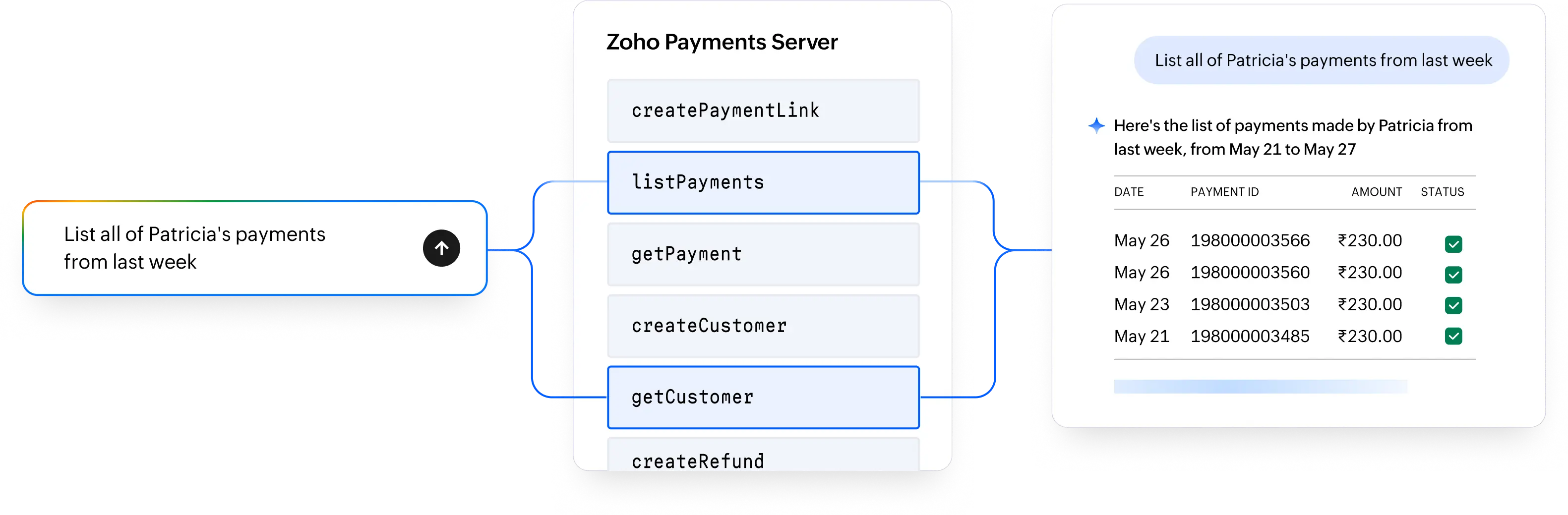
Enter a request such as creating a payment link or retrieving payment details to the AI client.
The AI client identifies the relevant Zoho Payments tool.
The MCP server routes the request, executes the action, and returns the response.
Enable AI clients to perform autonomous workflows combining payment actions across multiple Zoho and third-party services, using Zoho MCP.
Learn moreZoho Payments MCP is designed to give you controlled access to payment operations while ensuring sensitive interactions remain secure. It limits access to only the tools you configure, ensuring AI clients interact with payment workflows in a controlled manner. You can update configurations at any time, and regenerate the MCP URL to restrict or refresh access.
Zoho Payments MCP is a Model Context Protocol (MCP) server that allows AI clients to interact with Zoho Payments using structured tools.
You can create payment sessions, manage payment links, handle customers, retrieve payouts, and process refunds.
Zoho Payments MCP works with supported AI clients such as Claude, Cursor, Windsurf, and VS Code.
Create and configure an MCP server, then use the MCP URL to connect it with your AI client.
Yes, the MCP URL provides access to your configured tools and should be handled securely.