Transcribe Meetings, Audio, and Video with Notebook AI
Automatically transcribe meetings, lectures, and voice notes with Notebook AI so you can focus on listening, not typing. Record naturally, let Notebook AI turn them into clear, usable notes, and structure everything with custom templates built exactly the way you work.
Try AI Transcription
More than transcription. Your go-to AI tool.
Most transcription tools give you text. Notebook AI gives you context.
Notebook AI places transcripts exactly where they belong — inside your notes, alongside your ideas, highlights, and follow‑ups. You listen. Notebook AI remembers and takes care of the rest.
For meetings. Classes. And everything in between.
Meeting
Capture discussions, decisions, and action points with AI Transcript — then directly skip to your piece instead of replaying long recordings using timestamps.

Classes and lectures
Stay present in class instead of racing to keep up. Review transcripts later, highlight key concepts, and turn lectures into structured study notes.

Personal ideas
Think out loud. Notebook AI turns everyday voice notes into written notes you can refine, expand, and connect to other ideas anytime.

What makes AI Transcription truly powerful
Customer calls made easy
When AI Transcription works with Zoho CRM, sales and support calls are automatically captured, transcribed, and organized into structured notes with key points, decisions, and follow-ups to search and share easily.

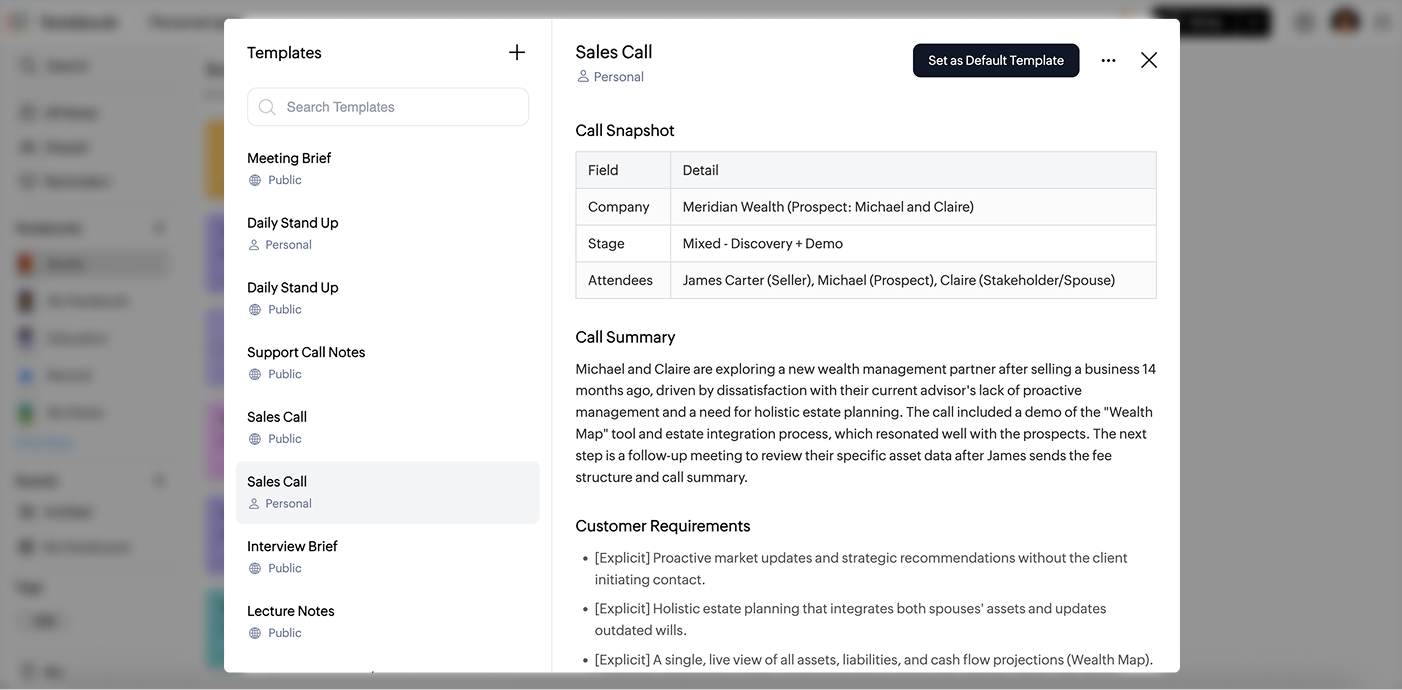
Your own templates, in Notebook
Every team has its own way of running meetings. With custom templates, you can create and save your own note structure that fits exactly how you work. Whether it is a weekly stand-up, a sales call, or a project review, set it up once and it is ready to use every time.
Turn transcripts into visual mind maps
Once your meeting or call is transcribed, Notebook lets you instantly transform notes into clear, visual mind maps. Mind maps help you spot connections, plan next steps, and break down complex conversations, making your transcriptions readable and actionable.

Transcription that lives inside your notes
No separate tools. Your recording and text stay connected to the notes you actually use — everything inside Notebook.

Clean, readable transcripts
Notebook generates clear, editable transcripts you can format, highlight, and shape into real notes.

Get instant summaries
Turn long recordings into concise, easy-to-read summaries so you can grasp the key points without listening to the entire audio.

Designed to stay out of your way
No complicated controls or overwhelming dashboards. Just press record and focus on the moment.

Privacy that's built in
Your conversations are personal. Your ideas are private. Notebook's AI Transcription is designed with that responsibility at its core.

Not just transcription. Better note‑taking
Start transcribing with Notebook AIFrequently asked questions?
What makes Notebook AI transcripts accurate?
Zoho built its own speech recognition models and runs them on its own servers, never a third-party service. They're trained to handle natural speech and everyday pronunciation. You choose the spoken language before you start, and you can edit any transcript whenever you like.
Can I transcribe audio to text for free?
Students can. Verify with a school or university email and you get 30 hours of transcription a month, on 5 GB of storage. For everyone else, AI Transcription comes with Notebook Pro Plus, Notebook for Business, or Zoho One. Notebook Essential records audio, but it can't turn it into text.
Does a bot join my meeting?
No. Notebook records the meeting on your Mac itself. Nothing extra shows up in the participant list, so nobody has to let a notetaker into the call. You can also import a recording afterwards and transcribe it in the same notecard.
What languages does it support?
Notebook AI transcribes in seven languages. Those are English, Spanish, French, German, Italian, Dutch and Russian. You pick the language before you start, and you can switch it and run the transcript again at any point.
What recordings can I transcribe?
You can transcribe any audio or video card you record in Notebook, plus audio and video files you bring in from elsewhere. Open the card, tap the Notebook AI icon, choose Transcribe, then pick the spoken language.
How large an audio file can I transcribe?
You can transcribe audio files up to 1GB, whether you recorded them in Notebook or brought them in from elsewhere. That covers a long meeting or a full lecture, so you do not need to split a recording before transcribing it.
Who can see my recordings?
Only you. Your transcripts stay private to your Notebook account unless you choose to share the note. We never use your recordings or transcripts to train public AI models, and transcription runs on our own in-house speech recognition models. Notebook is ISO 27001, 27701, SOC, GDPR and HIPAA certified.
Can I edit the transcript?
Yes. Every transcript is a note you can work in. Fix a word, reformat it, highlight the parts that matter, or add your own thoughts underneath. Your original recording stays untouched, so you can always go back to it.
How much does AI transcription cost?
AI Transcription comes with Notebook Pro Plus, which costs a year, or a month billed annually. That covers up to 30 hours of transcription every month. Notebook for Business and Zoho One include it too.