
- 16K
Customers
- 3M
Users
In this article
- What Is Embedded Analytics in Sales?
- Why Embedded Analytics Is Critical
- Embedded Analytics vs Traditional Reporting
- Examples of Embedded Analytics in Sales
- How to Implement Embedded Analytics
- Key Features for Embedded Sales Analytics Software
- Zoho Analytics for Embedded Sales Analytics
- Who uses embedded analytics in sales?
- Benefits of Choosing Embedded Sales Analytics
- Zoho Analytics for Embedded Sales Analytics
What Is Embedded Analytics in Sales?
Embedded analytics for sales brings reporting and analysis directly into CRM systems, sales portals, and internal applications. Instead of switching to a separate analytics tool, sales teams can review performance data and make decisions within the same workflow where sales activity happens. Embedded BI keeps reporting accessible inside the application so users can work with data without interrupting the sales process.
Why Embedded Analytics in Sales Is Critical for Modern Sales Teams
Sales teams lose time when reporting lives outside the tools they already use. Salesforce's State of Sales report found that reps spend only 28% of their week selling. The rest goes to updating reports, switching between systems, and hunting for information.
That cost compounds when analytics sits in a separate BI tool. Sales representatives stop checking dashboards. Managers review stale numbers. Decisions end up based on partial information because the latest context isn't where work happens.
McKinsey reported in 2023 that companies with tightly integrated data and analytics in sales workflows saw 5–10% higher revenue growth than peers using standalone BI tools. The difference becomes more obvious once teams spread across regions, ownership changes across deal stages, and reporting cycles slow feedback.
Real-time performance tracking
Sales leaders don't need another tab open. They need current numbers where pipeline decisions already happen. Embedding sales analytics inside a CRM lets teams see revenue, win rate, quota attainment, and deal velocity without leaving the workflow they're in. Teams can react as soon as sales activity changes. Say a regional manager sees deal velocity in the Northeast drop 18%. She opens the dashboard already inside the CRM, finds 3 deals stuck in closing, and pulls in solution engineers the same morning.
Pipeline visibility
Pipeline reviews break down when every team pulls numbers from a different place. Embedded dashboards give one shared view across territories, products, and teams. Managers can open a stage, check where deals slow down, and spot overloaded reps before pipeline problems show up in forecasts. For example, a sales ops team at a mid-market SaaS company places a pipeline dashboard on the CRM home screen. During weekly reviews they immediately see proposal-stage bottlenecks and shift ownership before deals slip.
Forecasting
Forecast reviews often expose gaps between expected pipeline and actual deal movement. Embedded forecasting uses historical performance plus current pipeline signals to estimate outcomes while there's still time to react. Say an enterprise sales team runs forecasting inside its CRM. Four weeks before quarter close, the model flags a 23% risk to Q3 targets. Leadership shifts effort toward shorter-cycle SMB opportunities and closes most of the shortfall.
Sales coaching
Most coaching fails because managers remember anecdotes instead of patterns. Embedded analytics gives managers actual activity data inside the same system reps already use. They can compare behavior across teams and coach from examples instead of assumptions. For example, a sales enablement team reviewed activity from top performers and found one habit that repeated consistently: follow-up happened within 4 hours after a demo. That became the team's operating rule for outbound follow-up.
Embedded Analytics vs Traditional Sales Reporting
| Embedded Analytics | Traditional Sales Reporting |
|---|---|
| Dashboards appear inside CRM, sales apps, or customer portals | Reporting happens in a separate BI platform |
| Sales teams stay in one workflow | Users move between systems |
| Data updates continuously or on configured refresh cycles | Reporting often depends on scheduled refreshes |
| Reporting becomes part of daily sales activity | Reporting happens separately from execution |
Real-World Examples of Embedded Analytics in Sales
In-CRM Performance Dashboards
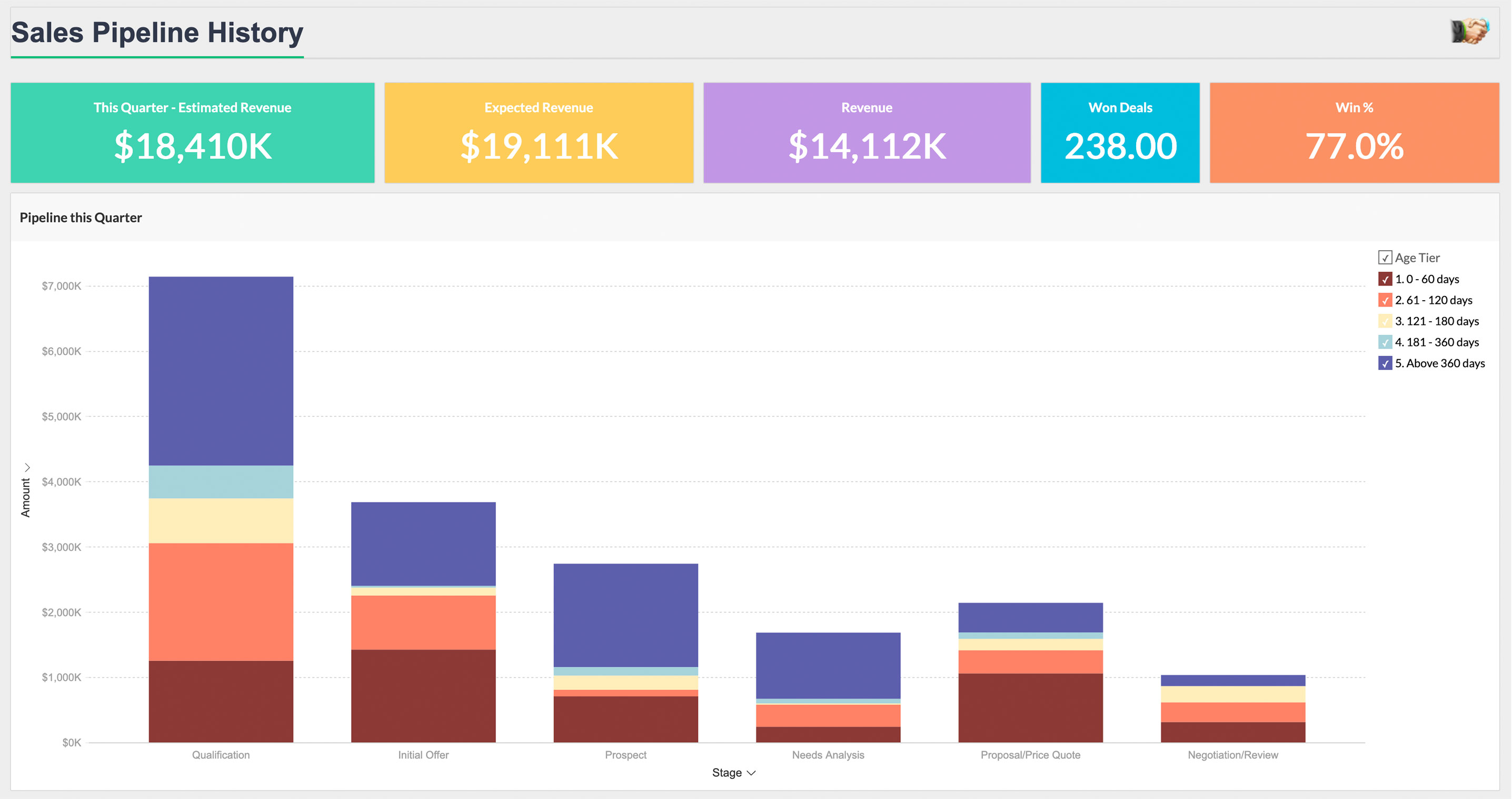
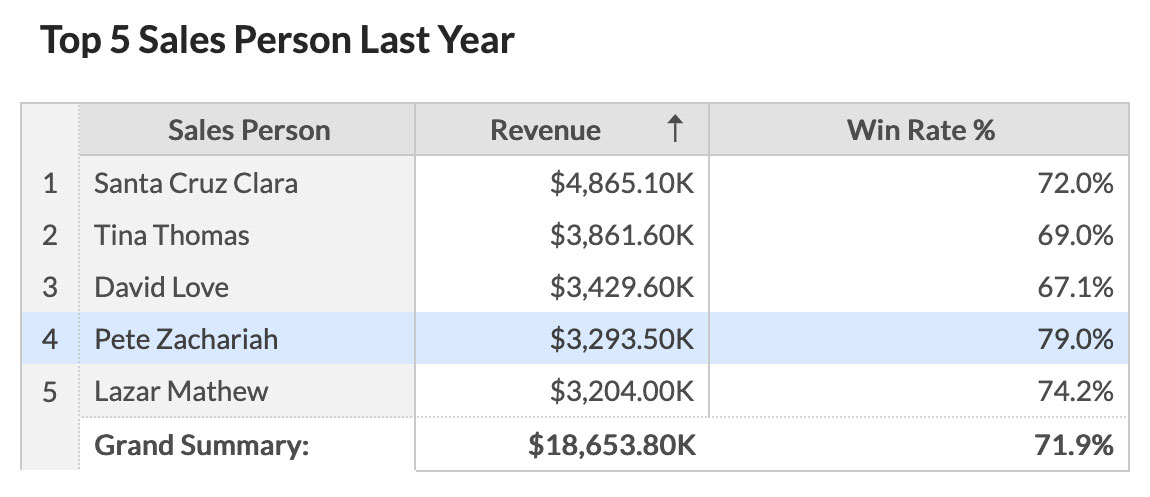
When dashboards live inside the CRM(read more about CRM analytics), reps stop wasting time opening reporting tools just to answer basic questions. A sales rep can open the same screen they already use and see revenue progress, closed deals, activity volume, or whether they're tracking toward quota. The workflow stays in one place and reporting becomes part of the work instead of a separate task.
Deal Velocity Reports
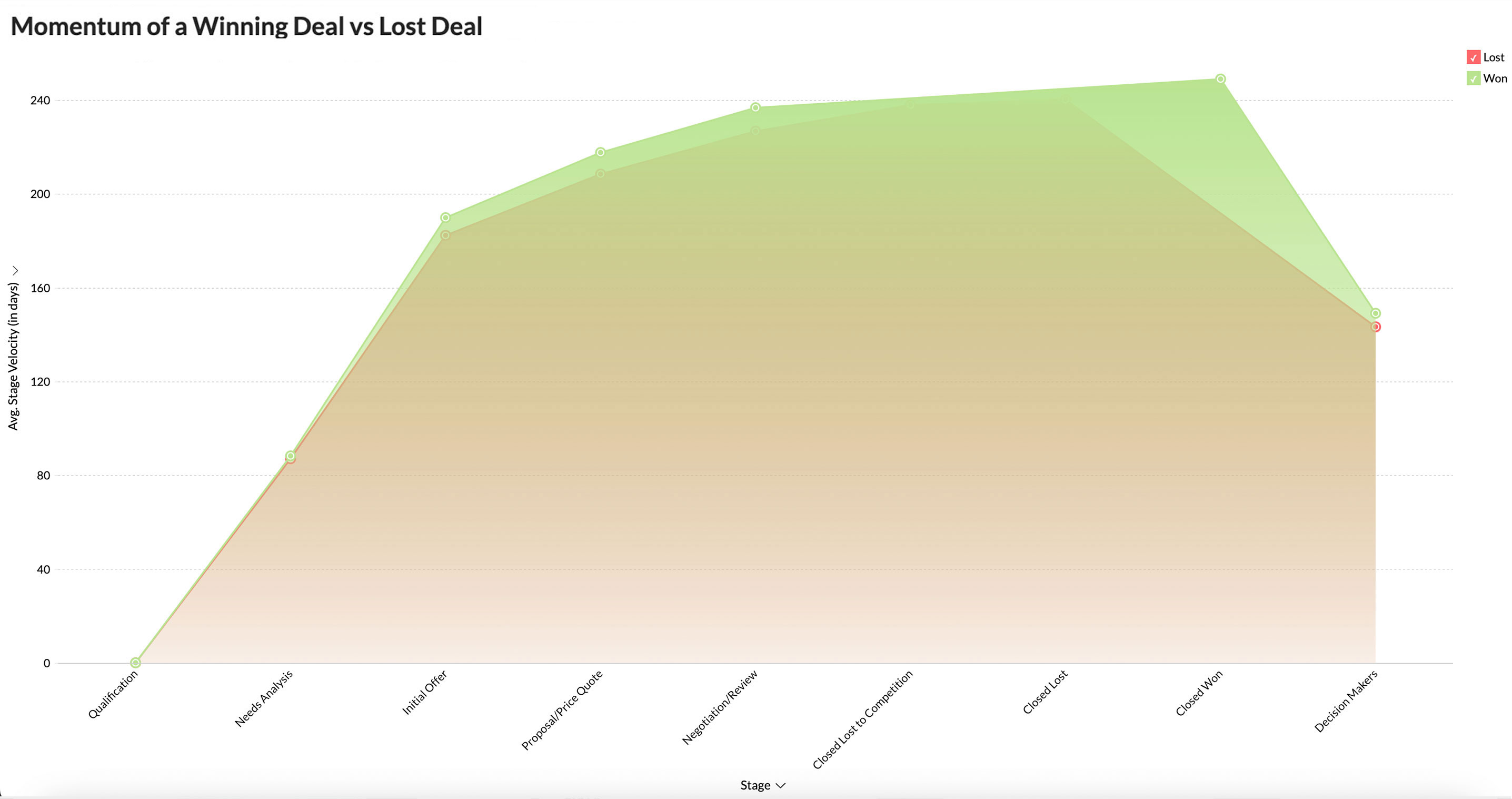
Deal reviews happen after momentum is already gone. Embedded deal tracking lets account executives see where opportunities slow down and act before the quarter does the talking. Stage movement, inactivity windows, and conversion patterns stay visible inside the sales process(Know more about sales pipeline analytics).
Sales Forecasting Modules
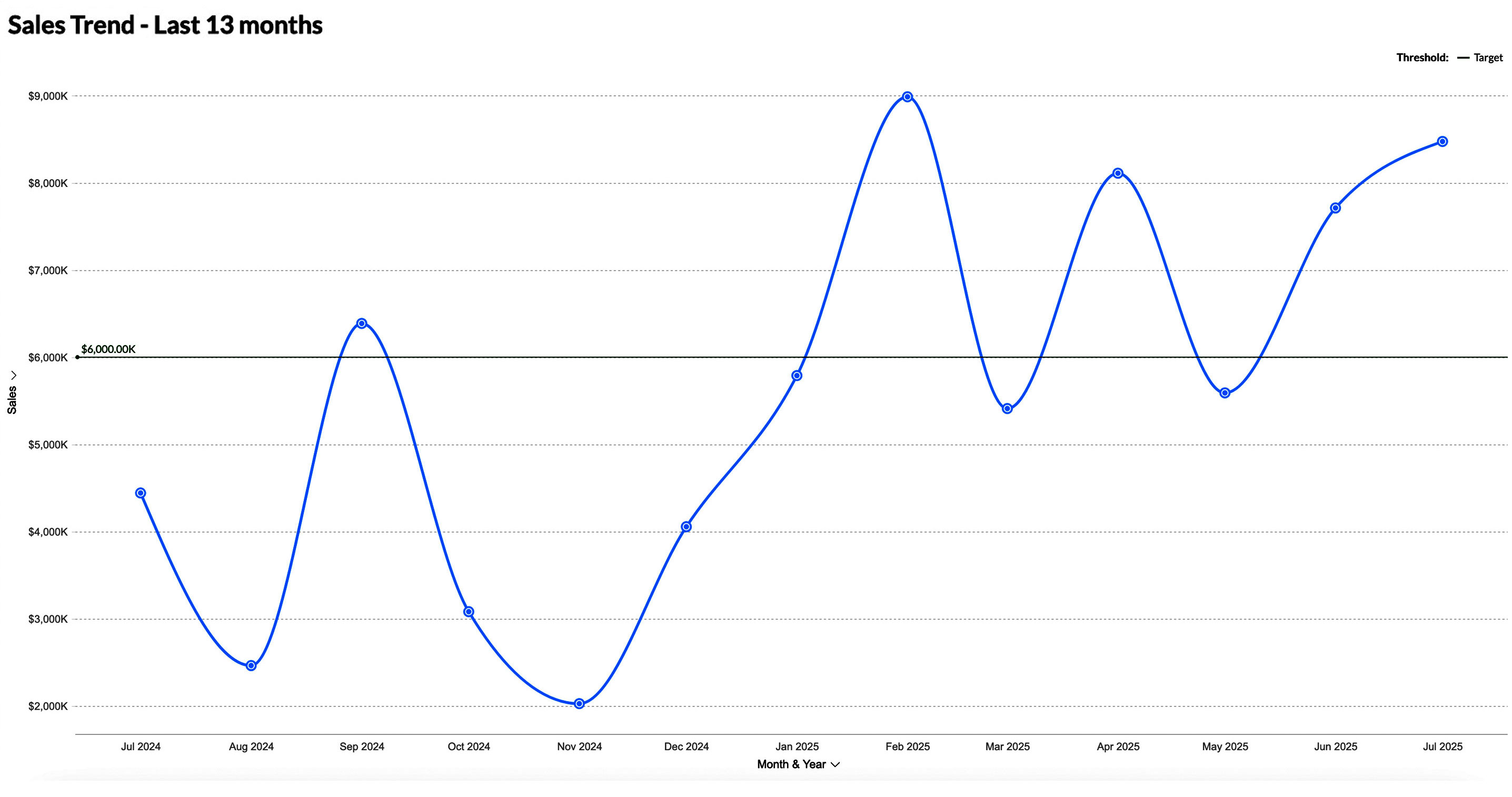
Forecasts become easier to use when they're part of the workflow instead of a separate reporting exercise. Embedded forecasting modules pull historical performance and current pipeline activity into one view so regional teams and partners can adjust plans earlier(Know more about predictive analytics).
Client Dashboards by Sales Tech Vendors
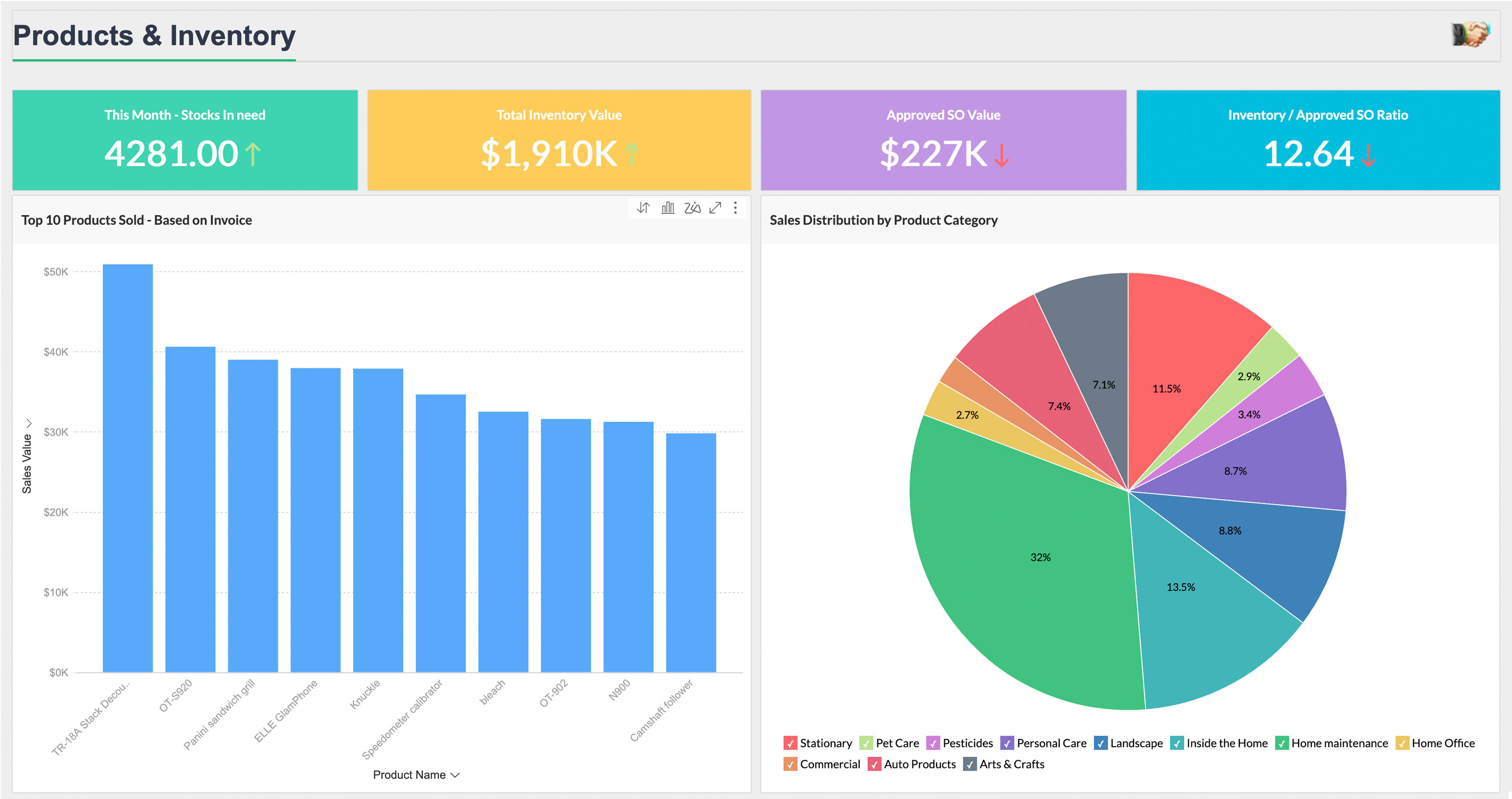
Sales software companies often embed analytics directly into the product instead of sending customers to external reporting tools. Customers can review usage, pipeline activity, and account performance inside the same application(Know more about embedded analytics for SaaS).
Internal Incentive Tracking
Compensation conversations go faster when everyone sees the same numbers. Embedded dashboards give reps a live view of commission progress, closed revenue, and payout calculations without waiting for finance reports.
How to Implement Embedded Analytics in a CRM or Sales Application
Adding analytics to a CRM takes more than placing a chart on a page. Decide which users need dashboards, what information they should access, and where reporting should appear inside the application.
Step 1: Identify your analytics requirements
Start with the sales questions your team needs answered every day. A rep might need open deals, follow-up tasks, and quota progress. A manager might need team pipeline, win rate, and deal velocity. Sales ops might need territory performance and forecast risk. Write these down before development starts. It keeps the project from turning into a dashboard dump.
Step 2: Choose an embedded analytics platform
Check how the platform embeds into your app. Some tools use iframe embeds. Some give you a JavaScript SDK. Others work through REST APIs. The right choice depends on how much control you need over the user experience, authentication, and data permissions. Also check for white-labeling, row-level security, and multi-tenant setup. Zoho Analytics, for example, has an Embed API built for this kind of use case.
Step 3: Connect your data sources
Connect the CRM first, then add the systems that affect sales reporting. That might include Zoho CRM, Salesforce, HubSpot, ERP data, marketing automation data, or support data. Live sync matters here. If the dashboard runs on old exports, sales teams will stop trusting it.
Step 4: Build dashboards by role
Don't give every user the same dashboard. A field rep should see their own pipeline, tasks, and account activity. A manager should see team numbers. Sales ops should see wider patterns across territories and deal stages. Use row-level security so each person only sees the data they're allowed to see.
Step 5: Generate embed tokens and add the dashboard
Use the platform's SDK or REST API to create secure session-based embed tokens. The token lets the dashboard load inside the CRM without exposing raw data, passwords, or backend credentials. Place the embedded dashboard where the user already makes the decision, such as the account page, opportunity view, forecast screen, or sales home page.
Step 6: Set up authentication and access control
Map CRM roles to analytics permissions. SSO or token-based authentication should let users access the embedded views with their existing credentials. Users should open the CRM once and automatically receive the dashboards and records that match their permissions.
Step 7: Test before rollout
Test the dashboard with real user roles and messy data. Check loading speed, mobile views, browser rendering, and live sync. Then give it to a small sales group first. Watch what they ignore, what they use, and where they still export data. That tells you what to fix before the full rollout.
Key Features to Look for in Embedded Analytics Software for Sales
CRM integrations
If sales data lives in multiple places, reporting breaks fast. Start with CRM connectivity. The platform should connect directly to systems your team already uses, whether that's Zoho CRM, Salesforce, HubSpot, or something internal. Native connectors reduce setup work and remove the habit of exporting CSV files every week. Also check how often data refreshes. A connector that updates once a day changes what teams can actually do with the dashboard.
Mobile responsiveness
Sales dashboards don't stay on desktop. Reps check numbers between meetings, during travel, and from customer sites. Embedded dashboards should load cleanly on mobile, resize charts properly, and stay usable without endless zooming. Open the dashboard on an actual phone before buying. Desktop previews hide a lot of problems.
Real-time data synchronization
Trust in sales embedded analytics dashboards stays high when updates happen close to when the underlying data changes. If a dashboard refreshes every few hours or only at the end of the day, sales teams stop relying on it for active decisions. Check how the platform updates data, whether through live connectors, webhook events, event-driven synchronization, or API refresh schedules.
Customizable white-labeled dashboards
Embedded analytics should match the application's branding and user experience. Check how much control you get over branding, domains, navigation, colors, and embedded components. Customer-facing products need tighter control than internal reporting tools. A practical check: if users immediately notice they left the application, the embedded experience probably needs more work(Know more about white-label analytics).
AI-assisted analytics
AI features are useful when they help sales teams make decisions inside existing workflows. Useful AI features surface changes in pipeline behavior, forecasts, or activity patterns that teams may overlook. Forecasting, anomaly detection, natural-language querying, and trend analysis can help if they're tied to actual actions. For example, Zoho Analytics includes Zia for questions, forecasting, and anomaly detection inside reports.
Unified sales analytics
Sales data typically sits across multiple systems. Teams need CRM data plus marketing activity, support history, ERP records, or product usage before a dashboard becomes useful. Look for platforms that combine these sources in one reporting layer so users don't jump between systems to understand what happened.
Role-based self-service access
Everyone should not see the same dashboard. Sales representatives need account activity and quota tracking. Managers need team performance. Leadership needs rollups. Role-based access should control both dashboard visibility and row-level access so users only see records they are allowed to view.
Who uses embedded analytics in sales?
Embedded analytics for sales teams helps different teams work with sales data based on their day-to-day responsibilities.
- Sales managers use embedded dashboards to review team results, conversion rates, and current revenue data inside the CRM instead of waiting for scheduled reporting.
- Account executives use embedded analytics to review their pipeline, check performance metrics, and decide which deals to work on next inside the CRM.
- Sales operations teams combine CRM, marketing, and finance data to review pipeline movement, find operational issues, and build compensation plans.
- ISVs and SaaS provider embed branded sales dashboards into customer applications and portals. This approach is common in fintech products(see also: embedded analytics for fintech) that include reporting directly inside customer workflows.
Benefits of Choosing Embedded Sales Analytics
Fast time to value
Sales teams abandon reporting tools when the setup takes longer than the sales cycle. Embedded analytics lets teams review data and act from the same screen. Sales professionals don't export data, open another dashboard, or wait for weekly reporting. They stay inside the CRM and move faster.
Enterprise scale
As teams expand across users, territories, and products, reporting requirements become more complex. A dashboard that works for 20 users often breaks once access rules, regions, product lines, and customer groups multiply. Check whether the platform supports multi-tenant environments, user segmentation, and permission controls without rebuilding dashboards every quarter. Zoho Analytics supports multi-tenant deployment for teams that manage reporting across multiple business units or customer environments.
Security and compliance
Sales dashboards typically expose customer records, pricing data, and forecast information. Access control matters more than visual design. Look for row-level access controls, encryption, audit logs, and identity management support. If your company operates across regulated markets, check compliance requirements early instead of treating them as procurement paperwork later. For teams evaluating Zoho Analytics, review its published security controls and compliance coverage directly against your internal requirements.
Flexible deployment
Deployment options become important once analytics moves beyond a pilot. Some teams want everything in the cloud. Others keep customer data on-premise or split workloads across environments. Embedded analytics platforms should support those decisions without changing the reporting experience for users. Zoho Analytics supports cloud, on-premise, hybrid, and multi-cloud deployment models depending on how teams manage infrastructure and data governance.
Zoho Analytics for Embedded Sales Analytics
A modern embedded analytics platform like Zoho Analytics makes it easy to embed intelligent, interactive, and secure sales dashboards that are fully customizable and scalable for any business environment. You can get started with Zoho Analytics by:
- Connecting your CRM and sales data sources through native integrations
- Building dashboards for different user roles
- Embedding dashboards into your application using the Embed API or JavaScript SDK
- Configuring row-level security and multi-tenant access for your user base
- Deploying branded dashboards across desktop and mobile
Customer Stories

"Since we started working Zoho Analytics, from a macro perspective we have increased sales volume by around 40%, which we largely attribute to the ability to react quickly and correctly to the certain needs of the room and the market."
Ivan CarilloBusiness Intelligence Director, WinlandRead more here"Our sales agents have dashboards and can see their performance, the profit they create per order, and targets for the month. This is crucial for our sales team. This deep analysis was not possible before."
Toni WallDirector of Market Development, The Collins CompaniesRead more hereConclusion: Get Started
Sales teams that rely on weekly reports make decisions on stale information. Embedded analytics moves reporting into the CRM or sales workflow so teams can see pipeline changes, forecast movement, and performance data where work already happens. Start with one high-use workflow such as pipeline reviews or forecasting, then expand from there.
Zoho Analytics supports embedded sales reporting through dashboards, APIs, access controls, and customization options that teams can integrate into CRM systems, portals, and internal applications.
Start DemoGet a Price QuoteFrequently Asked Questions
What is embedded analytics in sales?
- Embedded analytics means sales reporting and dashboards appear inside the tools the team already uses, like a CRM, partner portal, or internal sales application. Sales teams can review pipeline movement, deal progress, forecast changes, and account activity without leaving the system where they manage sales work.
Is embedded analytics useful for SaaS sales teams?
- Yes, especially for teams that manage recurring revenue. SaaS teams track MRR, ARR, churn signals, expansion revenue, and account health alongside standard sales metrics. Embedded analytics keeps those numbers inside the workflow instead of spreading them across CRM reports and separate BI tools.
How does embedded analytics improve sales forecasting?
- Forecast accuracy improves when teams review current pipeline activity alongside historical performance. Embedded analytics keeps forecasting tied to current pipeline activity instead of exported reports. Teams can review stage conversion, deal movement, historical close rates, and current pipeline coverage without leaving the sales system. Some platforms also include forecasting models that estimate risk and expected revenue based on recent changes.
What tools support embedded analytics in sales?
- Most embedded analytics platforms support dashboard embedding through APIs, SDKs, and access controls. Zoho Analytics supports embedded dashboards, multi-tenant deployment, user permissions, and AI-assisted analysis. Other commonly used tools include Sisense, Looker, and Qlik. The right choice comes down to integration depth, deployment requirements, and how much control you need over the embedded experience.
What is an affordable embedded analytics tool for sales teams?
- Zoho Analytics is often considered one of the lower-cost options for teams that want embedded reporting without building analytics infrastructure internally. It includes CRM integrations, dashboard embedding, white-label options, and user-level access controls that fit sales use cases. Pricing still depends on data volume, users, and deployment setup, so compare total cost instead of plan pricing alone.
Embedded analytics vs standalone BI tools for sales teams: Which one should you choose?
- Choose based on how people actually work. Embedded analytics works well when sales teams need reporting during day-to-day execution inside the CRM. Standalone BI tools work better for deeper analysis, custom modelling, and broader business reporting. Many teams end up using both: embedded dashboards for daily work and BI for analysis projects.
What security controls matter when embedding sales analytics in customer portals?
- Customer-facing analytics needs stricter controls than internal reporting. Check for row-level access controls, token-based authentication, encryption, audit logs, tenant isolation, and support for standards such as GDPR or SOC 2. Before launch, test whether users can access data outside their assigned scope.
Which embedded analytics platforms integrate with the CRM and sales tools we already run?
For sales analytics, integration depth with your CRM stack matters more than raw feature count, because reporting is only as current as the systems feeding it. Look for native connectors to your CRM and the surrounding tools, marketing automation, ERP, and support data, plus a refresh model current enough that reps trust the numbers during live pipeline reviews. Then confirm it embeds into the CRM through API or SDK with role-based access, so each rep sees only their own accounts. Zoho Analytics connects natively to Zoho CRM, Salesforce, HubSpot, and 500 or more other sources, blends them into unified sales reporting, and embeds into the CRM through its embed API with row-level security, so a shared dashboard stays scoped per user.
What APIs or SDKs are used to embed sales analytics dashboards?
- Most analytics platforms provide a REST API for authentication and embedding plus a JavaScript SDK for rendering dashboards. The API handles sessions and permissions. The SDK loads the dashboard inside the application. Teams often connect authentication through SSO using OAuth or SAML.
What challenges come up when implementing embedded analytics in sales platforms?
- Most issues show up after the first dashboard goes live. Common problems include delayed data sync, permission mismatches, mobile layout issues, and row-level access becoming harder than expected once teams grow. Defining the data model before dashboard development reduces most implementation issues.
What's the best way to deliver embedded dashboards inside a customer portal?
- iframe embedding with signed URLs: The fastest route. Each dashboard loads through a secure, permission-scoped URL, so a customer sees only their own data. Best when you need to ship quickly without deep front-end work.
- JavaScript SDK embedding:Loads dashboards directly into your portal's front end for tighter interaction and custom event handling. Best when the dashboards need to respond to actions elsewhere in the portal(Know more about embedded reporting tool).
- API-driven white-label embedding:Full control over rendering, theming, and user provisioning. Best for multi-tenant SaaS portals that need dashboards to look native and scale across many customer accounts(Know more about embedded dashboards).
The best way to deliver embedded dashboards inside a customer portal is to embed them through a secure, tokenized method that authenticates each user, isolates their data, and matches the dashboards to your portal's design. Three delivery options cover most portal scenarios:
Whichever method you choose, four things determine whether the delivery holds up in production: row-level security to keep tenant data separate, single sign-on so users aren't asked to log in twice, theming that inherits your portal's fonts and colors, and a hosting model that scales with your customer count(Know more about embedded analytics for SaaS).