

- HOME
- Revenue Recognition
- Revenue recognition software: Features, benefits, and how to choose the right solution
Revenue recognition software: Features, benefits, and how to choose the right solution

Most finance teams don't look for revenue recognition software because they like software evaluations. They start looking for it because month-end closures start taking a toll on their work. Every month-end feels like a déjà vu of sorts because of a repeating pattern — deferred revenue schedules hiding in different spreadsheets, contract changes that nobody kept a record of, and the audit team questioning why similar deals are being treated differently.
Revenue recognition software exists to take all this disconnected data off spreadsheets. It applies the rules of IFRS 15, ASC 606, or its regional variants to every contract automatically, keeps deferred and recognized revenue in sync with accounting records, and leaves an audit trail behind every change. This article explores what revenue recognition software does, the key features to look for, the benefits you can expect, and how you can choose the option that is a best fit for your business.
What is revenue recognition software?
Revenue recognition software is a solution that automates how and when a business records revenue in its financial statements from customer contracts. Instead of finance teams calculating revenue manually, the software reads contract and billing data, identifies what has been earned, and moves amounts from deferred to recognized revenue once the product or service is delivered.
In essence, this covers the five-step model of revenue recognition: identifying the contract, listing out the performance obligations, determining the transaction price, allocating it, and recognizing revenue as the obligations are fulfilled. If you would like a reminder on the fundamentals, here is our guide on the five-step model of revenue recognition.
Signs that it's time to move beyond spreadsheets
Revenue recognition can be managed in spreadsheets when you are handling a few contracts with straightforward terms. The real problem happens as you start scaling. Listed below are some signals that your business has outgrown spreadsheets.
Month-end processes take more time than usual, as manually handling revenue schedules gets cumbersome.
Plan upgrades, downgrades, and changes are noted down randomly without any process and nobody on the team has a clear idea of how each change was treated.
You sell bundled products/services and allocate the price by rule of thumb.
Your business follows a usage-based model for pricing and the amount to recognize changes every billing cycle.
Audit requests take weeks to answer because the supporting trail has to be reconstructed.
Reconciling the numbers between your recognition schedule and accounting data takes significant manual effort.
If three or more of these points sound familiar, the cost of manual recognition is probably already higher than the cost of revenue recognition software.
Key features to look for in revenue recognition software
Here are some of the capabilities that you need to look out for while evaluating revenue recognition software.
Standards coverage
The software should support the standards that you follow to report your numbers. Most global businesses follow IFRS 15, ASC 606, or a variant of them. Both the standards converge closely and most of the solutions support both.
Performance obligations and standalone selling price allocation
The system should be able to identify and separate the obligations and allocate prices to them based on their standalone selling prices. These are two critical steps in the five-step model.
Variable consideration and usage-based pricing
If your billing is usage-based or if you provide rebates or bonuses, look for support for estimating variable consideration without significant reversal at a later stage. This is where most of the tools go wrong as complexity rises.
Contract modification handling
It is common that the contract will go through multiple changes during its term. The software should apply the right treatment (prospective or retrospective) and show how each change flowed through to revenue.
Deferred revenue schedules
At any point of time, you should have a clear view of what has been billed, what has been recognized, and what remains deferred. This visibility helps forecast revenue and stay audit-ready.
Integrations
The tool should integrate with your other solutions like billing, CRM, accounting, or ERP. With no integration in place, the process is error-prone as data needs to be entered manually.
Audit trail and controls
Every action should be traceable. Every judgment call made should have a clear reasoning that can be referred to when a question arises during an audit. This is what makes audit season a breeze.
Multi-currency support
If you operate in multiple countries, it is more likely that you will bill in multiple currencies. The software should support revenue reporting and recognition in multiple currencies without any workaround.
Security and scalability
Billing involves confidential data so the software on which this data resides must be secure. The system must also be future-proof as your business scales and transaction volume increases.
Benefits of revenue recognition software
Faster, calmer month-end close: Revenue schedules are generated and updated automatically. This makes month-end periods less chaotic.
Fewer errors: Manual and spreadsheet-based processes are prone to errors. Automation eliminates that.
Consistent treatment: Similar contracts get similar treatment, which removes one of the most common audit findings.
Audit readiness: Contract terms, modifications, and recognition decisions sit in one place with a trail behind them. This keeps the business audit-ready at any point of time.
Better visibility: Management gets a clear picture of the recognized revenue against the deferred revenue.
Scalability and room to grow: Be it hundreds or thousands of contracts, the software is built to handle that. New pricing models, such as usage-based billing, can be added without redesigning your process, too.
Types of revenue recognition software
There are three major types of solutions. The right one depends on your contract complexity and existing systems.
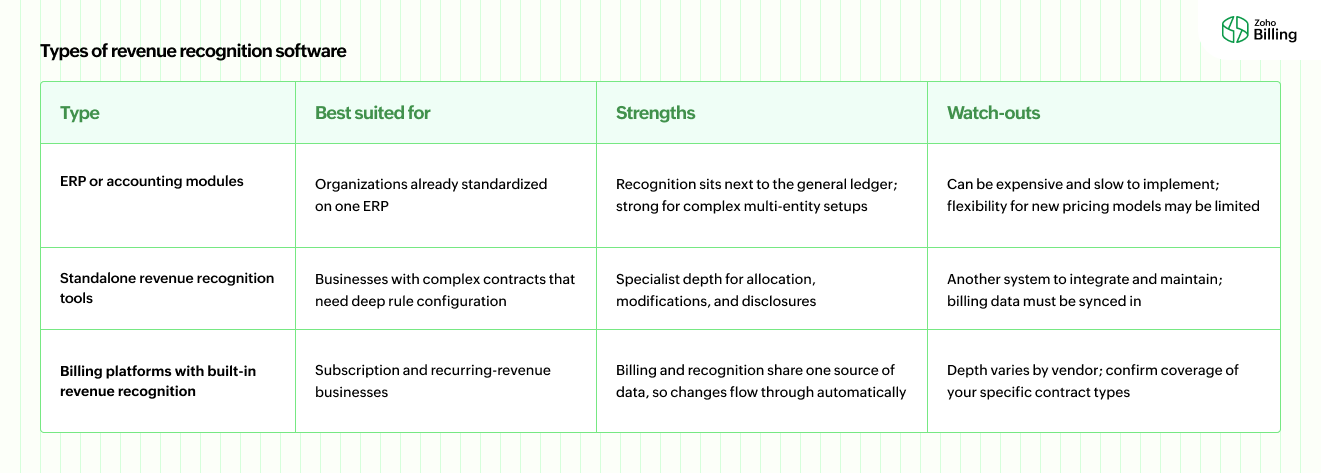
For most businesses, the third group is often the most practical starting point, because recognition problems usually begin at the billing layer; the contract changes, the invoice changes, and the schedule has to follow.
How to choose the right revenue recognition software
Map your revenue model first: List your pricing models (flat fee, usage, tiered, bundled, milestone) and contract behaviors (mid-term changes, prepayments, refunds). This becomes your requirements list.
Identify where the pain is: Find out where revenue recognition is going wrong, whether it's in managing deferred revenue schedules, handling contract modifications, managing allocation across entities, or anything else.
Confirm the standards you need: IFRS 15, ASC 606, Ind AS 115, or a combination depending on where you operate, and if the tool is natively capable of handling all the standards.
Check integrations before features: The software must integrate with your accounting system, CRM, and other solutions. Lack of integration will unnecessarily create more work.
Test with your own contracts: Ask the vendors to run a couple of your real, complicated use cases where you faced challenges. This will give you a better picture of how the tool aligns with your needs.
Look at total cost, not just license price: Include implementation, data migration, training, support, and other additional costs that may be needed to run the system.
Ask about the audit experience: Get feedback on how the vendor's current clients handled audits and what their overall experience was.
Plan for growth: Your pricing models may evolve in the coming years. Choose a solution that supports multiple pricing models and not just the ones you have today.
How Zoho Billing handles revenue recognition
Zoho Billing applies revenue recognition for businesses around the principles of IFRS 15, ASC 606, and their regional variants. Once it's enabled in your organization, revenue from an invoice is allocated across the actual service period rather than booked when the invoice is raised or paid, and the applicable amount moves from deferred revenue to recognized revenue as time passes.
What it offers
Recognition reports: Various dimensions of recognized revenue, deferred revenue, and a revenue waterfall view, so you get a picture of your earned revenue, deferred revenue, and obligations that are yet to be fulfilled.
Manual revenue recognition: For situations such as milestone-based projects or subscriptions with uncertain service periods, rule-based recognition isn't the best approach. With manual revenue recognition, you can control when and how much revenue is recognized at the line-item level.
Enterprise edition: Designed for larger and complicated revenue operations, with automated handling of the five-step process, customizable rules aligned to IFRS 15 and ASC 606, an audit trail capturing every minor action, and integration with your accounting software or ERP.
If you want to see how it applies to your own billing setup, you can connect with our team for an exclusive demo of Zoho Billing.
Conclusion
The right revenue recognition software isn't the one with a lot of features that you may not even use. It's the one that addresses your unique requirements — contract types, integrations, special cases — and leaves you with an output that you would be comfortable handing to an auditor. Identify your criteria, do your research, and shortlist the one that fits your business. Once you land on the right solution for your business, the switch turns revenue recognition from a month-end scramble into a routine, reviewable, and breezy process.
Frequently asked questions (FAQs)
Revenue recognition software automates how a business records revenue from customer contracts. It applies accounting standards such as IFRS 15, ASC 606, and other regional variants to determine when revenue has been earned, and moves amounts from deferred to recognized revenue over the contract period.
No. Billing software creates and sends invoices and collects payments. Revenue recognition software determines when the money on those invoices should be counted as earned. Certain billing platforms like Zoho Billing come with built-in revenue recognition features so you don't need a separate solution.
For simple contracts, you can record deferred revenue with manual journal entries in accounting software. However, as you add bundles, manage multiple pricing models, or work with contracts that go through frequent changes, having a separate billing or revenue recognition software is recommended.
Typically when contract volume adds to the complexity, when modifications get difficult to keep track of, or when audit requests take more time than what it is actually supposed to take, is when businesses migrate from spreadsheets to revenue recognition software.
Yes. Zoho Billing supports revenue recognition by spreading invoice revenue across the service period, tracking deferred and recognized amounts, and providing necessary revenue recognition reports.