What's New in Zoho Sprints: Fresh Updates for 2026

Zoho Sprints 3.0 gave us four new modules, broader integrations, and an AI foundation that carried our Agile platform into enterprise territory. Now we're back again with new capabilities and a set of enhancements to improve what was already there.
Here are the most recent additions to the platform:
New capabilities
From planning sprints with real capacity numbers to running ceremonies without leaving the tool, we've incorporated a fresh set of additions that give teams entirely new and more effective ways to approach their workflow.
Plan with confidence using Capacity Planning
Sprint planning has always come with an unsaid gamble: How much can the team actually take on this cycle? Over-commit and you burn people out. Under-commit and momentum stalls. Sprint Capacity Planning eliminates these arbitrary decisions.
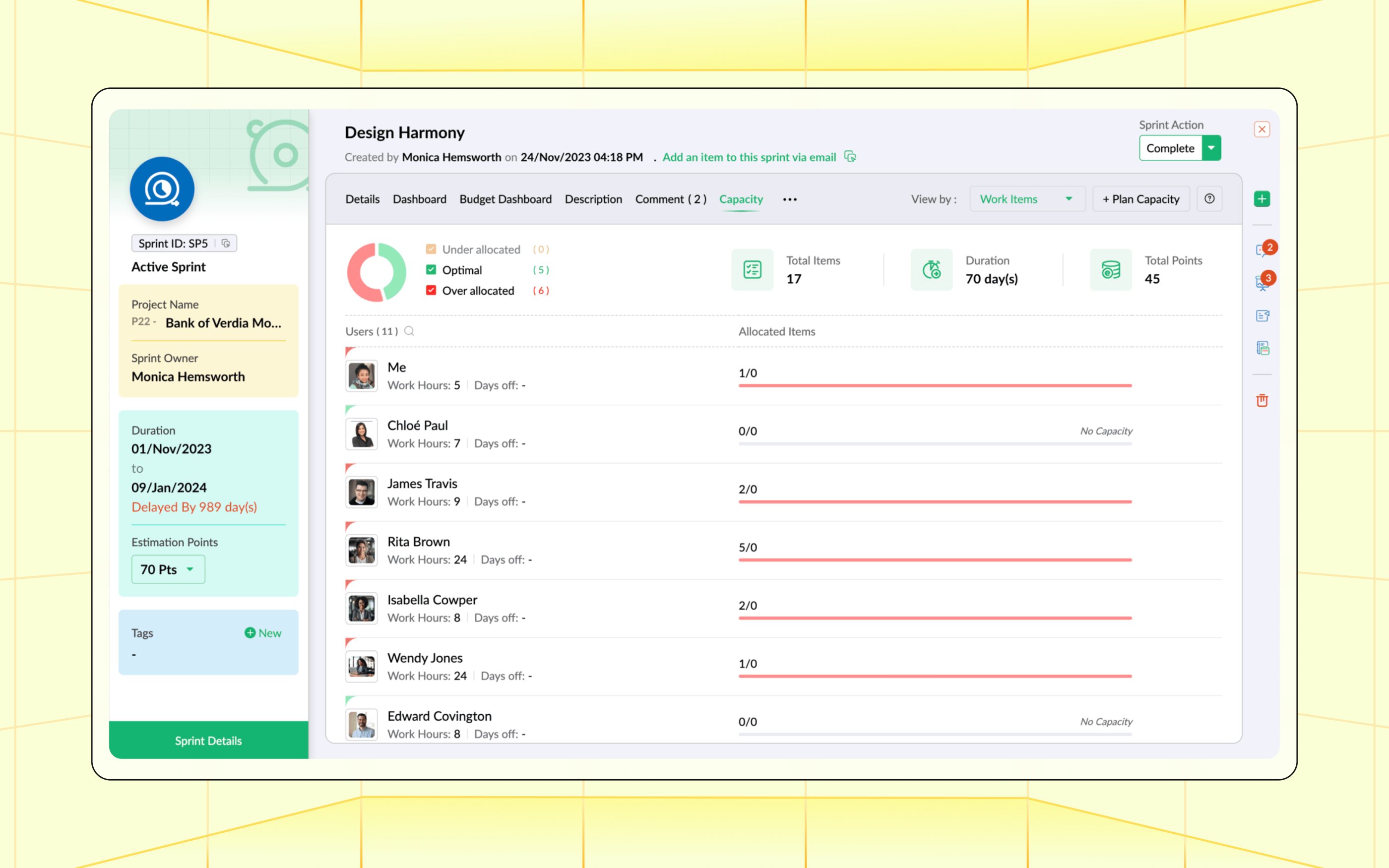
Set capacity at the sprint level based on team availability, working hours, and individual bandwidth. As work items are assigned, Sprints tracks committed hours against available capacity in real time, so you can see when a team member is at their limit before the sprint starts. Conversations around planning change from "does this feel right?" to "here's what the numbers say."
Learn more about Capacity Planning
See the whole picture with Calendar View
Sprints, releases, work items, and meetings are some of the key dated events that an Agile workspace generates. Until now, seeing them together meant jumping between modules, but the new Calendar View mode brings them all onto a single calendar surface.
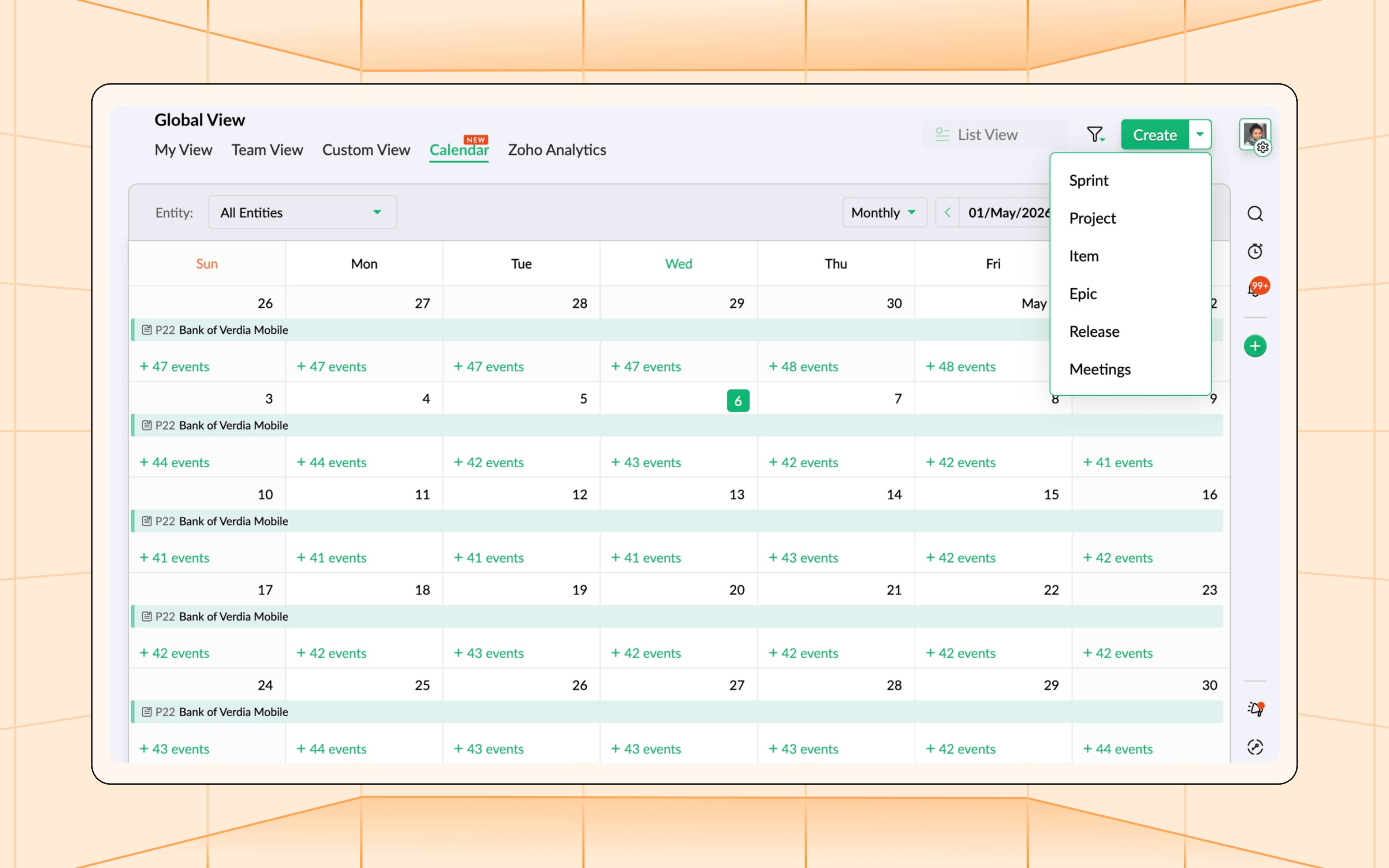
View events by day, week, or month. Filter by project, entity type, or owner to focus on what matters. Click through any event to jump straight into its details. It's the operating layer that sits above individual modules: a single view to answer "what's happening this week?" across every project you're part of.
Learn more about Calendar View
Run your ceremonies without leaving Sprints
Agile thrives on its ceremonies: daily stand-ups, plannings, reviews, and retros. Yet, most Agile tools still send you off to a third-party video provider the moment it's time to actually meet.
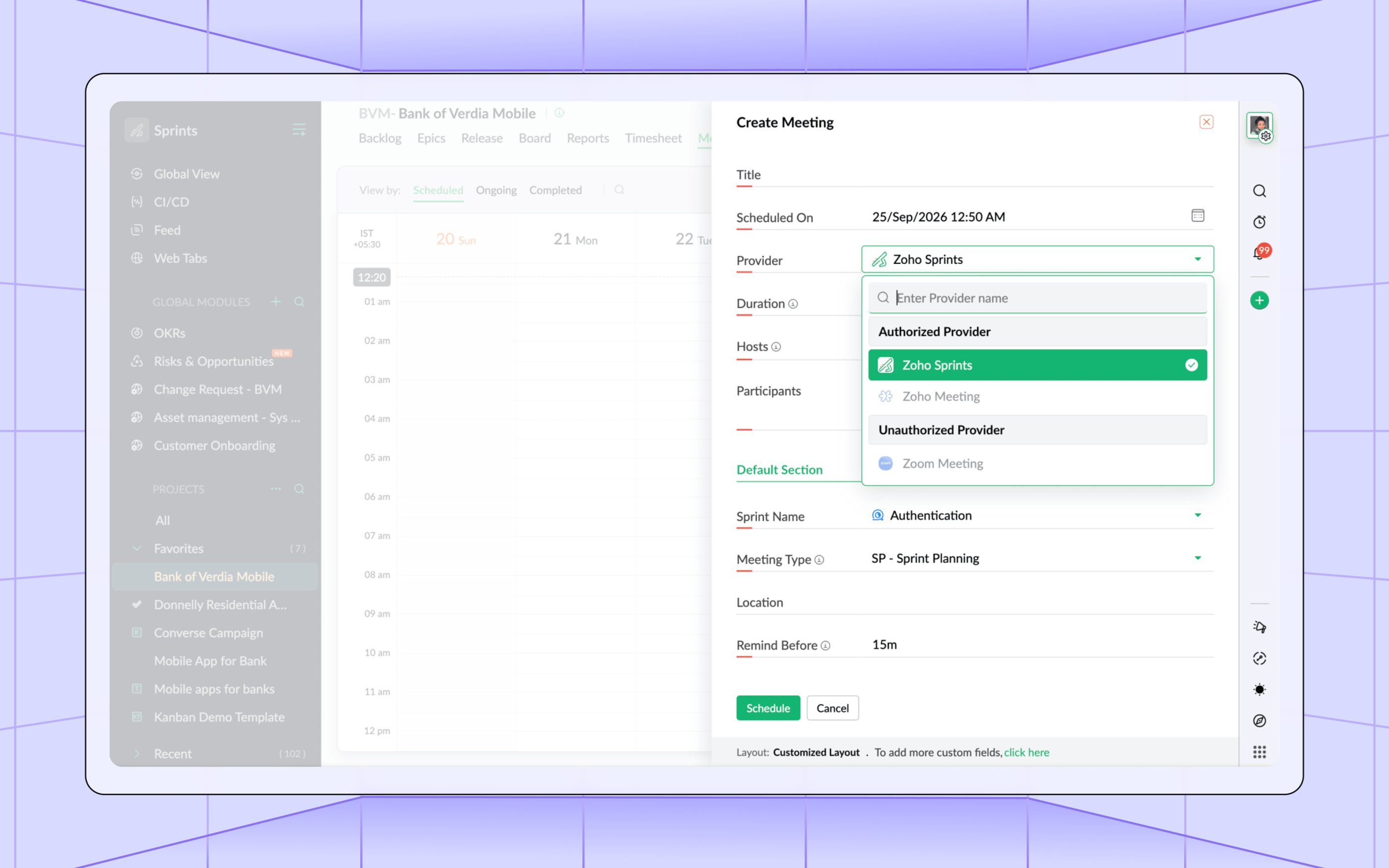
We've now closed that loop with native meetings. Schedule and host meetings directly inside Sprints, with no external provider setup required. Meeting details, notes, and attendees stay tied to the work items and sprints they belong to, so the conversation and the context live in the same place. For teams that already rely on external tools, our Meeting Bridge now also supports Google Meet alongside existing providers.
Learn more about Meetings in Zoho Sprints
Open the front door with Public Forms
You'd be surprised to hear how much crucial project feedback is out there that you'll never know about. Customers reporting bugs, stakeholders raising requests, and users submitting feedback never get to make their point heard simply because they never had a mechanism to do it.
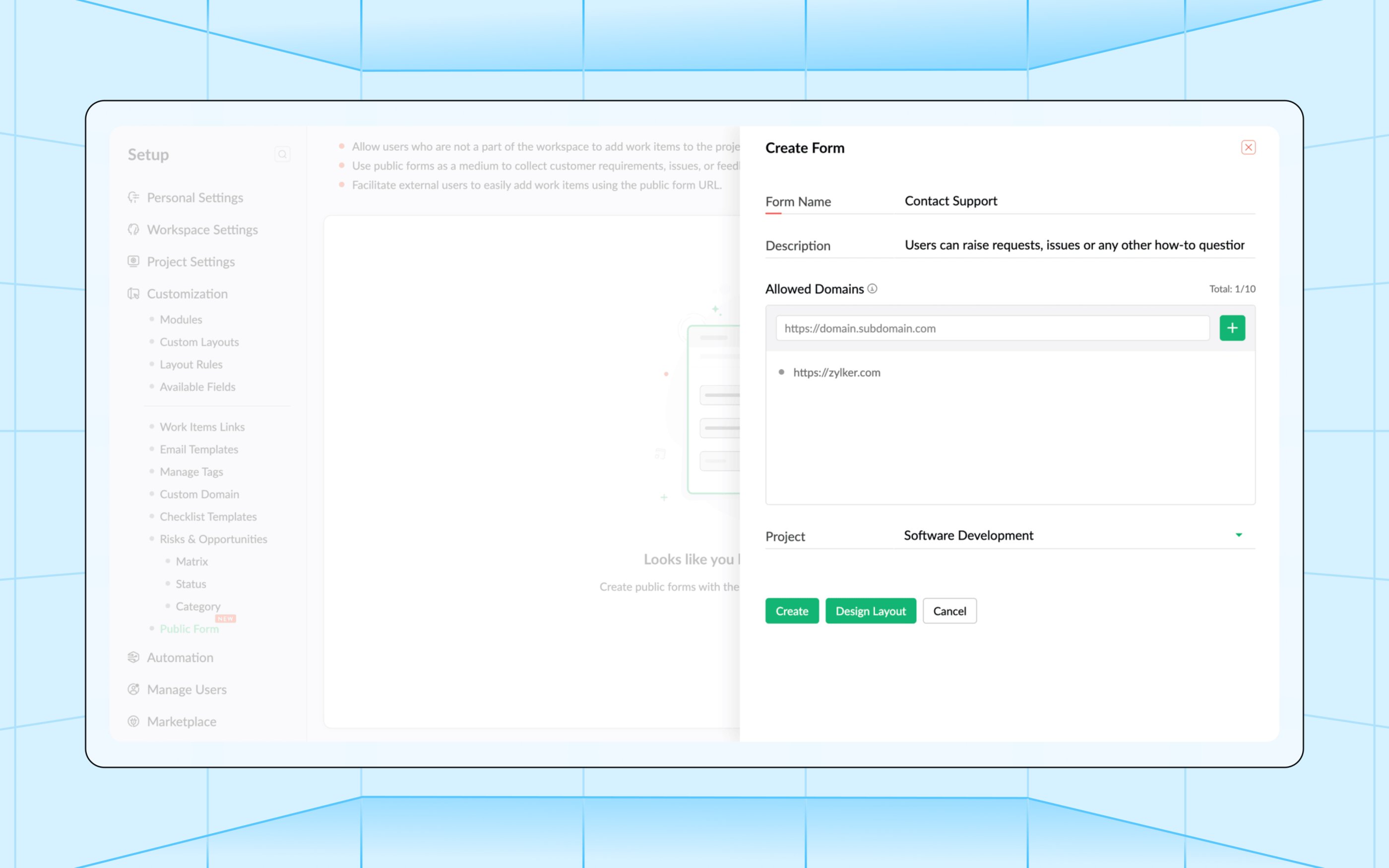
Public Forms give them one. Design your required form structure, share the link, and submissions land directly as work items. No login or license is required for the person filling it out. Choose which fields to expose, set default values, and let the form do the intake work while your team stays focused on delivery. It's a small surface change with a big reach: The boundary of your Sprints workspace now extends to anyone with a simple link.
Learn more about Public Forms
Connect the dots with Related Lists
Zoho Sprints uses a very sleek single-page layout so any data related to an entity, like the epics tied to a release or the sprints tied to a project, often lives exactly one module away. However, getting a picture of that data means you have to leave the view you're currently in, and we sought to eliminate even that minute level of friction.
Related Lists puts that data right on whatever entity you're viewing, without having to move away from it. It adds a tab to any module entity's detail view, where you can list out all connected records from the chosen lookup module you select at the beginning. Within the tab, you can manually enter records or set a pre-fill criteria, and the tab populates automatically with an option to turn on backlinks as well.
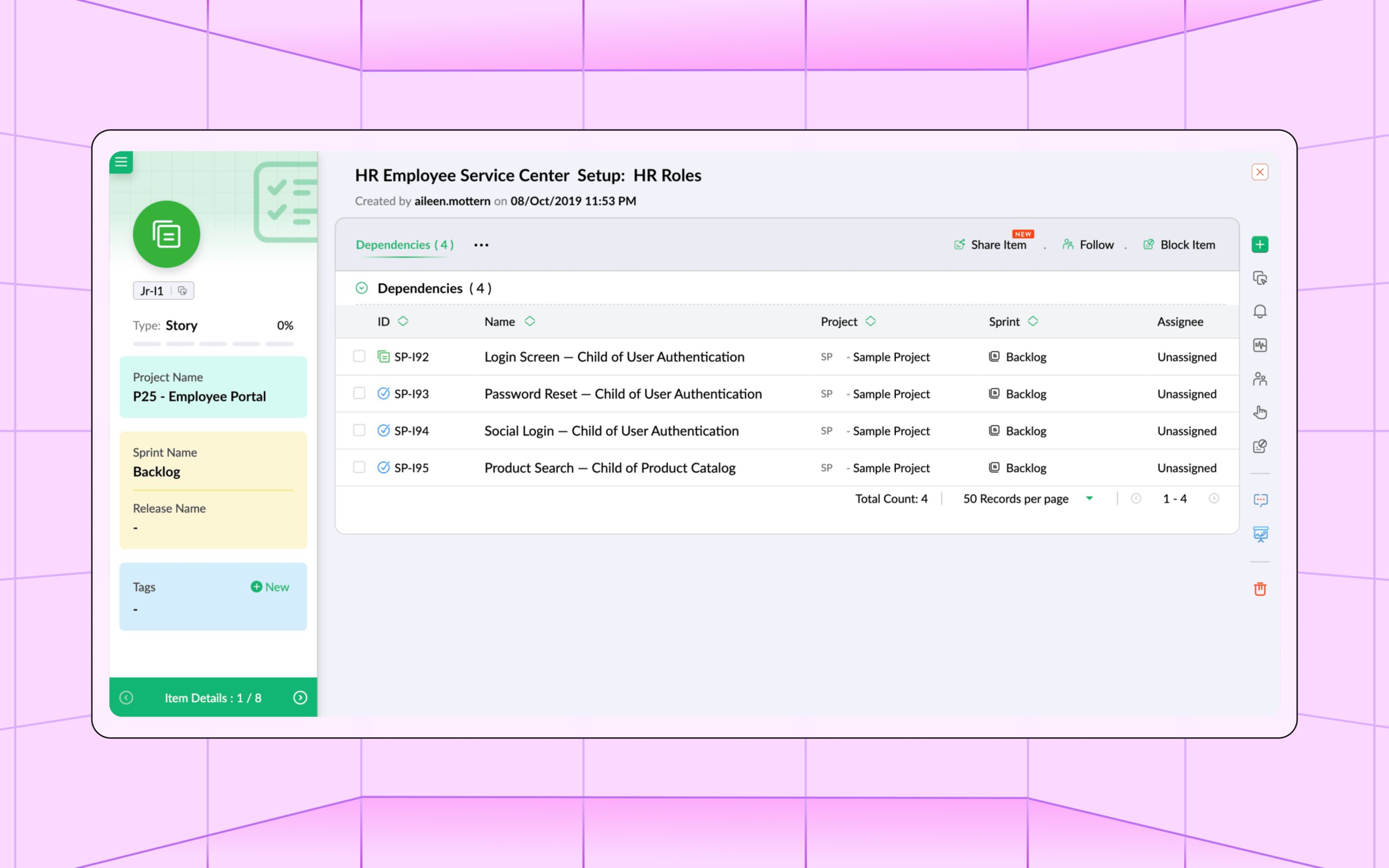
Need data from another app outside Sprints? Use a custom function Related List instead, and pull in records from an external source through a secure, connection-based script. Configure it once at the layout level, and it rolls out to every chosen entity built on that layout without the need to repeat that setup over and over.
Learn more about Related Lists
Smarter search and reporting
Finding the right work item, tracking how estimates held up, or getting a precise picture of how a release or risk progressed, is now a lot easier. These updates turn scattered information into something you can act on at a glance.
Find anything, faster, with Zia Search
3.0 brought AI into how you build your projects in Sprints, and we've now extended that functionality to how you find your way around. Zia Search now supports Zoho Sprints, letting you surface work items across all your workspaces from a single unified search bar.
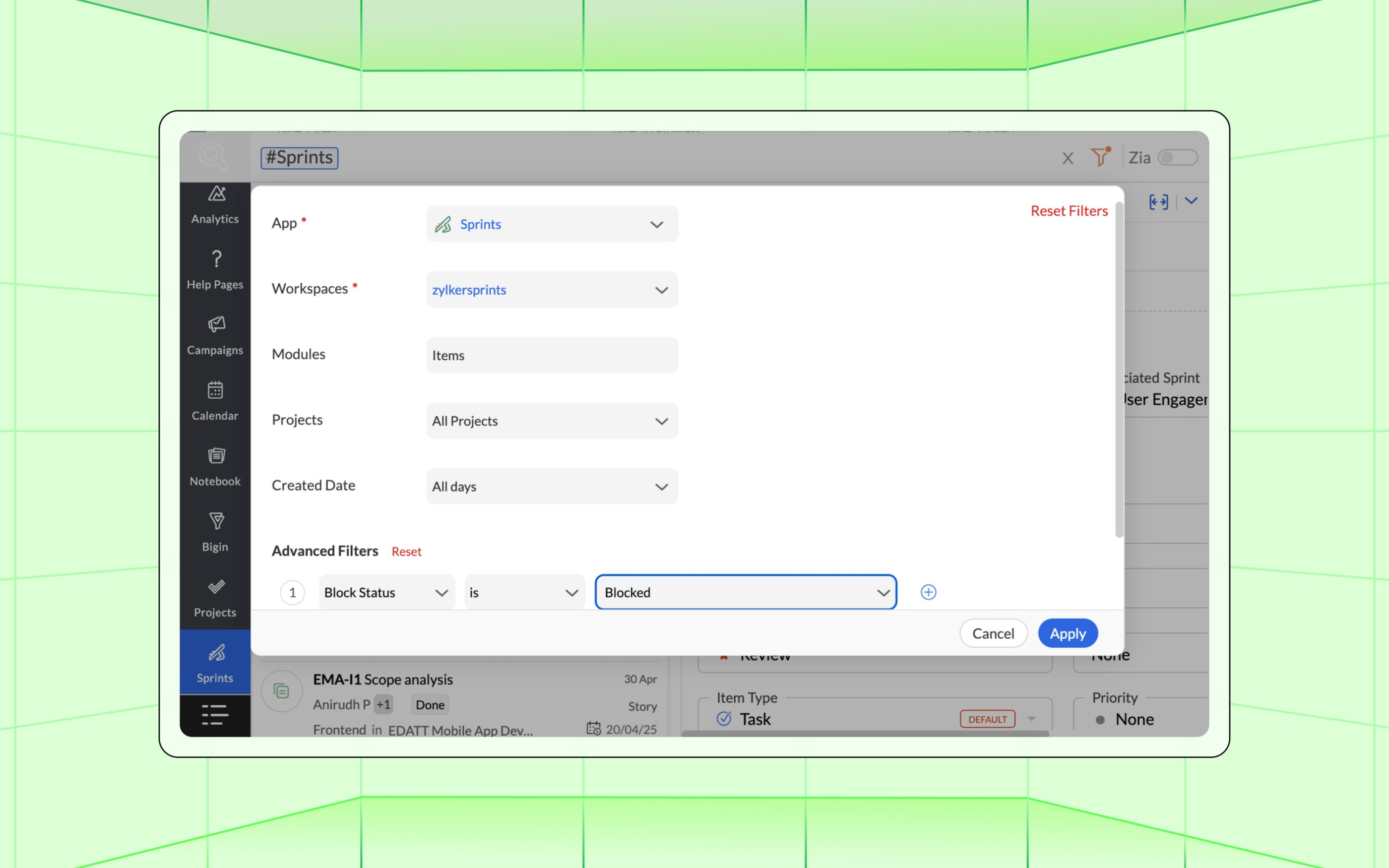
Search by item title, item number, sprint name, release name, or epic name. You can also @mention a user to pull up work items where they're the assignee, the creator, or a commenter. The bigger the workspace, the more this matters. Instead of clicking through modules to locate a single item, you type what you remember and land where you need to be.
Learn more about Zia Search
Search through epics with ease
Global search is our birds-eye navigation center for project and work item entities across your workspace. Its functionality has now been extended to epics as well. Search by epic name, number, or tag, across a single project or every project you're in.
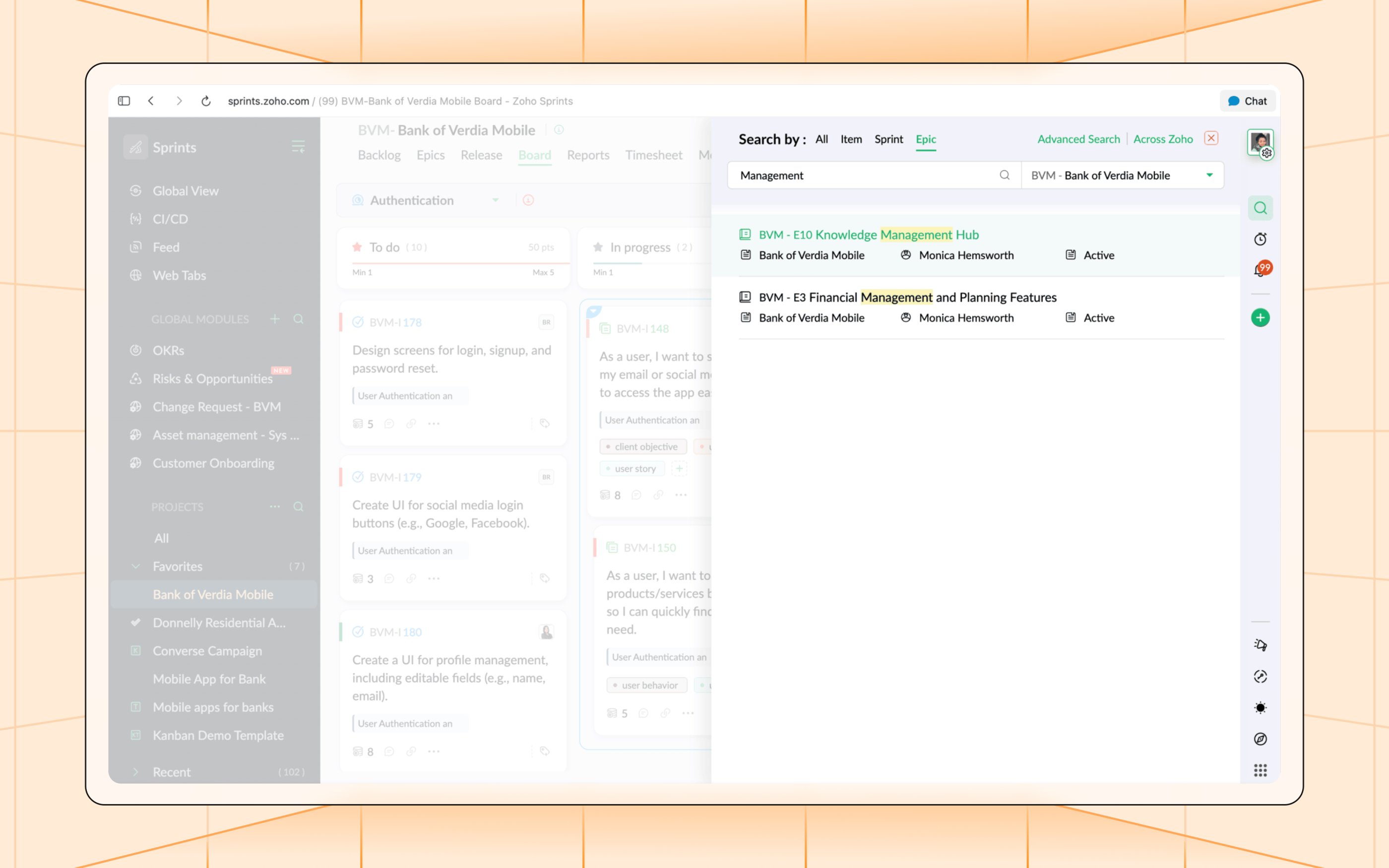
You can also pair it with Advanced Search, just like before, to build precise criteria, or group results to scan them faster.
Learn more about Global Search
Track the trail of releases, risks and opportunities
Some of the most high-stakes elements in an Agile project are releases, risks, and opportunities. Zoho Sprints now not only lets you know their status but also how it got there. The new stage/status timeline chart gives you a visual trail of every progress update these entities have been through.
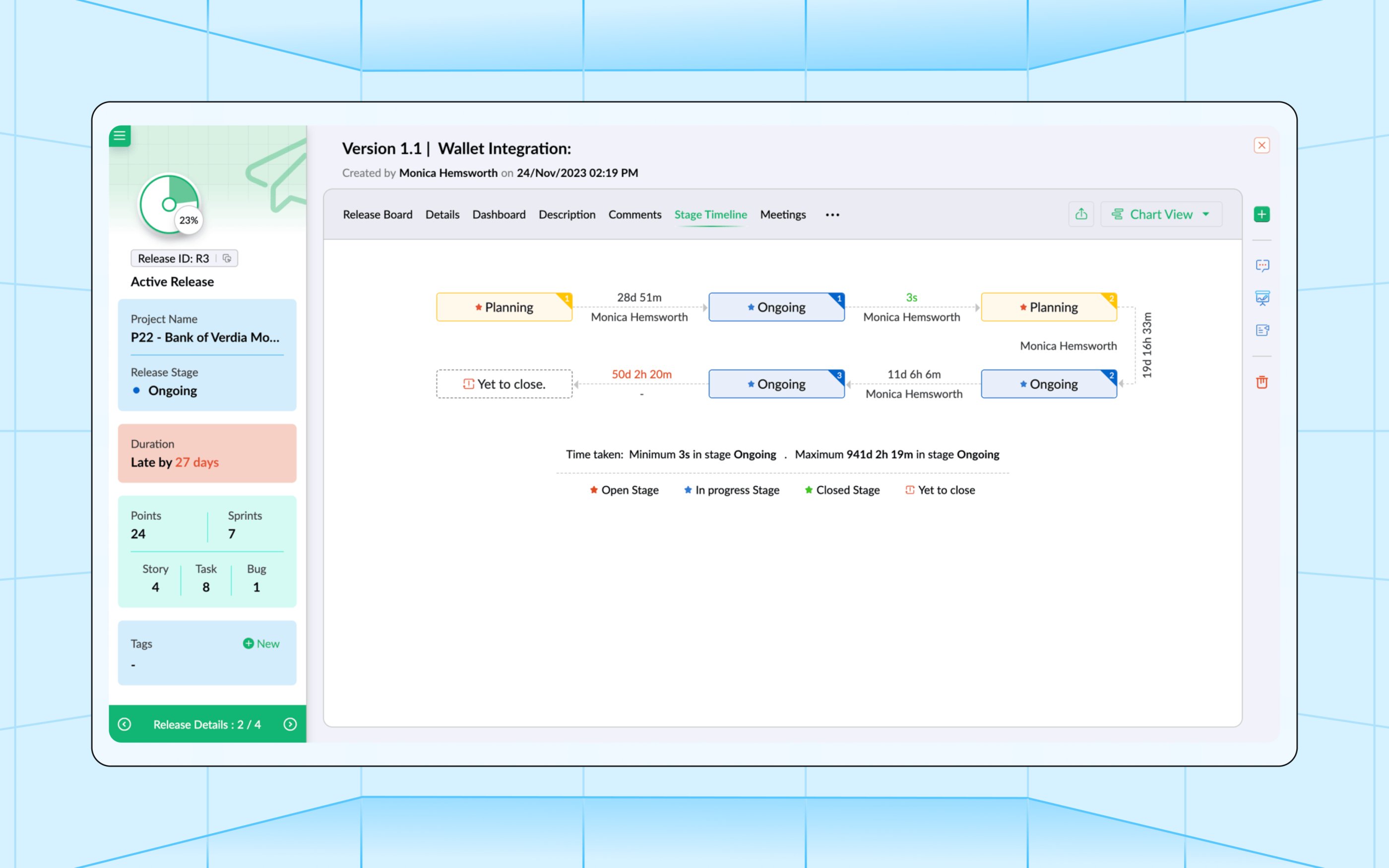
See the full progression in one glance, instead of piecing together history from comments or activity logs.
Learn more about Release Stage Timeline
Visually capture your custom module progress
One of 3.0's key upgrades was the ability to build totally custom modules based on your unique workflow's intricate requirements. We've now given them an additional analytics layer with dedicated dashboards, just like our prebuilt modules.
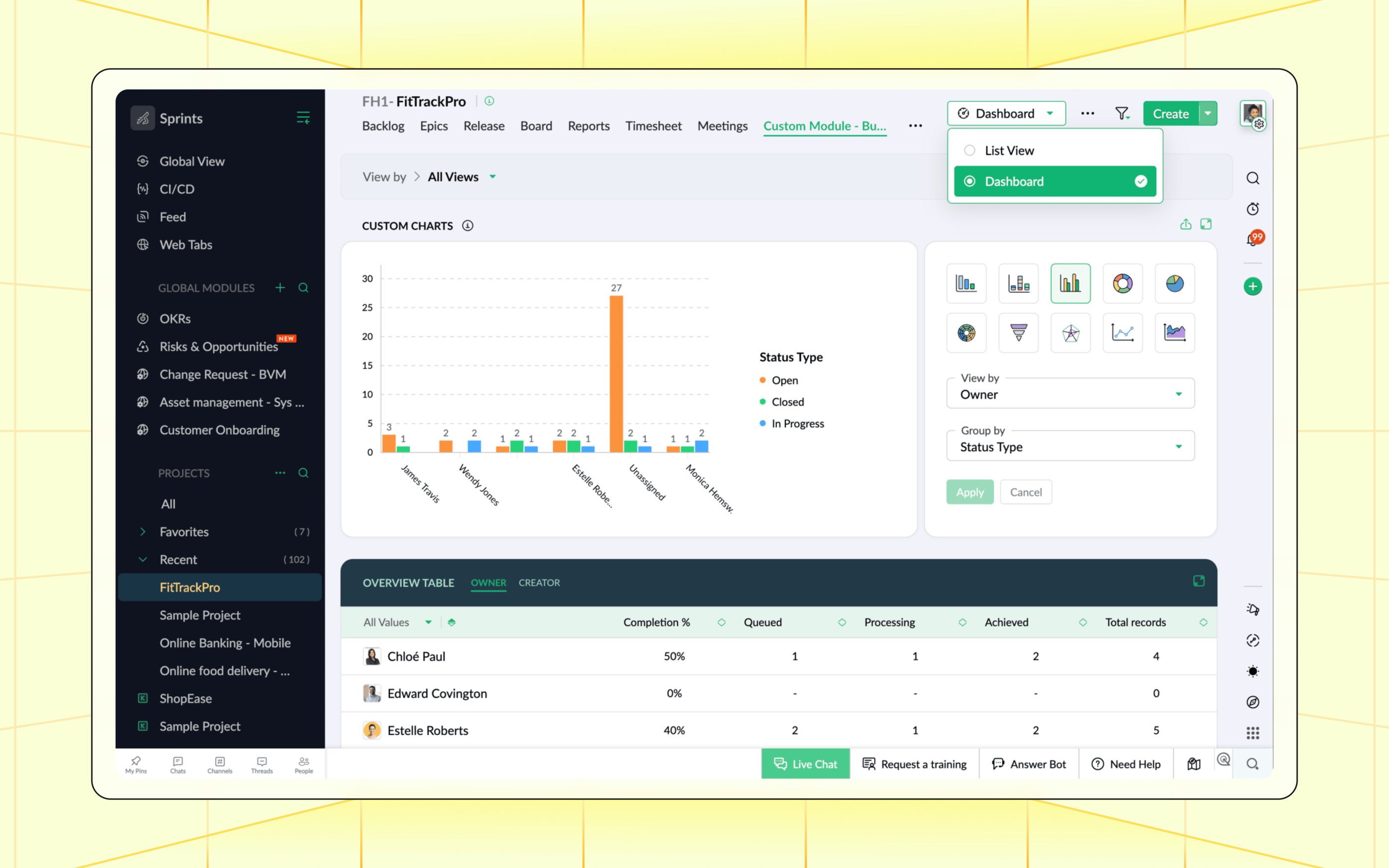
Get record status tiles, completion percentages, status and user distribution charts, and a fully custom chart builder with your choice of ten chart types. Filter any of it by a saved view, and export whatever you need for a report.
Learn more about Custom Module Dashboards
Sharper Actual vs Planned reports
Planning gets better when you can see where estimates held and where they slipped. Actual vs planned reports in timesheets now factor in the work hours set on each item alongside duration, for a more grounded read on how the plan tracked against reality.
Learn more about Actual vs Planned reports
Extending automation and customization
Layout rules now extend to the Release module: The layout rules engine that already drives conditional field behavior across other modules now also extends to the Release module. You can trigger actions like showing, hiding, or mandating fields based on the conditions you set.
Custom fields in OKR layout: The OKR layout now accepts custom fields, so you can capture the context specific to how your organization tracks objectives and key results, beyond the default operations.
Customized view for related lists: Hide the ones you don't need, and control what shows up on your detail view page. The changes apply across every project on that layout, so you only need to shape the experience once, instead of per project.
Other significant enhancements
Export in Test Management: Your QA data can now move with you. Export test cases, test suites, and test runs out of Sprints for audits, reporting, or handoffs.
Log weekly hours from Global View: Weekly log hours can now be added directly from Global View, so filling out the week doesn't need a project-by-project trip.
Grid View for Timesheet:View and analyze time logs in a calendar-style spreadsheet layout, from Global View: daily, weekly, monthly, quarterly, or yearly, by user or by project.
Zoho DAP integration:Onboard your team faster with in-product banners, walkthroughs, and guided videos, built and published without leaving Zoho Sprints.
Your Agile edge
Sprints 3.0 gave your teams the tools to take on enterprise-scale complexity. Now we've made it faster, sharper, and easier to use in your day-to-day workflows. Take the all new Zoho Sprints for a spin and see the difference.

Comments