- HOME
- Expert Talks
- Manage contracts in Zoho Contracts. Redline in MS Word.
Manage contracts in Zoho Contracts. Redline in MS Word.
- Last Updated : October 14, 2026
- 127 Views
- 5 Min Read
Microsoft Word has long been the tool legal teams turn to for drafting, editing, and redlining contracts. It’s a comfortable, easy word processor that’s been honed over decades. However, the trouble starts when a Contract Lifecycle Management (CLM) system enters the picture.
Suddenly there are two tools in play instead of one, and sticking to a single, structured process gets harder, not easier. That friction only compounds when everyone at the table—your legal team and the counterparty alike—is already working in MS Word by default.
An American Bar Association survey on legal technology found that 98% percent of lawyers who use word processing software use Microsoft Word specifically.
In this blog post, we’ll look at how you can manage your contracts in Zoho Contracts, while continuing to author, collaborate, redline, and negotiate in MS word.
Key takeaways
Here’s a tighter version:
Using a CLM alongside MS Word means constant exporting, downloading, and re-uploading, which breaks formatting, resets numbering, and loses comments.
Most contract work (authoring, redlining, tracking changes) already happens in MS Word, so teams resist switching tools.
A true CLM and Word integration fixes this; edits sync back automatically, formatting and comments remain intact.
Counterparties redline in MS Word that they already use. No new tool, no slower turnaround.
Zoho Contracts meets your team inside MS Word for drafting and negotiation, while managing the full lifecycle (repository, approvals, obligations, post execution, analytics, AI) in one place.
What does it mean to edit contracts in MS Word ?
Companies usually work from one of two starting points: their own contract templates or a counterparty’s format. Their own templates are the preferred route, as they’ve already been approved internally. They face far less scrutiny than a version coming from the other side. In some cases, a contract is authored entirely from scratch.
Whatever the starting point, the work that follows tends to look the same: updating, commenting, redlining, and tracking changes. When all of that happens in one place, the contract is being edited entirely in MS Word.
The challenge comes when a new CLM system enters the picture. Teams are rarely eager to learn a new tool just to do work they already know how to do in MS Word. So the ability to keep editing in MS Word, rather than being forced out of it, is what makes adoption stick.
Why editing in MS Word matters
A document that looks clean in MS Word doesn’t always look the same once it moves to a different CLM tool. Spacing shifts, numbering resets, and comments made along the way don’t always travel with the file. This can confuse stakeholders trying to follow what changed, and sometimes stops them from moving as fast as the deal actually requires.
A clean integration allows editing to be done completely in MS Word and syncs the new changes back perfectly, keeping the document’s original format intact through import so everything that follows builds on the original document. Nothing has to be manually carried over or re-entered once a change is made, it’s simply reflected on the other side, in the contract management system tracking the contract’s full lifecycle.
What does a CLM integration with MS Word mean for counterparties?
Whether a CLM system integrates cleanly with MS Word is a critical factor in how fast a counterparty responds. That's why an MS-Word integration is critical for engagements with counterparties.
How a CLM software and MS Word can coexist in your ecosystem
Bring your own format
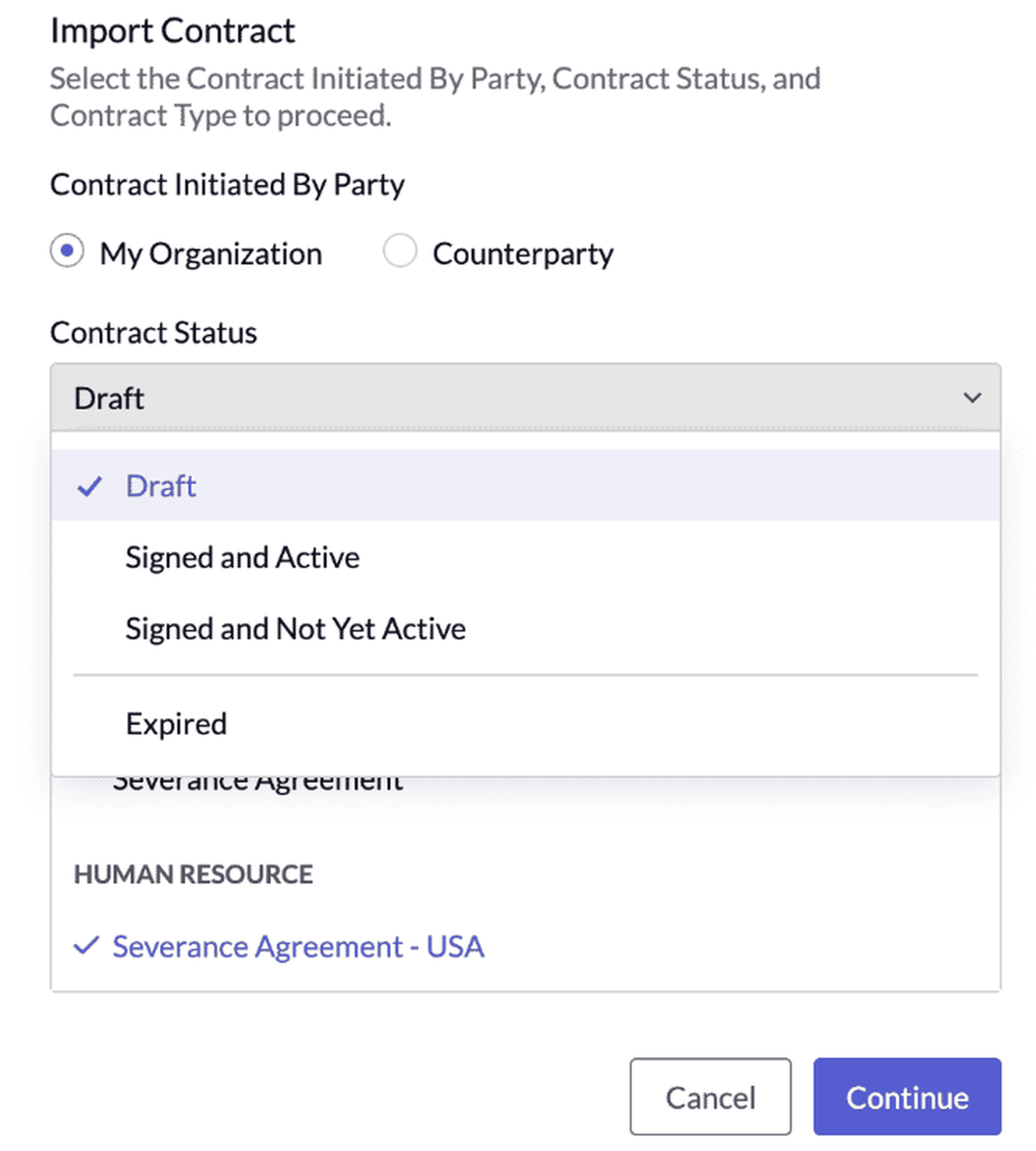
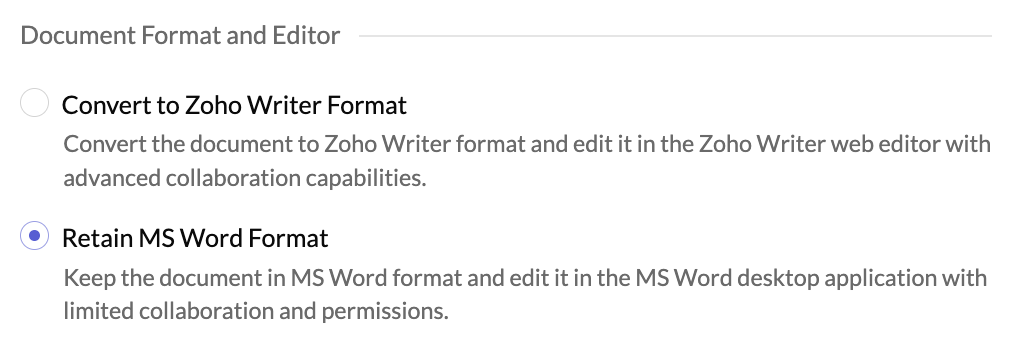
Import a contract at any stage, draft, signed, active, expired, or signed but not yet active, and choose to keep it in MS Word format instead of converting it. Building a new contract type from a template works the same way, your existing language and structure carry over without starting from scratch.
Draft and collaborate in MS Word
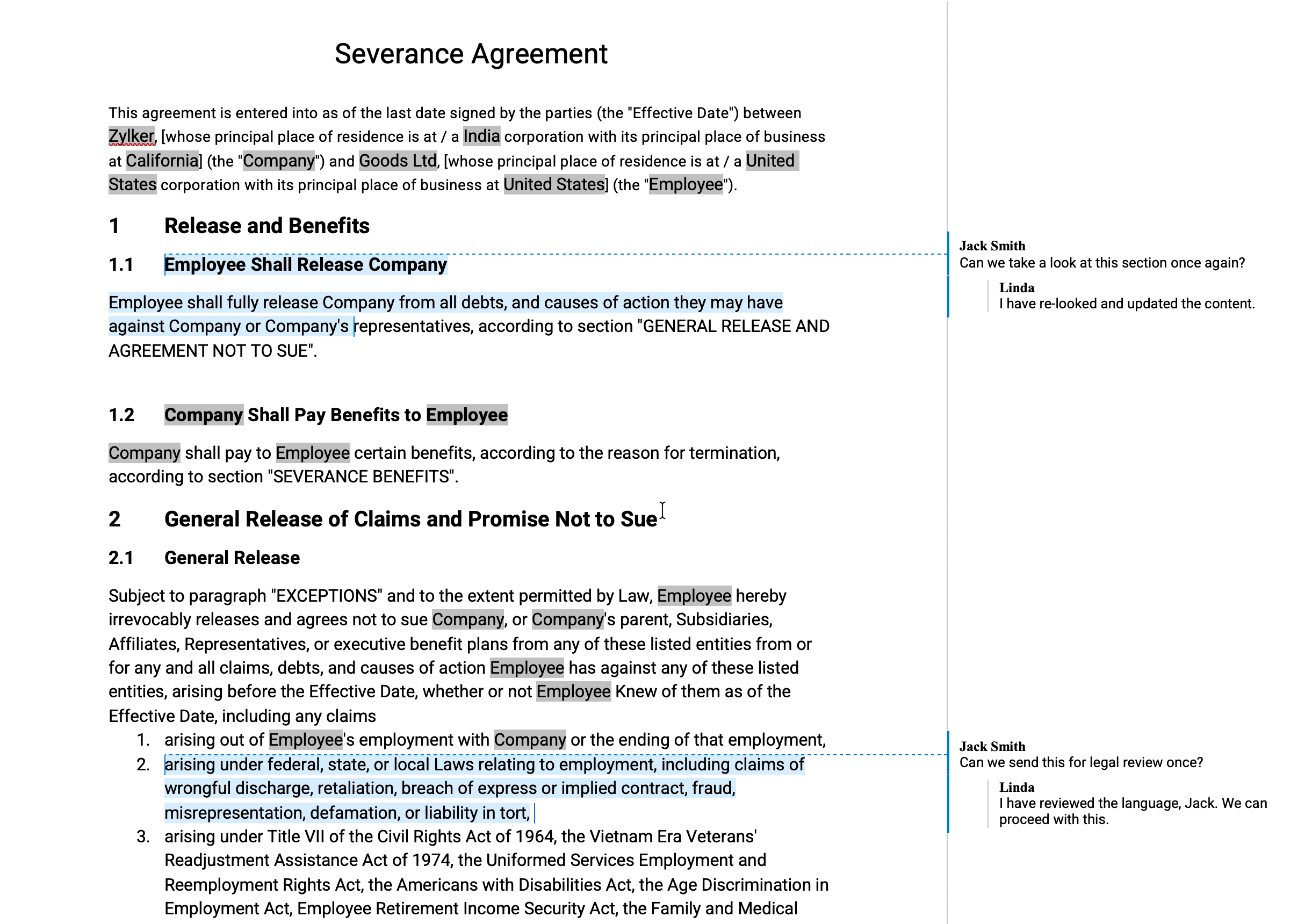
Build a contract type, or author the contract itself, directly inside the MS Word desktop application. Add collaborators to work through changes together, and accept or reject every edit as it comes back as a tracked redline, before the draft moves forward.
Finish it in MS Word
The counterparty redlines, tracks changes, edits, and comments right inside their own copy of MS Word, then completes their review. Every change syncs back automatically, and the contract owner reviews what came back. From here, the contract owner can send it back for another round, reply to comments, make further edits, or mark it as negotiated, and send for signature once everything's settled.
Manage contracts in Zoho Contracts: Redline in MS Word.
With the Zoho Contracts and MS Word integration, you can connect your MS Word desktop application directly with your CLM tool. Your contracts can move from draft through negotiation without anyone manually exporting, downloading, or re-uploading a file at any point along the way. For teams evaluating contract redlining software, what matters is which CLM system connects smoothly to the word processor they already use.
Apart from this, Zoho Contracts also gives you everything a CLM tool is meant to handle, a central repository to store and locate every contract in one place, approval workflows so the right people sign off before anything moves forward, reminders for renewals and obligations so nothing slips through, analytics to surface risk and patterns across your whole portfolio, and an AI layer that sits on top of all the lifecycle stages that can flag risks, summarize clauses, and extract obligations automatically.
Start your free trial or book a demo to see how it works for your team.
FAQ
Do I need a Microsoft Word license to use this integration?
Yes. Editing documents through this integration requires MS Word installed on your system with a valid subscription or license.
Can more than one person work on a contract in MS Word?
Yes. You can add users as collaborators in Zoho Contracts, who can then edit, review, and comment on the document based on the permission provided.
What happens to redlines once a counterparty sends a document back?
Every change syncs automatically back to Zoho Contracts once the counterparty completes their review, so the contract owner can see exactly what changed before deciding what happens next.
What file formats can be used during negotiation?
Documents can be uploaded in doc, docx, or rtf format, up to 10 MB per file.
What plans is this feature available on?
The MS Word integration is available on all paid plans of Zoho Contracts.
Can the approval stage be skipped if a contract type uses a pre-approved Word template?
It depends on whether an approval workflow is set up for that contract type, not on whether the template itself is pre-approved. Without one, the contract can move straight from draft to negotiation. With one, it still has to go through contract review first, even if the template's language was already vetted in advance.
Is Zoho Contracts a contract redlining software?
Zoho Contracts is contract management software with redlining built in. It provides native authoring capabilities. However, it also integrates with MS Word to support drafting, redlining, and negotiation through the desktop application of MS Word.
 Kendrick Jerry
A CLM Specialist at Zoho Contracts, who works across content strategy, product positioning, and SEO to help teams understand more about contract management. Outside of work, he loves basketball, great conversations, and finding new ways to tell a story.