const url = "https://cpaas.zoho.com/v1.1/voice";

const requestBody = {
    "to": "<to>",
    "from": "<from>",
    "agent_key": "<agent_key>",
    "template_key": "<template_key>",
    "merge_info": {
        "<merge_key>": "<merge_value>"
    }
};

fetch(url, {
    method: "POST",
    headers: {
        "Accept": "application/json",
        "Content-Type": "application/json",
        "Authorization": "Zoho-oauthtoken <token>"
    },
    body: JSON.stringify(requestBody)
})
.then(response => response.json())
.then(resp => console.log(resp))
.catch(error => console.log(error, "error"));
curl "https://cpaas.zoho.com/v1.1/voice" \
    -X POST \
    -H "Accept: application/json" \
    -H "Content-Type: application/json" \
    -H "Authorization: Zoho-oauthtoken <token>" \
    -d '{
    "to": "<to>",
    "from": "<from>",
    "agent_key": "<agent_key>",
    "template_key": "<template_key>",
    "merge_info": {"<merge_key>": "<merge_value>"}}'
using System;
using System.Net;
using System.Text;
using System.IO;
using Newtonsoft.Json.Linq;

namespace Rextester
{
    public class Program
    {
        public static void Main(string[] args)
        {
            System.Net.ServicePointManager.SecurityProtocol = System.Net.SecurityProtocolType.Tls12;
            var baseAddress = "https://cpaas.zoho.com/v1.1/voice";

            var http = (HttpWebRequest)WebRequest.Create(new Uri(baseAddress));
            http.Accept = "application/json";
            http.ContentType = "application/json";
            http.Method = "POST";
            http.PreAuthenticate = true;
            http.Headers.Add("Authorization", "Zoho-oauthtoken <token>");
            JObject parsedContent = JObject.Parse("{'to': '<to>','from': '<from>','agent_key': '<agent_key>','template_key': '<template_key>','merge_info': {'<merge_key>': '<merge_value>'}}");
            Console.WriteLine(parsedContent.ToString());
            UTF8Encoding encoding = new UTF8Encoding();
            Byte[] bytes = encoding.GetBytes(parsedContent.ToString());

            Stream newStream = http.GetRequestStream();
            newStream.Write(bytes, 0, bytes.Length);
            newStream.Close();

            var response = http.GetResponse();

            var stream = response.GetResponseStream();
            var sr = new StreamReader(stream);
            var content = sr.ReadToEnd();
            Console.WriteLine(content);
        }
    }
}
import requests

url = "https://cpaas.zoho.com/v1.1/voice"

payload = {
    "to": "<to>",
    "from": "<from>",
    "agent_key": "<agent_key>",
    "template_key": "<template_key>",
    "merge_info": {
        "<merge_key>": "<merge_value>"
    }
}
headers = {
    "accept": "application/json",
    "content-type": "application/json",
    "authorization": "Zoho-oauthtoken <token>",
}

response = requests.request("POST", url, json=payload, headers=headers)

print(response.text)
<?php

$curl = curl_init();

$payload = array(
    "to" => "<to>",
    "from" => "<from>",
    "agent_key" => "<agent_key>",
    "template_key" => "<template_key>",
    "merge_info" => array(
        "<merge_key>" => "<merge_value>"
    )
);

curl_setopt_array($curl, array(
    CURLOPT_URL => "https://cpaas.zoho.com/v1.1/voice",
    CURLOPT_RETURNTRANSFER => true,
    CURLOPT_ENCODING => "",
    CURLOPT_MAXREDIRS => 10,
    CURLOPT_TIMEOUT => 30,
    CURLOPT_HTTP_VERSION => CURL_HTTP_VERSION_1_1,
    CURLOPT_CUSTOMREQUEST => "POST",
    CURLOPT_POSTFIELDS => json_encode($payload),
    CURLOPT_HTTPHEADER => array(
        "accept: application/json",
        "authorization: Zoho-oauthtoken <token>",
        "cache-control: no-cache",
        "content-type: application/json",
    ),
));

$response = curl_exec($curl);
$err = curl_error($curl);

curl_close($curl);

if ($err) {
    echo "cURL Error #:" . $err;
} else {
    echo $response;
}
?>
import java.io.BufferedReader;
import java.io.InputStreamReader;
import java.io.OutputStream;
import java.net.HttpURLConnection;
import java.net.URL;
import java.nio.charset.StandardCharsets;

import org.json.JSONObject;

public class VoiceSendApi {
    public static void main(String[] args) throws Exception {
        String postUrl = "https://cpaas.zoho.com/v1.1/voice";
        BufferedReader br = null;
        HttpURLConnection conn = null;
        String output = null;
        StringBuffer sb = new StringBuffer();
        try {
            URL url = new URL(postUrl);
            conn = (HttpURLConnection) url.openConnection();
            conn.setDoOutput(true);
            conn.setRequestMethod("POST");
            conn.setRequestProperty("Content-Type", "application/json");
            conn.setRequestProperty("Accept", "application/json");
            conn.setRequestProperty("Authorization", "Zoho-oauthtoken <token>");
            JSONObject mergeInfo = new JSONObject();
            mergeInfo.put("<merge_key>", "<merge_value>");
            JSONObject object = new JSONObject();
            object.put("to", "<to>");
            object.put("from", "<from>");
            object.put("agent_key", "<agent_key>");
            object.put("template_key", "<template_key>");
            object.put("merge_info", mergeInfo);
            OutputStream os = conn.getOutputStream();
            os.write(object.toString().getBytes(StandardCharsets.UTF_8));
            os.flush();
            br = new BufferedReader(new InputStreamReader(conn.getInputStream(), StandardCharsets.UTF_8));
            while ((output = br.readLine()) != null) {
                sb.append(output);
            }
            System.out.println(sb.toString());
        } catch (Exception e) {
            br = new BufferedReader(new InputStreamReader(conn.getErrorStream(), StandardCharsets.UTF_8));
            while ((output = br.readLine()) != null) {
                sb.append(output);
            }
            System.out.println(sb.toString());
        } finally {
            try {
                if (br != null) {
                    br.close();
                }
            } catch (Exception e) {
                e.printStackTrace();
            }
            try {
                if (conn != null) {
                    conn.disconnect();
                }
            } catch (Exception e) {
                e.printStackTrace();
            }
        }
    }
}
HOW IT WORKS
One API call to trigger a voice call
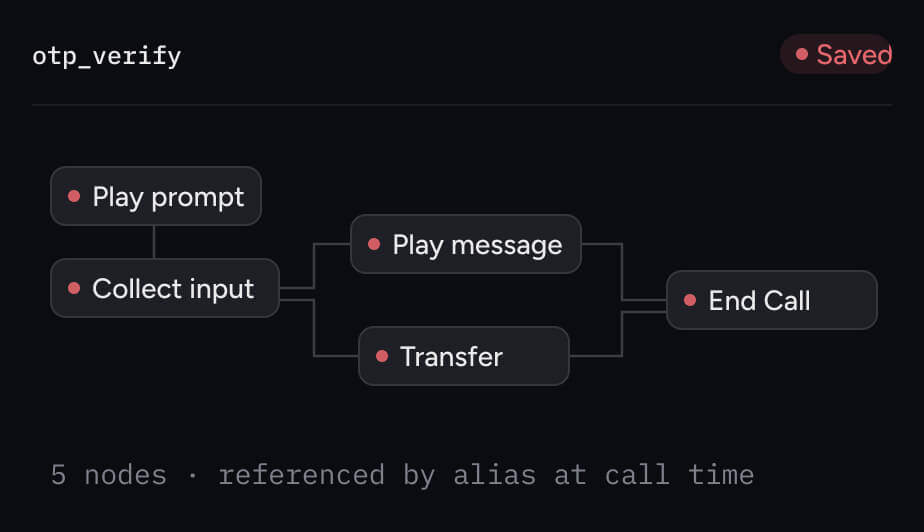
Trigger a voice call with a single API request without the need for your own telephony infrastructure or call center setup. Build a voice call flow once and reuse it across every call type like OTPs, alerts, reminders.
templatevariablesroutedelivered