- HOME
- Know Your Tech
- Top 7 benefits of automation in app development
Top 7 benefits of automation in app development
- Last Updated : November 30, 2025
- 685 Views
- 10 Min Read
How long does your business wait for a simple application to be built? If your answer is weeks or months, you're not alone. Most organizations face the same challenge. IT backlogs grow longer while business teams need solutions faster, and traditional development can't keep pace with demand.
Highlights
Faster development cycles: Automation speeds up tasks like testing, deployment, and monitoring.
Improved code quality: Automated testing reduces human error and ensures thorough, consistent checks.
Scalability: Automation makes it easier to handle larger projects and more complex workflows as your business grows.
Cost savings: Reduces manual work, which lowers operational and labor costs.
Enhanced productivity: Developers can focus on strategic tasks, boosting overall productivity.
Improved collaboration: Automated tools enable better communication and collaboration across development, testing, and operations teams.
This is where app development automation steps in. By automating these routine tasks, you can significantly cut down manual effort, free up valuable time, and accelerate your development process, allowing your team to focus on what truly matters.
In this blog, we'll explore the app development automation benefits, showing you how it can help your business improve efficiency, cut down on manual effort, and, ultimately, speed up your development cycles.
What is automation in app development?
Automation in app development uses tools to handle repetitive tasks that usually require manual effort.
Common tasks that get automated include:
Application building: Visual builders let you create forms, screens, and data structures using drag-and-drop interfaces instead of manual coding.
Workflow automation: Business processes like approvals, notifications, and data routing run automatically based on rules you define visually.
Data integration: Systems connect and sync information between multiple applications without custom integration code.
Deployment: Applications are published to web and mobile platforms automatically without manual configuration.
For example, when you need a customer tracking system, a low-code app development platform lets you build forms, set up workflows, and deploy the complete application in days. Traditional development would require weeks of coding and configuration.
Zoho Creator, an AI-powered low-code application development platform, helps you build custom applications using drag-and-drop interfaces, automate business workflows visually, and integrate with existing systems seamlessly. This approach reduces development time while maintaining flexibility and control.
How is automation evolving in app development?
The future of automation in app development offers significant benefits, including faster development cycles, fewer errors, and increased responsiveness to user and market demands. With 90% of enterprise software expected to integrate AI by 2025, adopting these advancements will help businesses stay efficient and competitive in an evolving software environment.
AI assistance in application building
AI-powered platforms now help you build applications by suggesting form fields, recommending workflow patterns, and auto-generating database structures based on your requirements. Instead of starting with a blank canvas, you get intelligent recommendations that speed up the initial setup.
These intelligent suggestions reduce the time spent on repetitive setup tasks and help less technical users make better design decisions. You spend less energy on basic configuration and more time solving actual business problems.
This creates several benefits for development teams:
Faster initial builds: Applications get built faster because setup and configuration happen in minutes instead of hours.
Better design decisions: AI recommendations help less experienced builders follow proven patterns and avoid common mistakes.
Reduced learning curve: New users can build functional applications quickly by following AI suggestions rather than learning all options first.
Consistent quality: AI-guided building ensures applications follow best practices even when built by different team members.
Visual development environments are becoming more powerful
Modern low-code platforms now offer sophisticated drag-and-drop interfaces that handle complex business logic, multi-step workflows, and intricate data relationships without requiring code.
What once needed custom programming now happens through visual configuration. This matters because the gap between what you can build visually compared to what requires traditional coding continues to shrink. More complex business requirements become accessible to teams without specialized programming skills.
Here's how this helps in the app development process:
Enterprise-grade applications: Teams can build custom ERP systems, customer portals, and workflow automation tools using primarily visual tools.
Complex workflows: Multi-step approval processes, conditional logic, and data transformations happen through visual configuration.
Democratized development: Business analysts and operations teams build solutions without depending entirely on IT departments.
Faster iterations: Changes to workflows and interfaces happen through visual updates rather than code rewrites and testing cycles.
Integrated automation across the application lifecycle
Platforms now handle not only building applications but also deploying them to multiple devices, managing data flows between systems, and automatically scaling infrastructure. One platform manages the complete journey from design to deployment to maintenance.
This integration helps you avoid the complexity of coordinating multiple tools and the errors that come from manual handoffs between systems. Everything works together seamlessly without requiring specialized expertise in deployment, infrastructure, or device-specific development.
Some of the noteworthy advantages of this integration include:
Multi-platform deployment: Applications deploy to web, iOS, and Android simultaneously without separate development efforts for each platform.
Automatic updates: Changes roll out across all platforms automatically, ensuring users always have the latest version.
Infrastructure scaling: Systems handle increased usage automatically without manual intervention or capacity planning.
Smaller team requirements: A team of only a few people can manage applications serving thousands of users across multiple platforms.
Top 7 benefits of app development automation
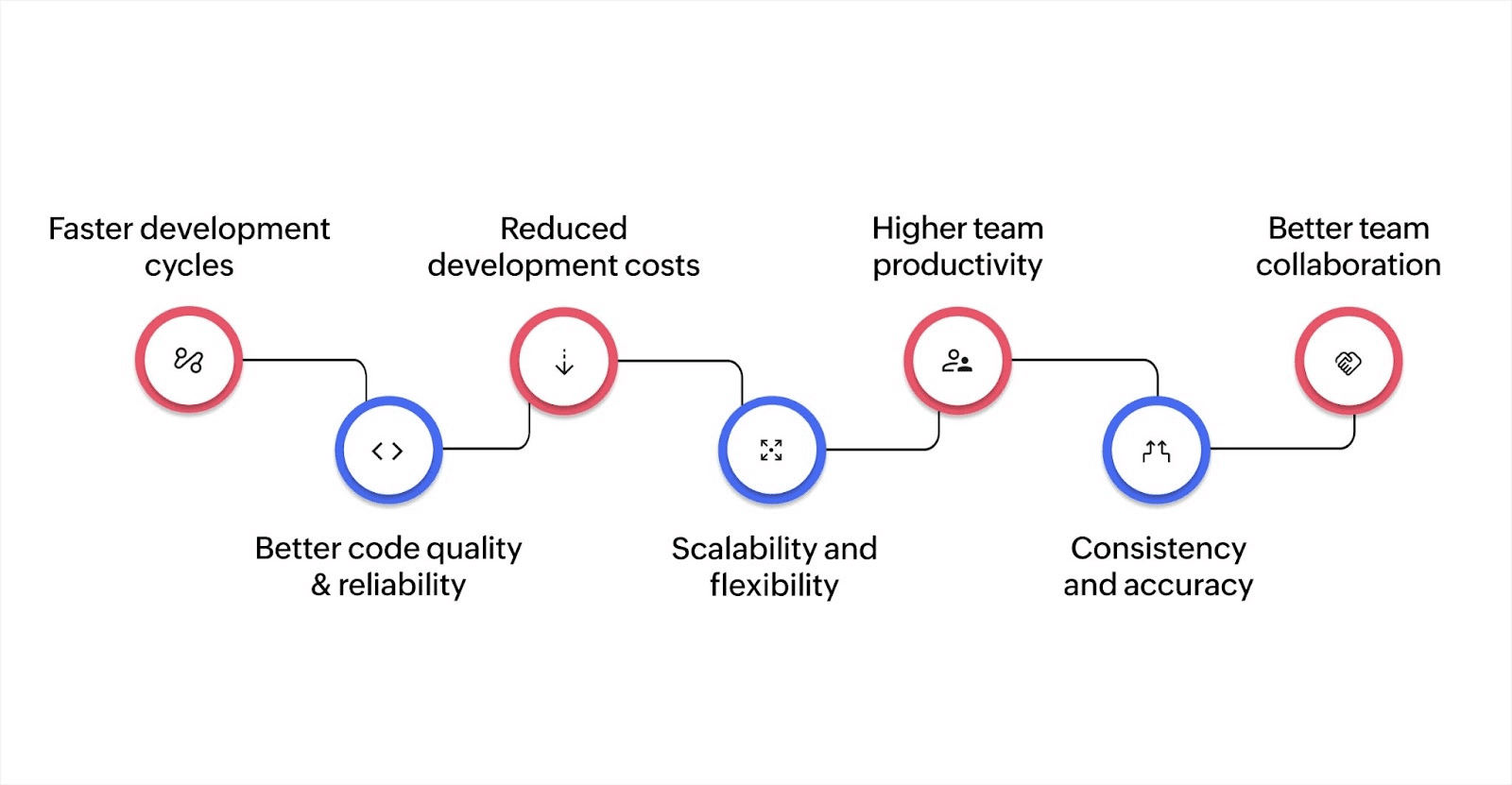
1. Faster development cycles
Automation removes delays from your development process by handling tasks instantly that would otherwise require hours of manual work. Here's how automation accelerates your development:
Instant multi-platform deployment: Publish to web and mobile automatically once you finish building, without separate processes for different platforms.
Rapid iterations: Make changes and updates quickly without waiting for development sprints or extensive testing cycles.
2. Better code quality and reliability
Automation improves application quality by providing consistent building blocks and reducing opportunities for configuration errors. Low-code platforms deliver better quality through:
Pre-built tested components: Use reliable form builders, database structures, and workflow tools that work correctly instead of building from scratch where mistakes happen.
Visual development accuracy: Drag-and-drop interfaces prevent syntax errors and logic mistakes that occur in manual coding.
3. Reduced development costs
While automation tools require an initial investment, the long-term savings are significant. Automating tasks like testing and deployment reduces the need for a large manual workforce, ultimately lowering your overall development costs.
Eliminating manual tasks: Automating deployment and testing processes reduces the time and labor required, enabling your team to focus on more strategic tasks.
Lower operational costs: Automation allows you to scale development without adding extra resources, reducing both direct and indirect costs.
4. Scalability and flexibility
As your business grows, automation provides the scalability to handle larger projects and more complex workflows without overwhelming your team. Automated systems can adapt to increased demand, ensuring your development processes remain efficient.
Handling large codebases: Automation makes managing complex, large-scale projects more efficient, allowing you to maintain quality without additional resources.
Adaptability: Automation allows for quick adjustments to market changes, ensuring your development processes can support new features and updates as needed.
5. Higher team productivity
Automation accelerates the development process by reducing delays associated with manual testing and deployment. This enables you to deliver updates and new features to the market more quickly, keeping you ahead of your competitors.
Better skill allocation: IT teams focus on complex integrations and security while business users build simple applications themselves.
Capacity for innovation: Address urgent needs and innovation projects without disrupting planned work.
6. Consistency and accuracy
By automating repetitive tasks, you ensure that every process is performed the same way each time, leading to higher consistency and accuracy across your development cycle.
Consistent testing: Automated tests ensure that each iteration is thoroughly tested under the same conditions, eliminating variability caused by human involvement.
Reduced error: Automation minimizes the risk of mistakes that are common in manual processes, ensuring your app is more reliable.
7. Better team collaboration
Automation enhances collaboration by streamlining workflows across development, testing, and operations teams. This leads to improved communication, faster feedback, and more effective teamwork.
Cross-functional collaboration: Automated systems allow teams to work together smoothly, reducing delays in handoffs and making the process more fluid.
Real-time feedback: Automation tools provide instant feedback on code changes, ensuring all team members are aligned and can address issues promptly.
Challenges in implementing automation in app development
Complexity of automation tools
Automation tools are often packed with features, which can make them difficult to use, particularly for teams new to automation. The wide range of options available can be overwhelming, and integrating them with existing systems can be time-consuming.
Overwhelming features: Many automation tools come with numerous options, which can be confusing if you're just starting.
Integration hurdles: Ensuring compatibility with your current technology infrastructure can slow down the adoption process.
Solution: Begin by automating simpler tasks, gradually building up as your team becomes more familiar with the tools. Focus on tools that are easy to use and can integrate smoothly with your existing systems.
High upfront costs
A major barrier to adopting automation is the initial cost of the tools. Automation software often requires a significant upfront investment, which can be a challenge for smaller businesses with tighter budgets. In addition to the initial investment, ongoing costs for maintenance and updates may also add up over time.
Initial investment: The cost of purchasing automation tools can be prohibitive for SMBs, even though they may provide long-term savings.
Maintenance costs: Keeping the tools up-to-date and functional adds ongoing costs that need to be factored in.
Solution: Consider the long-term savings and increased productivity that automation can bring. Start with lower-cost options and scale up as your business grows. This way, you can spread out the investment over time.
Resistance to change
Introducing new automation practices can meet with resistance from your team. Some developers may be hesitant to change existing workflows, often out of fear that automation will reduce their job security or disrupt their routines.
Fear of job loss: Some may worry that automation will replace their roles in the development process.
Reluctance to change: Long-established workflows can make it difficult for teams to adopt new tools and practices.
Solution: To overcome resistance, provide clear communication about the benefits of automation, focusing on how it will make their jobs easier rather than replace them. Offer training and allow the team to experiment with automation in low-risk situations to build trust in the tools.
How to get started with app development automation
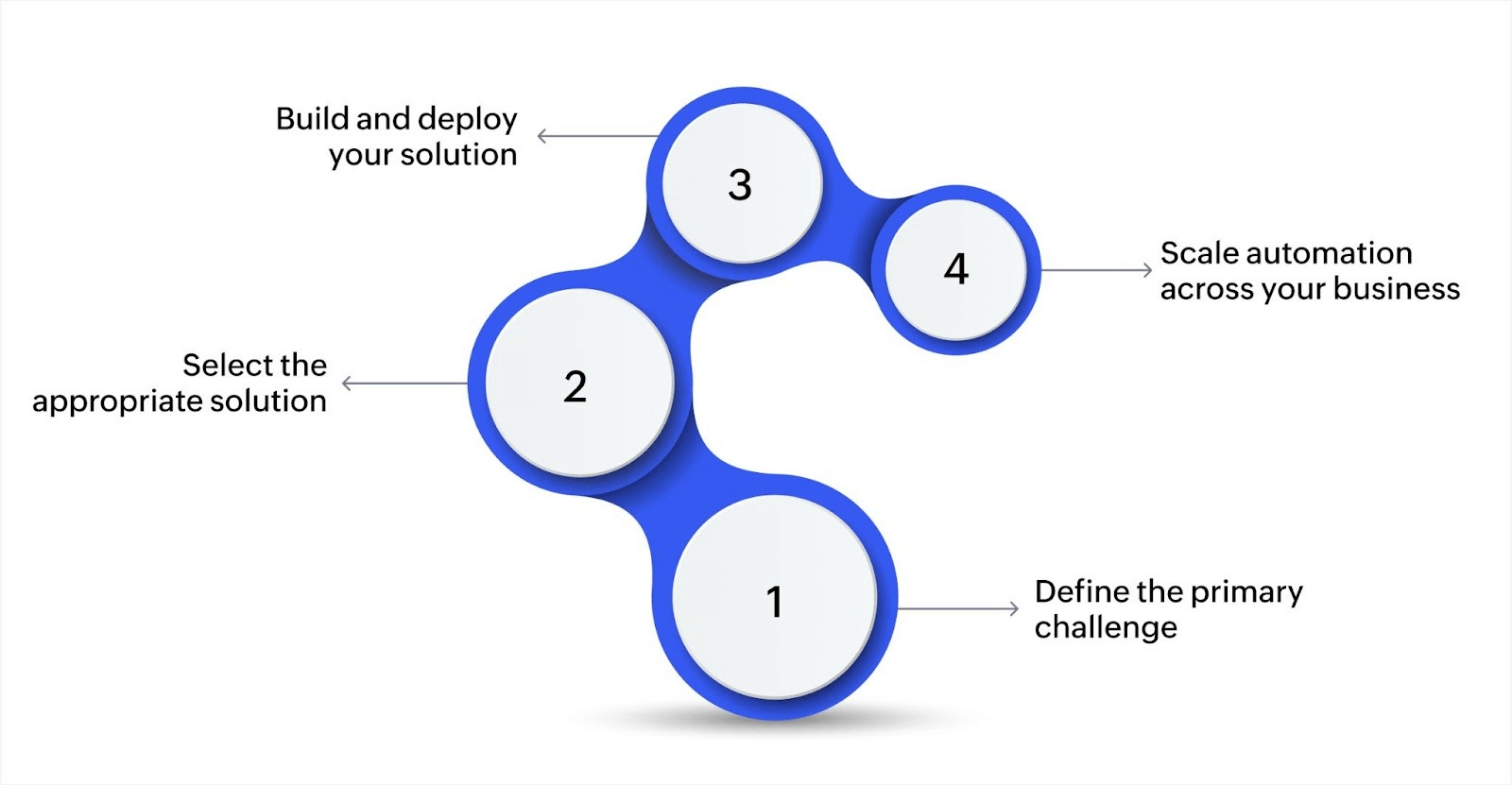
Step 1: Define the primary challenge
To begin, pinpoint the main issue you need to address. Understanding the problem is key to applying the right automation solution.
Engage key stakeholders: Speak with business leaders or technical teams to identify the most critical pain point. Focus on a process that, when automated, can significantly improve operational efficiency.
Avoid overcomplicating: Don't try to solve all problems at once. For example, if your sales team spends too much time manually entering customer data, automating this step can improve accuracy and save time.
This is the foundation of your project. With this clear focus, you can move forward without getting sidetracked by other issues.
Step 2: Select the appropriate solution
Once you’ve identified the problem, you need to determine how to solve it with automation and app development. The solution could involve creating a custom app or automating an existing workflow.
Start with a simple app: Develop an app that addresses the identified issue. For example, create an app that allows sales representatives to input customer data directly into a system.
Digitize existing processes: If you're still relying on paper forms, digitize them first. This makes it easier to automate subsequent tasks such as data entry or approvals.
Integrate automation into workflows: After developing the app, add automation to enhance its functionality. For instance, automate the transfer of data between departments or trigger notifications for approvals.
The aim is to solve one problem at a time. By starting small, you can manage complexity and ensure the solution fits the needs of your business.
Step 3: Build and deploy your solution
Now that you have a defined solution, it's time to build and deploy it. This step is crucial for testing the app and measuring its impact on productivity.
Develop your app: Use low-code or no-code platforms to create your app quickly. Focus on building an app that solves the identified problem effectively.
Test and roll out: After development, deploy the app and test it within your team. Gather feedback and make necessary adjustments based on real-world usage.
Iterate for improvement: Once your app is in use, continue refining it. Automation isn't a one-time task; it's an ongoing process of optimization.
Step 4: Scale automation across your business
After achieving success with your first app, it's time to expand automation efforts throughout your business.
Automate additional processes: Once your initial app is working well, look for other areas to automate. This could involve streamlining workflows in departments like finance, HR, or marketing.
Monitor performance: Regularly track how the app performs across various functions. Collect data and user feedback to make adjustments as needed.
Ensure scalability: Design your automation solutions with scalability in mind. This allows you to expand without having to rebuild your app each time your business grows.
Scaling automation across your organization will result in increased operational efficiency and reduced reliance on manual intervention.
Following a simple, structured approach, starting with identifying a problem, selecting a solution, building and deploying your app, and finally expanding automation across your business, you can realize the full potential of automation. Over time, this will lead to more efficient workflows, reduced errors, and a stronger foundation for growth.
Automate your app development process with Zoho Creator
App development automation benefits businesses by cutting down on manual work, speeding up processes, and ensuring more consistent outcomes. By automating, you simplify workflows and can focus more on strategic tasks. Automation helps reduce errors, increase scalability, and lower operational costs. Zoho Creator's low-code platform allows you to easily build, automate, and integrate custom applications while keeping control over your processes.
With app development automation, you reduce the need for constant IT involvement, leading to faster execution and lower reliance on specialized resources. This approach frees up time and resources across your team, creating a more agile environment.
FAQ
How do low-code platforms contribute to app development automation?
Low-code platforms, such as Zoho Creator, simplify automation by enabling users to create applications with minimal coding. This speeds up the development process and reduces reliance on specialized developers, making automation accessible to a broader range of users.
Can app development automation improve the security of applications?
Yes, automation tools can improve the security of applications by ensuring that security tests are conducted regularly and consistently. Automated security scans can detect vulnerabilities early, reducing the risk of security breaches in production.
How can app development automation help with compliance requirements?
Automation helps ensure that applications meet compliance requirements by maintaining consistent documentation, automating audit trails, and running compliance checks during testing and deployment phases. This reduces the risk of human error and helps meet industry standards.
What are the key metrics to measure the success of app development automation?
Key metrics include development speed, error rates, deployment frequency, and system uptime. By monitoring these metrics, businesses can evaluate the effectiveness of their automation strategy and identify areas for improvement.
 Bharathi Monika Venkatesan
Bharathi Monika Venkatesan is a content writer at Zoho Creator. Outside of work, she enjoys exploring history, reading short novels, and cherishing moments of personal introspection.