- HOME
- Know Your Tech
- How AI-accelerated app development reduces time-to-market
How AI-accelerated app development reduces time-to-market
- Last Updated : April 10, 2026
- 909 Views
- 10 Min Read
How do you deliver custom applications in weeks instead of months when your business needs solutions now?
Traditional app development often takes months to go from concept to launch. By the time your app is ready, market conditions may shift, competitors get ahead, or the original business problem evolves. Long development cycles create missed opportunities and frustrated stakeholders.
Highlights
- AI-accelerated app development uses machine learning and generative AI to automate coding, design, and workflow tasks across the development lifecycle.
- Natural language processing converts business requirements into working code, eliminating weeks spent on manual programming.
- AI tools reduce time-to-market through automated code generation, rapid prototyping, and intelligent project planning.
- Time-to-market measures the complete development duration, from initial concept to production launch, which covers ideation, design, development, and release.
- Successful adoption requires team training, data preparation, and gradual integration with existing development workflows.
According to recent industry data, 88% of organizations now implement AI in at least one of their workflow processes. This shows how quickly AI tools are becoming standard across business operations for speed and efficiency.
This blog post explains how AI-accelerated app development reduces time-to-market for custom applications. You'll learn how AI fits into rapid development, which tasks AI automates, and how to adopt these tools in your organization.
What is AI-accelerated app development?
AI-accelerated app development eliminates the manual work involved in building custom software. Developers describe what they need in plain language, and AI tools generate the corresponding code, database structures, and user interfaces.
The technology relies on several AI capabilities working together:
- Natural language processing: Converts business requirements written in plain English into executable code and database schemas.
- Generative AI: Creates complete application components, like data-entry forms, approval workflows, and API integrations, from text prompts.
- Machine learning: Analyzes patterns from existing code to suggest optimal implementations and predict potential performance issues.
- Pattern recognition: Identifies repetitive tasks across the development process and automates them without manual intervention.
For instance, a development team building an inventory management system can provide detailed requirements like: "Build a real-time inventory dashboard that displays current stock levels for all products across three warehouses, sends automated email alerts to purchasing managers when any item drops below its designated reorder threshold, and includes drilldown views that show stock movement history for the past 90 days."
The AI will then generate the complete database schema with product and warehouse tables, create the dashboard interface with filtering and search capabilities, implement the alert logic in the development team's email integration, and build historical reporting views. The team can review this generated foundation, adjust business rules to match company policies, and customize the interface to fit their workflows.
How AI fits into rapid application development
Rapid application development (RAD) focuses on quick iterations and continuous feedback rather than lengthy planning phases. AI enhances this approach by automating the manual work that traditionally slows down each iteration cycle.
Here's how AI accelerates each RAD phase:
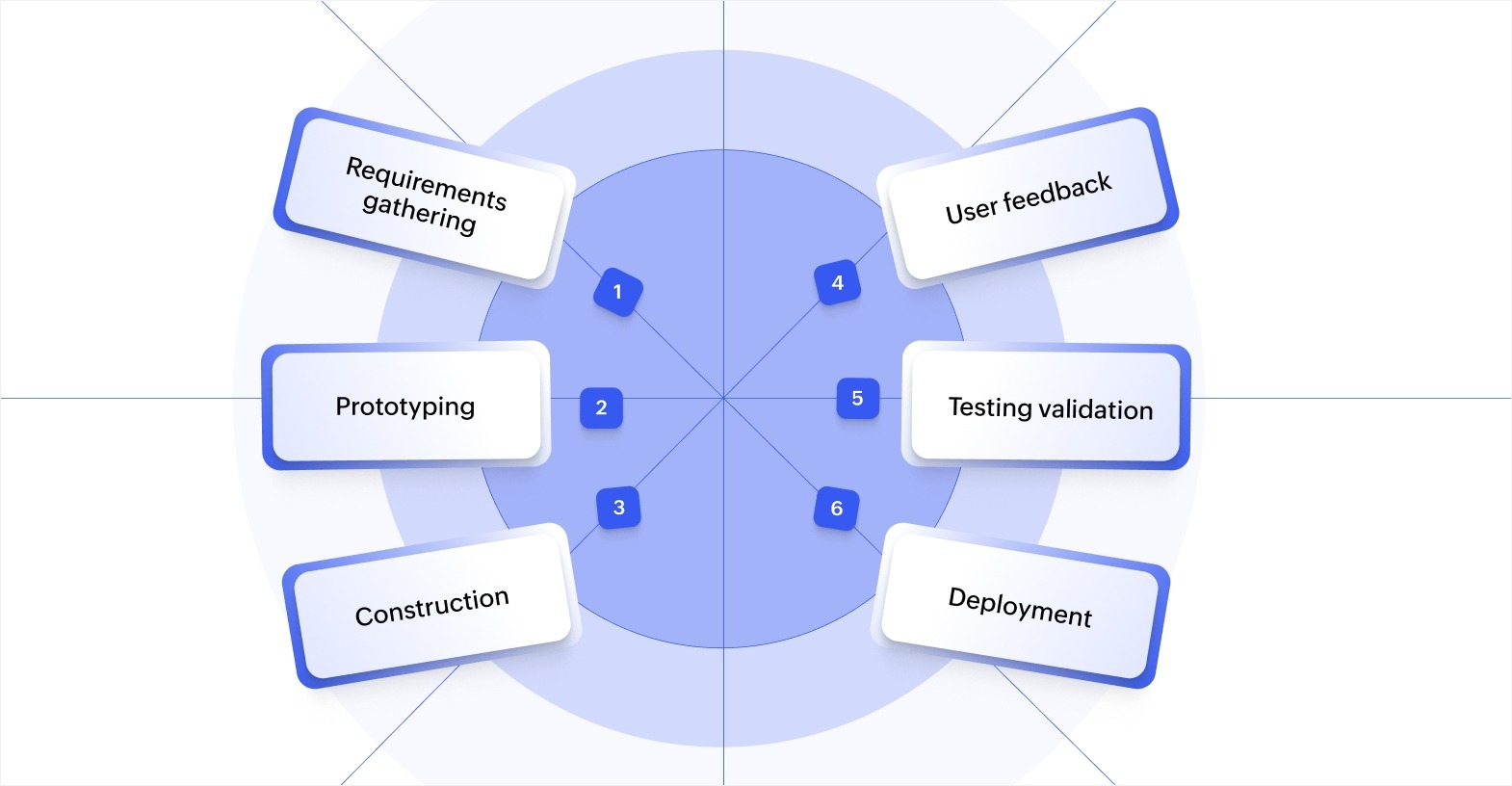
- Requirements gathering: AI converts business descriptions into structured data models and entity relationship diagrams, eliminating weeks spent translating requirements into technical specifications.
- Prototyping: AI generates interactive prototypes from wireframe sketches or text descriptions, creating functional interfaces with navigation and sample data within minutes instead of days.
- Construction: AI produces complete code for features from plain language requests, which includes handling database queries, business logic, and API integrations automatically.
- User feedback: AI analyzes user feedback and usage patterns to suggest interface improvements and feature adjustments based on actual behavior data.
- Testing validation: AI creates comprehensive validation scenarios covering normal operations and edge cases and runs checks automatically whenever code changes.
- Deployment: AI optimizes release configurations and automates deployment checklists, which reduces the time needed to move applications from development to production.
This automation shrinks full iteration cycles from weeks to days. Teams can refine features based on stakeholder feedback without getting bogged down in implementation mechanics.
What does "time-to-market" mean in app development?
Time-to-market measures the amount of time elapsed between initial conceptualization to product launch. This includes every phase of development:
- Turning business ideas into requirements
- Designing user experiences
- Building features
- Deploying to users
Delays occur at predictable points in this lifecycle: Requirements often change as stakeholders clarify what they actually need; manual coding takes weeks or months, depending on app complexity; and deployment coordination across teams creates scheduling bottlenecks.
AI can serve to shorten each development stage significantly. During ideation, AI tools analyze requirements to identify gaps and suggest features based on similar applications. Design phases shrink as AI generates multiple UI options from basic descriptions.
Ultimately, AI accelerates development through automated code generation. What previously required weeks of manual coding now takes just days as AI handles the implementation details. Deployment becomes smoother when AI is predicting and preventing common release problems.
How does AI accelerate custom app development?
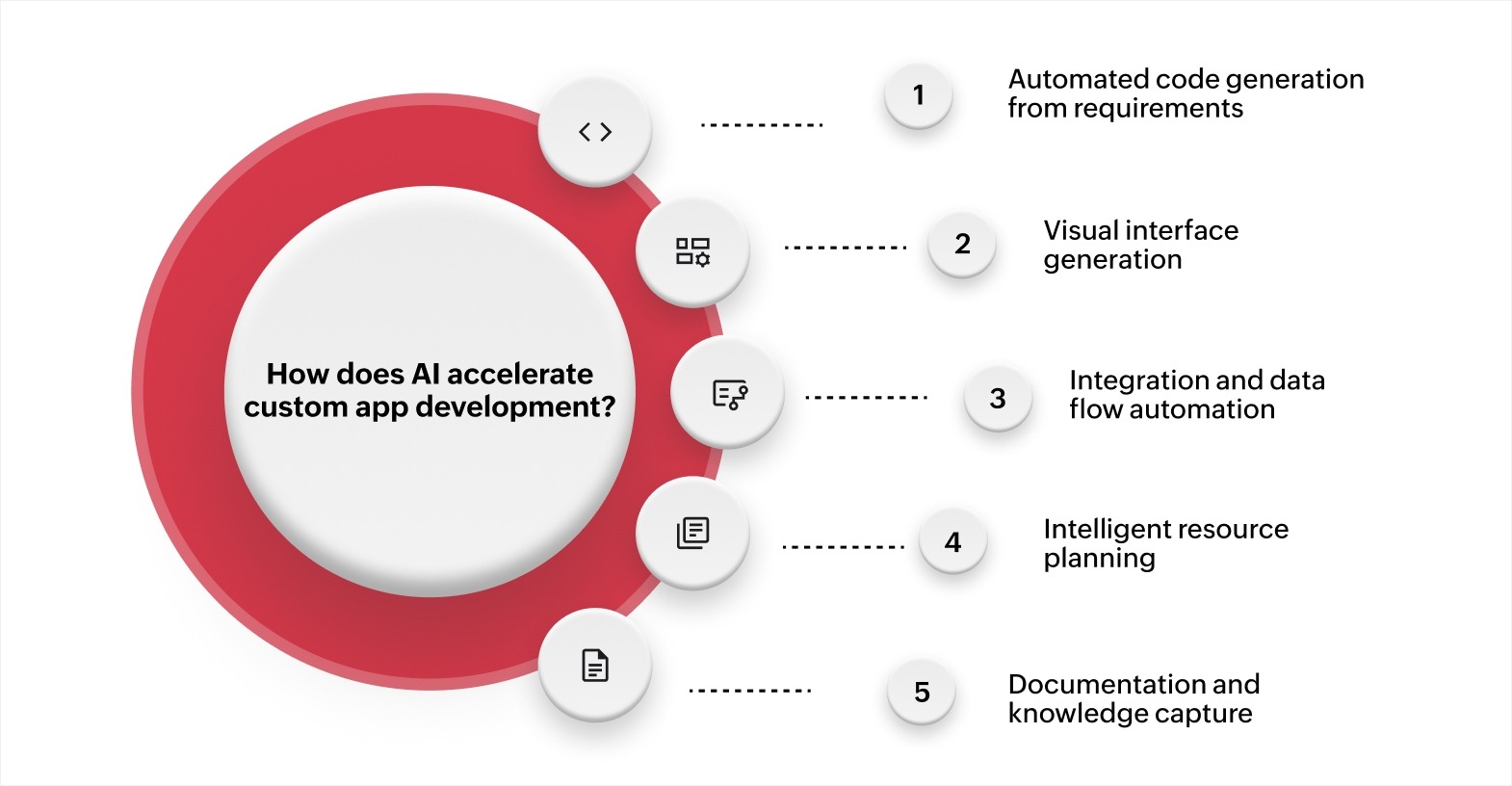
AI handles the implementation work that traditionally consumes weeks of developer time. This enables teams to focus on defining business requirements and validating that applications solve actual problems. Some of the different ways in which AI accelerates custom app development include the following:
Automated code generation from requirements
AI converts detailed business requirements directly into working code without manual programming. You describe the functionality you need, and the system generates the database structures, business logic, and user interface components.
For instance, a prompt like, "Create an expense approval workflow where submissions under $500 auto-approve, amounts between $500 and $5,000 require manager approval, and anything above $5,000 needs both manager and finance director sign-off," produces the complete workflow logic with conditional routing, approval tracking, and automated notification.
Visual interface generation
AI creates functional user interfaces from sketches, wireframes, or text descriptions. Teams can draw rough layouts and receive interactive prototypes with proper navigation, data binding, and responsive design.
Uploading a sketch of a customer feedback form with rating fields, comment boxes, and submission buttons produces a working form with appropriate input validation, mobile responsiveness, and data collection logic. Custom app development becomes faster when AI handles interface construction from design concepts.
Integration and data flow automation
AI generates connection code between different systems and services automatically. You specify which applications need to share data, and AI creates the integration logic that handles authentication, data transformation, and error management.
A prompt like, "Create a system that syncs customer records between the CRM and accounting system and updates contact details and purchase history bidirectionally every hour," produces complete integration code with field mapping, conflict resolution, and sync scheduling. Integration workflows leverage AI to connect different systems without manual API coding.
Intelligent resource planning
AI analyzes project requirements to estimate realistic timelines and identify resource needs. The system examines similar completed projects to predict development duration and potential bottlenecks.
Describing a new project scope enables AI to forecast delivery timelines based on feature complexity, team size, and historical performance data. This helps managers allocate resources effectively and set accurate stakeholder expectations.
Documentation and knowledge capture
AI generates comprehensive documentation by analyzing application structure and code. Technical documentation, user guides, and API references get created automatically as the application develops.
The system analyzes a completed inventory module and produces documentation covering all functions, data fields, workflow steps, and integration points. This keeps documentation current without requiring developers to write separate guides manually.
How to adopt AI-accelerated app development in your team
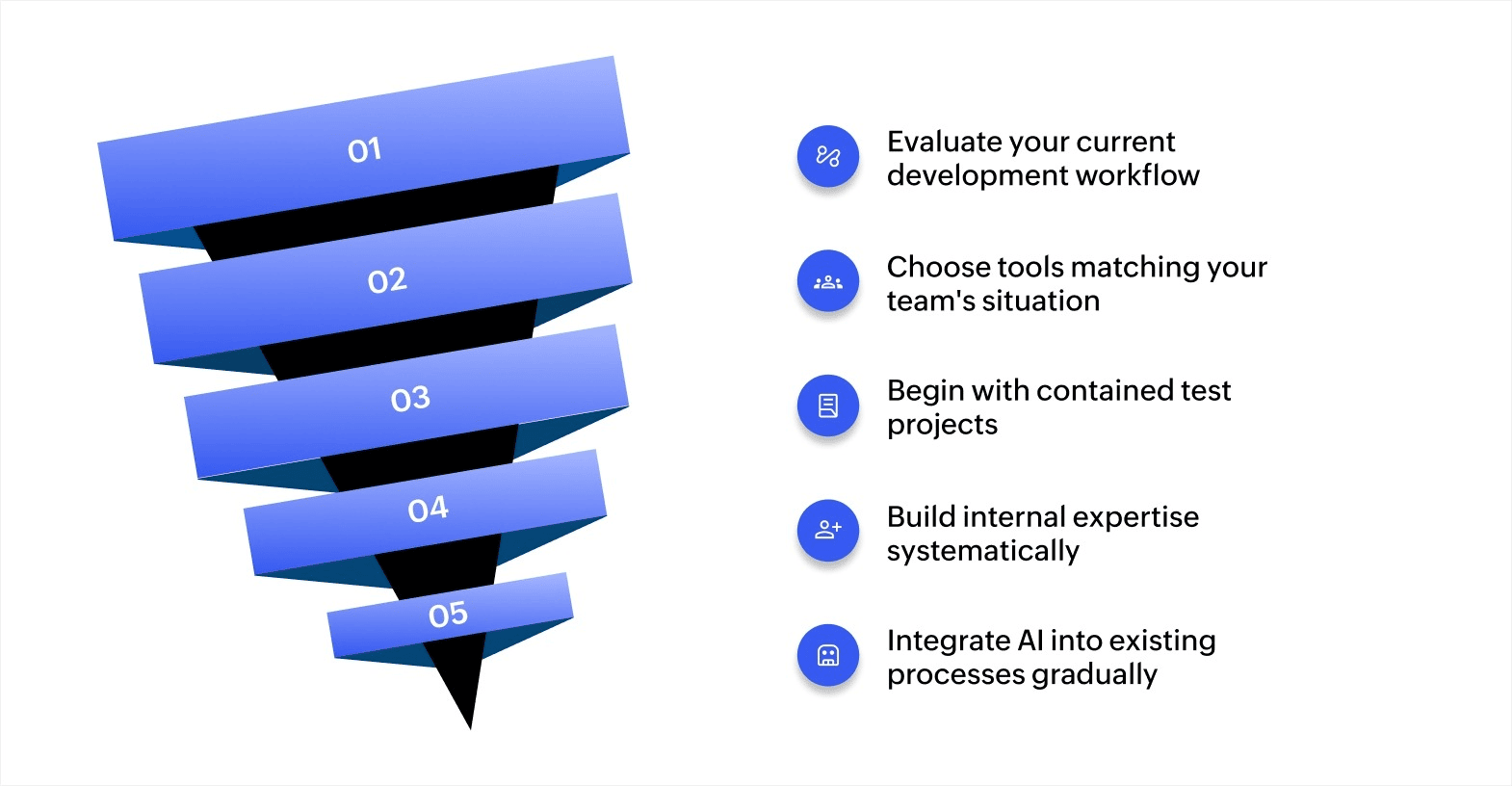
Adopting AI tools requires proper planning and gradual implementation. Teams need time to learn new approaches while maintaining productivity on current projects.
1. Start by evaluating your current development workflow.
Begin documenting how work actually moves through your development process today. Track a recent project from initial request through deployment, noting how long each phase takes and where delays occur.
For instance, you might discover that the requirement clarification phase consumes two weeks, or that setting up integrations takes three weeks per connection because each requires custom coding. These challenges show you exactly where AI assistance delivers the most value for your specific situation.
2. Choose tools that match your team's situation.
Select AI tools based on what your team actually builds and how they work today. For instance, teams building customer portals and internal tools benefit more from platforms that offer complete application generation than from code completion assistants designed for complex algorithm development.
Consider a team managing five different business applications with frequent change requests. An AI-powered low-code platform that generates entire workflows from descriptions serves them better than tools focused solely on code suggestions, because their main challenge is building complete features quickly rather than optimizing individual functions.
3. Begin with contained test projects.
Choose an internal tool or department application as your first AI-assisted project. Pick something valuable enough to matter but not so critical that any delays create business problems.
A good test project might be rebuilding your team's project tracking system or creating a new vendor management portal. These projects have clear requirements, forgiving timelines, and users who understand they're testing new approaches. Success here builds team confidence and provides concrete examples when expanding AI use to customer-facing applications.
4. Build internal expertise systematically.
Identify team members who enjoy learning new tools and designate them as your AI development experts. Give them dedicated time to explore capabilities, experiment with different approaches, and document what works well.
These experts become your internal resource. They can collect examples of effective prompts, common customizations, and solutions to problems the team has faced to create a knowledge base that accelerates learning for everyone else.
5. Integrate AI into existing processes gradually.
Connect AI tools to the systems your team uses every day rather than requiring them to switch to completely new environments. Integrating it with your current version control, project management, and communication platforms means developers continue working in familiar spaces.
Start applying AI to specific tasks while keeping established practices for everything else. Your team might begin using AI for generating integration code and documentation while maintaining existing approaches for core business logic and database design. This gradual expansion lets people adapt without overwhelming them with too many changes simultaneously.
Challenges in implementing AI in custom app development
Adopting AI development tools creates obstacles that teams need to address deliberately. Understanding these challenges and their solutions helps you plan effective implementation.
- Skills and training requirements: Teams need time to learn how to work effectively with AI tools, and the learning curve varies based on tool complexity and team experience. Holding dedicated training sessions and starting with simpler tools help teams build confidence before tackling complex implementations.
- Data quality and availability: AI tools need clean, well-structured data to generate accurate code and useful suggestions. Establishing data standards and running cleanup processes before AI implementation ensures the tools produce reliable outputs.
- Integration complexity: Connecting AI tools to legacy systems and existing development environments creates technical challenges that require careful planning. Using middleware for system connections and choosing AI tools with strong integration capabilities resolves most compatibility issues.
- Architecture and governance risks: Teams using multiple AI assistants without coordination can create inconsistent code quality and architecture drift across different projects. Establishing coding standards and implementing code review processes before adopting AI helps maintain consistency across generated outputs.
- Security and compliance concerns: AI-generated code requires validation for security vulnerabilities and regulatory compliance before production deployment. Performing security scans of all generated code and human review for sensitive components ensures applications meet organizational standards.
- Change management: Developers accustomed to traditional coding approaches sometimes resist AI assistance, which requires cultural shifts alongside technical adoption. Demonstrating quick wins through pilot projects and involving developers in tool selection increases acceptance and speeds adoption.
These obstacles are manageable with thorough planning. Most teams overcome initial challenges within weeks and see significant productivity improvements once AI tools are integrated into daily workflows.
Accelerate your app development process with Zoho Creator
Long development cycles and resource constraints prevent many businesses from building the custom applications they need. By the time traditional development completes, business requirements often shift or market opportunities pass.
Zoho Creator is an AI-powered low-code app development platform that accelerates custom app development through intelligent automation and visual building. The platform's built-in AI assistant handles complex development tasks that traditionally require weeks of coding work.
The platform converts business requirements into working applications quickly. Describe what you need in plain language, and it generates complete data models, workflow automations, and user interfaces automatically.
Automated workflow creation handles business process flows with relevant stages that ready for customization, per your requirements. Smart integration capabilities connect to existing systems and generate integration code for seamless data flow across platforms.
The platform also supports multi-device deployment, so apps run natively on web, iOS, and Android devices without separate development efforts for each platform. Data modeling assistance maps data structures, identifies relationships, and organizes information for efficient app architecture. Built-in analytics provide insights without requiring separate business intelligence tool integrations.
With Zoho Creator, teams can build functional applications in a matter of days rather than months. The platform handles technical complexity while letting you focus on business logic and user needs. Start your 15-day free trial to see what you can build without extensive coding.
FAQ
Do developers still need coding skills when using AI tools?
Developers need coding skills to review AI-generated code, customize implementations, and handle complex scenarios that AI tools can't address. AI handles repetitive tasks, but developers provide the judgment, architectural decisions, and problem-solving that tools can't replicate.
What types of applications work best with AI-accelerated development?
Business applications with standard features like data management, workflows, reporting, and integrations work exceptionally well with AI development. Custom applications that require unique algorithms or specialized domain knowledge gain less, but still benefit from AI handling routine coding tasks.
How do AI development tools handle security and compliance requirements?
AI tools generate code based on security best practices, but still require human review for sensitive applications. Organizations must validate AI-generated code against their security standards and compliance requirements, particularly for applications handling regulated data or critical operations.
Can AI tools integrate with existing development environments and workflows?
Most AI development tools integrate with version control systems and popular project management platforms. This integration enables teams to add AI capabilities without abandoning the familiar tools and processes they already use effectively.
How do you measure ROI from AI-accelerated app development?
Measure ROI by tracking development time reduction, team productivity increases, application quality improvements, and faster time-to-market for business initiatives. Compare these metrics to baseline measurements from projects completed without AI assistance.
 Bharathi Monika Venkatesan
Bharathi Monika Venkatesan is a content writer at Zoho Creator. Outside of work, she enjoys exploring history, reading short novels, and cherishing moments of personal introspection.