- HOME
- Know Your Tech
- Top 6 workflow automation mistakes and how to get it right
Top 6 workflow automation mistakes and how to get it right
- Last Updated : December 1, 2025
- 537 Views
- 7 Min Read
Automation always begins with optimism. The idea is simple: save time, reduce chaos, and make work move faster. For a while, it even feels like that’s happening. Processes that once needed endless back-and-forths start running on their own, teams get to focus on bigger things, and everything looks like it’s finally in sync.
Then, a few weeks in, the cracks begin to show. A workflow stalls because one approval step wasn’t defined properly, a notification goes to the wrong team, and suddenly nothing connects the way it should. The system that promised control starts to feel unpredictable.
The truth is, most automation failures don’t come down to bad tools. They happen because of how automation is planned and managed. When teams rush through design, skip ownership, or forget to review what they’ve built, things start to fall apart.
In this blog, we’ll break down six common mistakes that often disturb automation projects, and explain how to avoid them so that businesses can stay on track.
The rushed start
Every automation project begins with momentum. Teams are eager to get things moving, deadlines are tight, and the pressure to go live as soon as possible is real. But in that hurry, two early mistakes can quietly set the entire project up for trouble.
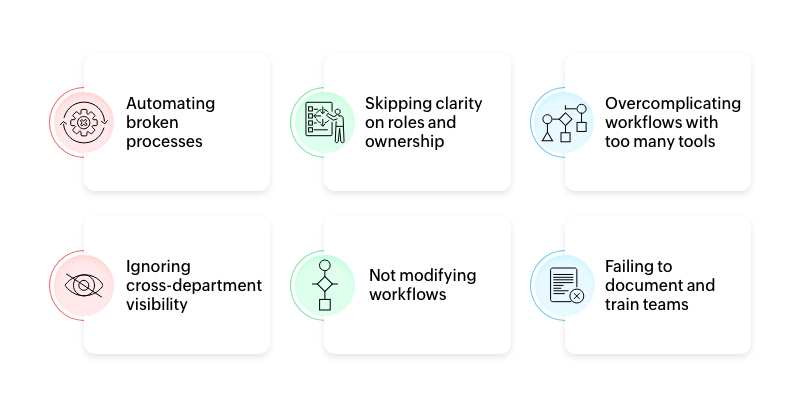
1. Automating broken processes
It's tempting to take an existing manual process and simply turn it digital. On the surface, that feels efficient because you're speeding up what already exists. In reality, you're just locking in the same inefficiencies. If a process has unnecessary approvals or outdated steps, automation only makes those problems faster and harder to spot.
Before automating anything, take a step back and map the process as it currently works. Identify where tasks pile up, where approvals lag, and where duplicate work happens. Then simplify it. Automation should help bring you clarity, not confusion.
For example, take MTN, whose procurement data was once scattered across emails and spreadsheets shared by 24 stakeholders. The result was inconsistent entries, slow approvals, and time wasted chasing updates. When MTN built their custom procure-to-pay app on Zoho Creator, they didn’t just digitize the old system—they redesigned it. The new process improved accuracy, added audit trails, and gave teams real-time visibility. Once the process was fixed, automation finally delivered the speed and control they wanted.
2. Skipping clarity on roles and ownership
Another early trap is assuming the system will handle everything automatically; someone builds the workflow, switches it on, and everyone else assumes the software knows who should act next. The problem is that when an error appears or a task stalls, no one knows who's responsible for fixing it.
Automated systems still need human checkpoints. Define ownership for each stage before launch, like who approves, who reviews, who updates, and who maintains. When accountability is part of the design, automation becomes dependable instead of chaotic.
For instance, Finar Chemicals was using several disconnected software tools across departments. Their data was scattered, and teams had to dig through multiple systems just to compile a single report. This made ownership and visibility difficult. When they moved to Zoho Creator, they built applications for sales tracking, pipeline management, and COVID compliance—all integrated with their CRM and HR systems. Each process was assigned clear checkpoints and responsibilities, ensuring that everyone knew who handled what. This clarity reduced manual effort, improved visibility across regions, and made it easier for management to make decisions with confidence.
The midway confusion
Once the first workflows are live, teams usually breathe a little easier. Things are running, approvals are faster, and reports are coming in on time. Then the next set of challenges begins to show up. Processes become more complex, more tools get added to the mix, and what once felt simple now starts feeling scattered.
3. Overcomplicating workflows with too many tools
It often starts with good intentions: one tool for collecting data, another for sending notifications, and a third for tracking reports. Over time, you end up spending more effort keeping these tools connected than actually improving the process itself. Each integration adds friction, increases the risk of data mismatches, and makes troubleshooting harder.
The key is to keep it simple. Choose a platform that can handle multiple steps of your process natively, or integrate only what is truly necessary. Fewer tools mean fewer breakpoints and more control over how information moves through your system.
For example, take New Coast Trading, a global agricultural trading company that once ran its operations through countless spreadsheets and emails. With data scattered across systems, teams spent more time reconciling files than moving shipments. When they built a unified system on Zoho Creator covering logistics, finance, and documentation, they finally had a single source of truth. Workflows ran automatically, updates synced in real time, and the team managed to grow by 30% during the pandemic without expanding their workforce.
4. Ignoring cross-department visibility
Many automation projects start on a single team. For example, sales automates their follow-ups, operations automates inventory tracking, and finance builds a separate system for billing. Each one works fine on its own, but none of them connect to each other. When data stays confined within individual teams, visibility disappears, and the benefits of automation stop at the department level.
Build workflows that share data and updates across teams so everyone knows where things stand without chasing status updates. Make sure the automation connects the organization, and doesn't divide it.
Emirates Logistics India, for instance, used to rely on emails, phone calls, and spreadsheets to manage everyday operations across departments. Communication gaps and scattered data made coordination across departments slow and unclear. Using Zoho Creator, they built more than 15 connected applications that unified operations, HR, sales, and compliance on a single platform. Field staff now update data through mobile apps, while managers track everything in real time. This reduced job completion time from 30 to 12 minutes and lowered their per-user cost by 40%.
The scaling struggle
When automation starts working well, teams naturally want to scale it. They add more workflows, users, and data, thinking it’ll multiply results. And for a while, it definitely does. But without a strong foundation, that expansion can slowly turn smooth systems into ones that are harder to manage and even harder to fix.
5. Not modifying workflows
Many teams treat automation as a one-time setup. The problem is that processes evolve. What worked for a handful of users may not hold up when the team grows or when business rules change. Without regular testing, small issues go unnoticed until they start disrupting work.
But testing and modifying workflows doesn't have to be complicated. Start small, see how the workflow performs in real situations, and make adjustments based on feedback. The goal is to ensure the automation evolves with the team and continues to save time rather than create new bottlenecks.
For example, take Magnarab, a design and equipment supplier for large-format commercial laundries. Off-the-shelf software couldn’t handle their complex workflows that spanned factory operations and client servicing. Over time, they built their own system on Zoho Creator to track garments through every stage of the laundry process, apply customer-specific logic, and adapt as operations scaled. The result was a dynamic workflow that reduced manual tracking efforts by over 60% and stayed flexible as the business grew.
6. Failing to document and train teams
Every workflow contains important details that often exist only in the mind of the person who built it. This includes the logic behind triggers, the reasons for specific conditions, and how data moves between different steps. When that person leaves, moves roles, or is unavailable, the workflow quickly becomes difficult to understand or maintain.
Without proper documentation and training, automation loses transparency and can slow down the very processes it was meant to improve. Even a simple guide, a short walkthrough, or a video demo can save hours of frustration later. Teams should know not just how to use the workflow but also why it was set up that way. Clear guidance ensures that anyone can troubleshoot, modify, or improve the workflow confidently, keeping the system reliable as the business grows.
A good example of this is Cloud Solutions, a digital transformation company that built custom applications on Zoho Creator to enhance both internal operations and client projects. To ensure knowledge wasn’t confined to a few individuals, they set up ZCreatorLAB, which is a dedicated team trained to explore Creator’s full capabilities and document every build. This approach helped them maintain complex apps like a WhatsApp management system and a quote calculator integrated with their CRM. By documenting and sharing what they built, Cloud Solutions kept their workflows clear, scalable, and easy to improve over time.
How Zoho Creator helps you stay on track
Most of these mistakes don’t happen because teams lack effort or intent. They happen because there’s no single place to design, automate, and refine processes with clarity. Zoho Creator closes that gap by bringing every stage of workflow automation together on one platform.
With Creator’s drag-and-drop workflow builder, you can design workflows visually instead of guessing how things should connect. Triggers, actions, and approvals are all mapped out in front of you, so the logic stays transparent and mistakes are identified early.
The Blueprint feature takes this a step further by helping teams outline entire processes from start to finish before automating them. Once workflows go live, Creator’s built-in schedulers, notifications, and approval systems keep work moving smoothly without constant reminders or manual follow-ups.
Visibility also improves across departments. With shared dashboards and real-time data views, everyone stays informed about progress and ownership, reducing confusion and overlap.
With these capabilities, Zoho Creator turns automation into an adaptable system that’s easy to manage, update, and scale.
The smarter way forward
The real value of automation isn’t just in speed—it's in clarity as well. When processes are well designed, roles are clear, and teams can adapt as things change, automation becomes a source of stability instead of stress.
That’s exactly where Zoho Creator stands out. It gives teams the freedom to build, test, and refine workflows without starting from scratch each time. You can design apps that match your business, connect data across departments, and update workflows as your operations evolve.
With low-code tools, built-in analytics, and the flexibility to integrate with existing systems, Creator turns automation into an ongoing practice rather than a one-time project. It helps businesses stay efficient, transparent, and ready to grow, no matter how their processes change.
 Ann Elizabeth Sam
Hey! I'm Ann, and I work as a content writer at Zoho Creator. I'm exploring the SaaS world through various forms of content creation. Outside of work, I love dancing and would give up anything to read a good murder mystery.