- HOME
- Expense Management
- How AP teams can prevent invoice fraud with AI
How AP teams can prevent invoice fraud with AI
AI invoice fraud detection uses document extraction, transaction matching, policy rules and anomaly detection to find invoices that may be fraudulent or need a closer look. It helps accounts payable (AP) teams catch duplicate billing, inflated charges, suspicious vendor changes and prohibited purchases. What a system can check depends on its integrations, configuration and data. A person still decides before payment.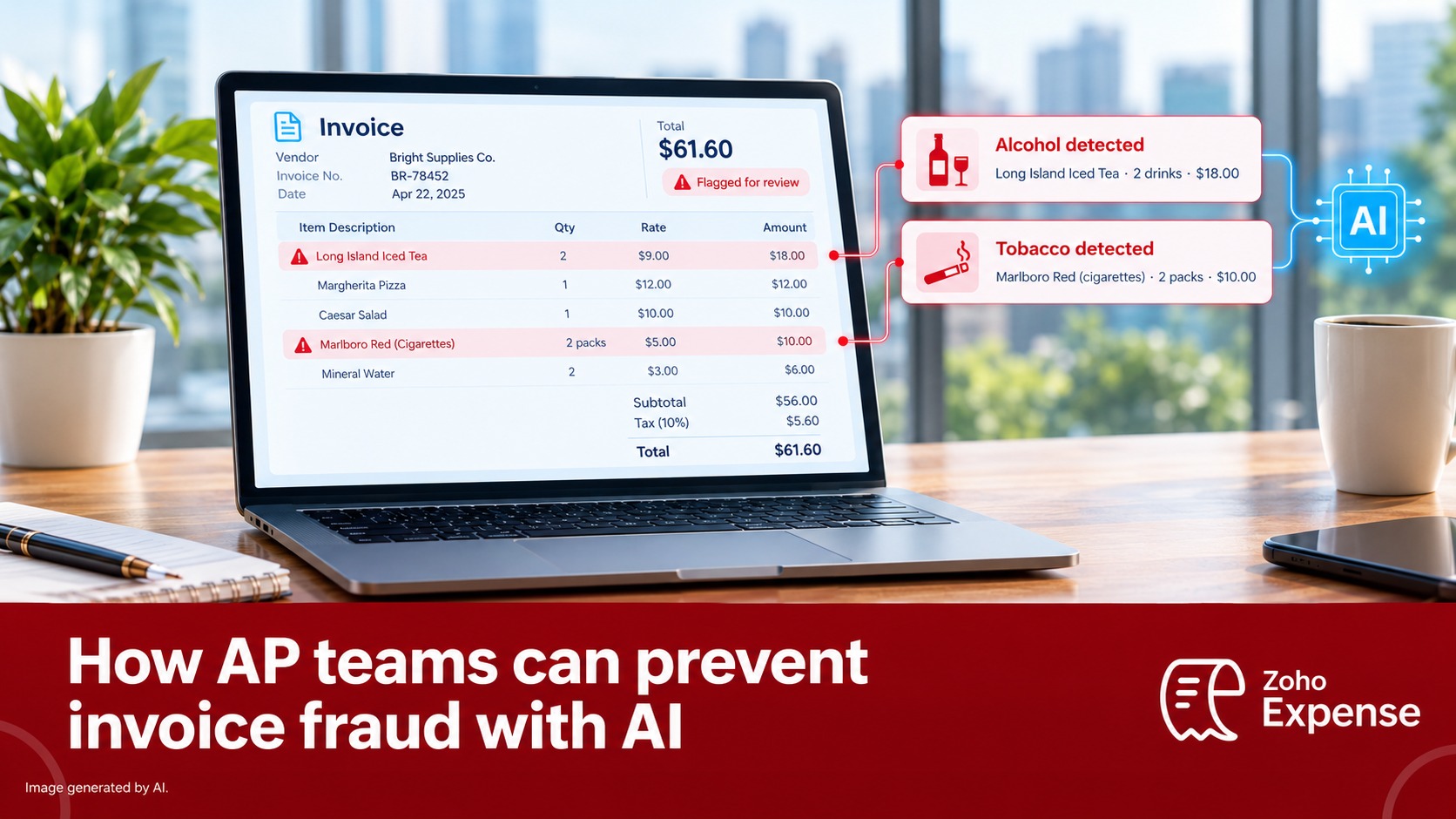
The problem: suspicious spend that looks routine
It's quarter-end, and an AP specialist has 400 invoices in the queue. One is a caterer's ₹1,86,000 bill for a 30-person client dinner, with a valid PO and a manager's approval. She posts it.
An audit later finds that "beverage service" was eight cases of single malt and "hospitality supplies" was 20 cartons of cigarettes. The caterer had also billed the same dinner again under a new invoice number.
None of this was proven fraud when it was paid. The second invoice could have been a billing error. All three items should still have been held for review, but nobody had time to read line items.
The same risks run through supplier invoices, matched against purchase orders in AP, and employee expenses, audited against policy. Alcohol and tobacco show up most often in expenses.
What is invoice fraud?
Invoice fraud is an attempt to get a company to pay for goods or services that weren't delivered, weren't allowed, or were billed at the wrong price. Not every product supports every method below.
Fraud type | Common detection method |
Duplicate invoices | Reference-number matching; multi-field matching where supported |
Inflated quantities or prices | Two-way or three-way matching |
Fictitious vendors | Vendor onboarding checks; matching vendor details to employee records |
Disguised purchases (alcohol, tobacco, personal items) | Line-item extraction plus policy rules |
Bank-detail fraud | Alerts on changed payment details |
Split invoices | Pattern analysis around approval thresholds |
Software can flag a bank-detail change, but it can't confirm who owns the new account. The FBI advises verifying account-change requests through secondary channels or two-factor authentication (IC3).
How AI detects invoice fraud
Invoice data extraction and line-item analysis
OCR and other extraction methods capture the vendor, tax ID, invoice number, dates, totals and, if the document is itemised, each line. Some systems use language models to interpret descriptions. Line items matter most, because prohibited purchases hide in descriptions, not totals. Extraction records what the document says. It doesn't prove the invoice is genuine.
Duplicate invoice and purchase order matching
Two-way matching compares the invoice with its purchase order. Three-way matching adds the goods receipt. Most systems catch a repeated invoice number. Fewer compare vendor, amount, date and line items together, which is what catching a resubmission under a new reference takes. A mismatch can be a clerical error as easily as fraud.
Anomaly detection and risk scoring
Rules find known violations. Anomaly detection flags transactions that don't fit patterns in the data the system can see, such as a stationery supplier suddenly billing for "hospitality". An anomaly is a reason to investigate, not proof.
How AI flags alcohol and tobacco expenses
These examples are illustrative composites, not real cases.
A prohibited item behind a vague label. A $150 client lunch is billed as “Food & beverages,” but the itemised bill lists “Marlboro Gold 20s x 10 packs.” If company policy bans tobacco reimbursement, Zoho Expense can identify tobacco items from receipt line-item details and flag them as policy violations. Similarly, it can identify alcoholic drinks from specific cocktail names on an itemised receipt, even when the items aren't explicitly labelled as “alcohol.” Depending on the system, the flag may appear on the line item, expense or report. The reviewer decides whether the rest of the bill can be approved.
A quantity out of line with the event. A 12-person offsite produces a bill for 24 bottles of spirits. Policy allows alcohol at approved events up to a per-person limit. If the expense exceeds that limit, or a configured quantity rule is triggered, the system can flag it for review. A reviewer looking only at the total might miss the mismatch.
The same bar bill twice. Two colleagues claim the same $350 hotel bar bill, one with the restaurant receipt and the other with the hotel folio, so the reference numbers differ. A system that compares details such as merchant, date, total and line items may flag the second claim as a possible duplicate. A system that checks only the invoice number and merchant may miss it.
A vendor that changes what it sells. A cleaning-supplies vendor bills $780 for “premium beverages,” and its delivery note shows wine and cigars sent to an address that isn't a company office. The unfamiliar items, vendor history and delivery address may raise enough concerns to hold the expense for review.
Each flag starts a review. The evidence determines whether it was fraud, a policy breach or an honest mistake.
Limitations of AI invoice fraud detection
It only sees the document. An invoice for work never done can look perfect.
- Extraction makes errors. Faded receipts and unfamiliar brands cause missed and false flags.
- Anomaly models need history. New vendors have no baseline.
- Policies must be explicit. Software can't decide what "reasonable entertainment" means.
- Collusion defeats single-invoice checks. A vendor and an approver working together can produce paperwork that matches.
- Too many alerts get ignored. Tune rules so that flags are specific.
The US GAO traces the root cause of improper payments, including paying the same invoice twice, to missing or broken internal controls (GAO-02-749). AI supports those controls. It doesn't replace them.
How to build an AI-assisted invoice review workflow
- Write policy as rules: prohibited items, per-head limits, approval thresholds.
- Require itemised invoices and receipts.
- Start with duplicate and policy checks. Add anomaly detection once you have enough history.
- Send each flag, with its reason, to someone who can act, and log every override.
- Audit a sample of unflagged invoices.
How Zoho Expense helps detect suspicious employee expenses
Zoho Expense is an expense management product, not a supplier-invoice system. It covers the employee-spend side. Zoho documents:
- AI-driven fraud detection that scans expense reports for suspicious transactions (expense report audit).
- An Alcohol & Tobacco audit that checks receipts for those items (audit help).
- A Duplicate Invoice Number audit that matches on reference number and merchant, not line-item content.
- Receipt and Merchant Verification, which flag receipt mismatches and blacklisted merchants. MCC restrictions for card feeds are in early access (MCC help).
Violations appear as warnings for the approver. Supplier invoices still need PO matching and vendor controls in your AP system.
Frequently Asked Questions
Invoice fraud is any attempt to get a business to pay an invoice it doesn't owe. That includes duplicate invoices, invoices from fake vendors, inflated quantities or prices, prohibited items disguised as allowed ones, and payments redirected to a fraudster's bank account.
AI extracts data from each invoice, including line items, and compares it with past invoices, purchase orders, vendor records, and company policy. It flags exact and near-duplicates, policy violations, and transactions that don't fit normal patterns. A person then reviews each flag.
Yes, if the document is itemised and readable. Line-item extraction can identify alcohol and tobacco products by name or category, and a policy rule can then flag or block them. It works less well on summary bills, poor-quality scans, and brand names the system doesn't recognise.
An exact duplicate repeats the invoice number and amount. A near-duplicate changes one or two details, such as the invoice number, the date, or the amount by a small sum, while the vendor, items, and total stay essentially the same. Detecting near-duplicates means comparing invoice content, not just reference numbers. Many systems match only on reference number and vendor, so near-duplicates can get through.
No. AI handles the volume work: reading, matching, and sorting by risk. Approvers still decide whether a flagged item is legitimate, and they remain accountable for that decision. Many frauds, such as billing for services never delivered, can only be confirmed by someone with context.
Hold payment, read the stated reason, and verify it against the source: the PO, delivery records, event headcount, or the vendor through a known contact. Record the outcome. If the flag was a false positive, adjust the rule so it doesn't repeat.
Yes, for employee expenses. Admins can set up a receipt item-level audit that flags uploaded receipts containing non-compliant items such as alcohol or tobacco. Organisations using Direct Feed Integration or Real-Time Feeds can also restrict merchant category codes on card transactions. That's an early-access feature and doesn't apply to manually created expenses. Flags show up as warnings for the approver to review.
Invoice fraud involves supplier bills paid through accounts payable, such as fake vendors, inflated charges and redirected payments. Expense fraud involves employee claims and card spend, such as personal purchases, padded receipts and duplicate claims. The controls overlap, but supplier invoices also depend on purchase order matching and vendor master controls.
Three-way matching compares the supplier invoice with the purchase order and the goods receipt or delivery record before payment. It flags differences in items, quantities or prices. Two-way matching compares only the invoice and the purchase order.
Sources
Business Email Compromise, FBI Internet Crime Complaint Center
Business Email Compromise: The $55 Billion Scam, FBI IC3, 11 September 2024
GAO-02-749: Coordinated Approach Needed to Address the Government's Improper Payments Problems, US GAO, August 2002