


Why are exited employees not migrated to the revised ₹25,000 ceiling, and how do I update them?

When you apply the revised EPF wage ceiling, Zoho Payroll migrates the salary details of active employees to the new ceiling of ₹25,000. Exited employees are not migrated automatically, and they are not shown in the Attention Required notice, which lists active employees only.
This matters for an exited employee whose full and final settlement has not been processed yet. The revised ceiling takes effect on 17 September, so a settlement you run on or after that date should use ₹25,000. Since the employee was not migrated and is not in the notice, you update them separately.
To apply the revised ceiling to such an employee, turn EPF off and on again in their profile. This makes Zoho Payroll recalculate their EPF using the new ceiling.
- Go to Employees and select the exited employee.
- Switch to the Overview tab.
- Under Statutory Information, disable EPF and then enable EPF again.
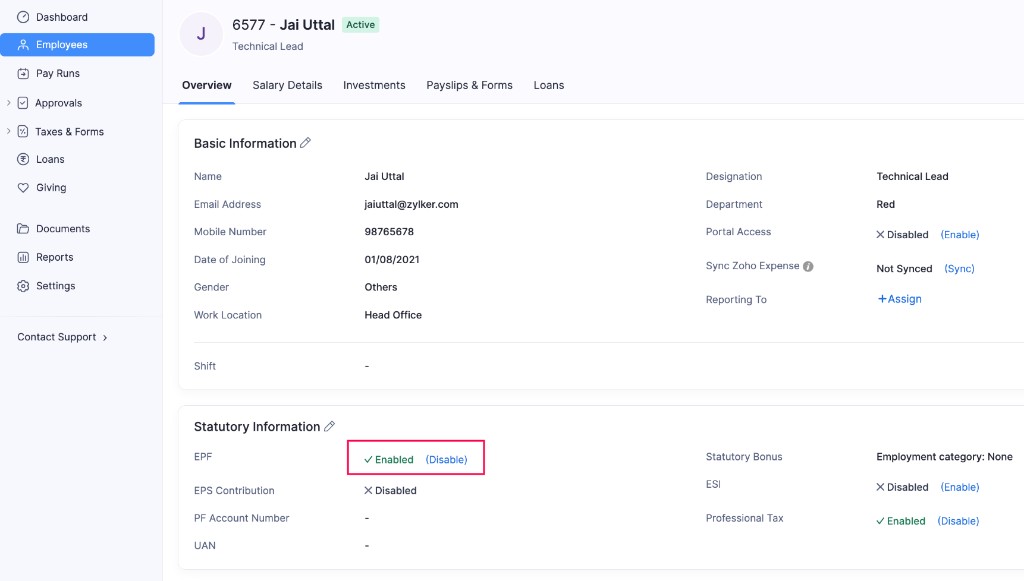
Zoho Payroll now recalculates the employee’s EPF using the revised ceiling of ₹25,000. Their full and final settlement will use the updated amount when you process it.