

- HOME
- Accounts payables
- AI in accounts payable: How it works and its role in AP automation
AI in accounts payable: How it works and its role in AP automation
Accounts payable (AP) has a deceptively simple end goal: pay the right supplier the right amount at the right time.
Getting there is less straightforward. Every invoice needs to be captured, checked, and matched against purchasing and receiving records, approved, and eventually paid. Along the way, finance teams deal with mismatched quantities, pricing discrepancies, missing information, duplicate invoices, unexpected charges, and changes to supplier or payment details.
Traditional AP automation has made many of these tasks faster by applying predefined rules to repeatable processes. AI adds another layer. It can interpret unstructured information, compare related records, recognize patterns, and surface transactions that need closer attention.
The value of AI in AP, then, isn't simply that it can process invoices faster. It is that it can help separate routine transactions from exceptions, so finance teams can spend less time processing clean invoices and more time investigating the ones that require judgment.
What you'll learn
What AI in accounts payable is and how it differs from traditional AP automation
How AI can support the AP process, from invoice capture and matching to exception handling and payment
Why exception management matters beyond simply processing invoices faster
Why connecting invoices with purchasing and receiving information gives AP teams more context
Where AI can help beyond invoice processing, including anomaly detection, payment prioritization and cash flow visibility
What to look for when evaluating AI-powered AP software
What is AI in accounts payable?
AI in accounts payable refers to the use of technologies such as machine learning, optical character recognition (OCR), natural language processing (NLP), and AI models across the procure-to-pay process.
At a basic level, AI can read an invoice, extract relevant information, validate it, and compare it with related purchasing records. It can also recognize patterns that are difficult to capture through fixed rules alone.
Consider a simple rule:
If an invoice exceeds $5,000, route it to the Finance Director.
That rule works consistently, but it only knows what it was configured to look for. AI can evaluate additional context, such as whether the invoice price differs from the agreed purchase price, whether the quantity exceeds what was received, or whether the transaction looks unusual compared with previous activity.
AI does not replace rules or automation. In practice, they work together: rules define business conditions, automation executes repeatable steps, AI helps interpret information and identify patterns, and people handle exceptions and decisions that require judgment.
How does AI work across the AP process?
AI can support multiple stages of accounts payable, from capturing invoice data to identifying transactions that need further review.
1. Capture and validate invoice data
AI-powered document processing can extract supplier details, invoice numbers, dates, line items, taxes, payment terms, and amounts from invoices received through different channels and formats.
The extracted information can then be validated against existing records, while duplicate detection can flag invoices that appear to represent the same transaction.
2. Match invoices with purchasing records
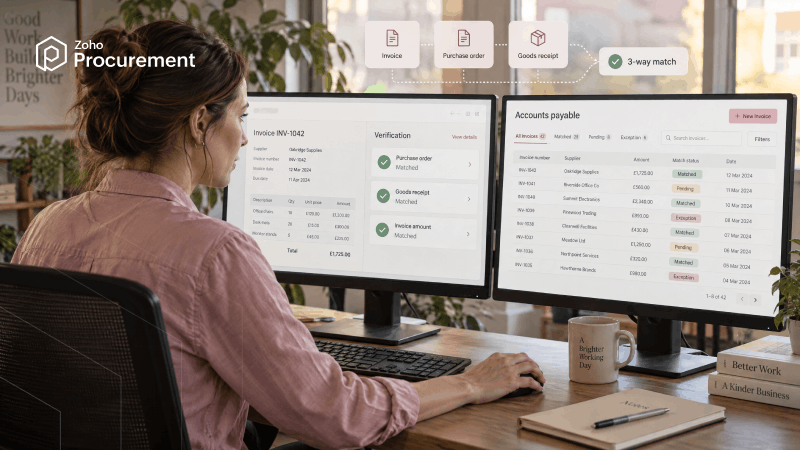
AI can support 2-way matching by comparing an invoice with its purchase order, and 3-way matching by adding goods receipt or service confirmation data.
It can also recognize minor variations in descriptions or formats, helping distinguish genuine discrepancies from differences that don't require investigation.
3. Identify and route exceptions
When an invoice doesn't match the available records, AI can surface the discrepancy and route it to the appropriate stakeholder.
For example, a quantity discrepancy may require the receiving team's review, while a price variance may need the buyer's attention.
4. Support payment decisions
After approval, AI can help identify invoices eligible for early-payment discounts, prioritize payments based on due dates and available cash, and provide visibility into outstanding liabilities.
Why exception management matters
Automating clean invoices removes repetitive work. But the larger operational question is what happens when an invoice isn't clean.
Consider a simple transaction.
A purchase order is created for 500 units at $10 each. The warehouse receives 500 units, and the supplier submits an invoice for $5,000.
The records agree, so there is little reason for someone to investigate the transaction manually.
Now imagine the same supplier submits an invoice for 600 units.
The system can identify that the billed quantity is 100 units higher than the recorded receipt and bring the relevant records together. An AP specialist can then determine whether a second shipment is expected, whether the invoice is incorrect, or whether another action is required.
The same principle applies to other exceptions:
A duplicate invoice submitted through two different channels
An invoice with a price that differs from the agreed purchase order
An unusual spending pattern compared with historical transactions
A change to supplier bank details before a significant payment
AI can help identify these signals, but a signal is not a conclusion. An unusual transaction may have a legitimate explanation. Human review remains important when an exception involves financial judgment, supplier communication, fraud investigation, or policy decisions.
Why AP needs purchasing context
An invoice tells you what a supplier is asking to be paid. It doesn't necessarily tell AP whether the payment itself makes sense.
The underlying transaction typically looks like this:
Purchase request → Approval → Supplier → Purchase order → Receipt → Invoice → Payment
Each stage adds information:
Purchase request: Why is the purchase needed?
Approval: Who authorized the expenditure?
Purchase order: What was agreed with the supplier?
Goods receipt: What was actually received?
Invoice: What is the supplier asking to be paid?
Payment: What liability is being settled?
Consider a $12,000 freight invoice arriving without a purchase order attached. Looking only at the invoice, AP may know the supplier, amount, and description, but have limited information about whether the charge was expected.
With purchasing context, the invoice can be connected to the original request, approved terms, related purchase order, and receiving records. AP can then assess not only whether the invoice is mathematically correct, but whether the charge is consistent with the transaction that created the liability.
This is an important distinction for AI-powered AP: AI can help interpret the invoice. Purchasing context helps establish whether the transaction behind it makes sense.
What should you look for in AI-powered AP software?
When evaluating an AP solution, look beyond whether a vendor offers “AI.” Consider how those capabilities work within the actual finance process.
Invoice processing: Can the system process invoices from the channels suppliers actually use and extract line-level information from different layouts, currencies, and tax structures?
Matching and exceptions: Does it support 2-way and 3-way matching, explain discrepancies, and route exceptions to the appropriate stakeholder?
Purchasing context: Can AP users see the purchasing records behind an invoice, including requests, approvals, purchase orders, and receipts?
Controls: Can teams define approval rules, maintain audit trails, control access, and review AI-generated exceptions before financial decisions are made?
Connected workflows: Can the platform connect with procurement, accounting, ERP, banking, and supplier systems without creating another isolated workflow?
AI-Powered AP with Zoho Procurement
Zoho Procurement brings accounts payable into the broader source-to-pay process, connecting purchase requests, approvals, suppliers, purchase orders, receipts, invoices, and payments.
Invoices can be captured and processed using AI and OCR, with information extracted from digital or scanned documents. The system can then match invoices against purchase orders and goods receipts, helping identify quantity and price discrepancies before payment.
The purchasing context remains connected around the invoice, including purchasing, approvals, supplier information, and receiving records. Approval workflows can route invoices according to business rules, while financial visibility helps teams track outstanding liabilities and upcoming payments.
The result is a connected AP process where routine invoices can move through defined workflows while exceptions are surfaced with the information needed to resolve them.
Conclusion
AI is changing accounts payable by moving more routine work into automated workflows and helping finance teams focus their attention where it is needed.
The value becomes clearer when invoice information is connected to the purchasing process behind it. A purchase request, approval, purchase order, receipt, invoice, and payment are parts of the same financial transaction. Bringing that information together gives AP teams better context when something does not match.
The goal is not to automate every financial decision. It is to make routine transactions easier to process, surface exceptions earlier, strengthen financial controls, and give finance teams better visibility into what the business has committed to spend and what need their attention.