
- HOME
- Procurement
- Procurement Automation: The Complete Guide (2026)
Procurement Automation: The Complete Guide (2026)
Ask a procurement manager what takes up most of their week, and the answer probably won't be "strategic sourcing" or "supplier innovation". It might be a software subscription request sitting in someone's inbox for three days. Or a purchase order waiting for a VP's approval. Or an invoice that doesn't quite match the PO, which means someone now has to dig through emails to figure out what went wrong.
That's the reality of procurement in a lot of organizations.
Procurement teams are responsible for managing suppliers, controlling spend, reducing risk, and finding better commercial outcomes. Yet much of the day-to-day work still involves moving information between email, spreadsheets, approval chains, supplier forms, and finance systems. This is where procurement automation comes in.
The scale of that problem is significant. Ardent Partners' 2025 State of ePayables research found that the average invoice costs $10.89 to process and takes 10.9 days to clear approval, compared with $2.78 and 3.1 days at organizations that have automated the process.
So, what exactly can procurement automation do, and where should a procurement team start? Let's break it down.
What is procurement automation?
Procurement automation is the use of software to automate procurement tasks and workflows such as requisitions, approvals, purchase orders, supplier communication, invoice matching, and reporting.
Instead of someone manually moving each request from one step to the next, the system handles the workflow based on predefined rules.
For example, a procurement system can determine:
who needs to approve a purchase
whether the request falls within budget
whether an approved supplier already exists
when a purchase order should be created
whether an invoice matches the corresponding PO and receipt
when an exception needs human attention
Modern procurement automation combines workflow rules, system integrations, and increasingly, AI. AI can help with activities such as extracting information from invoices, identifying anomalies, classifying spend, and flagging transactions that need review.
Automation vs. digitization
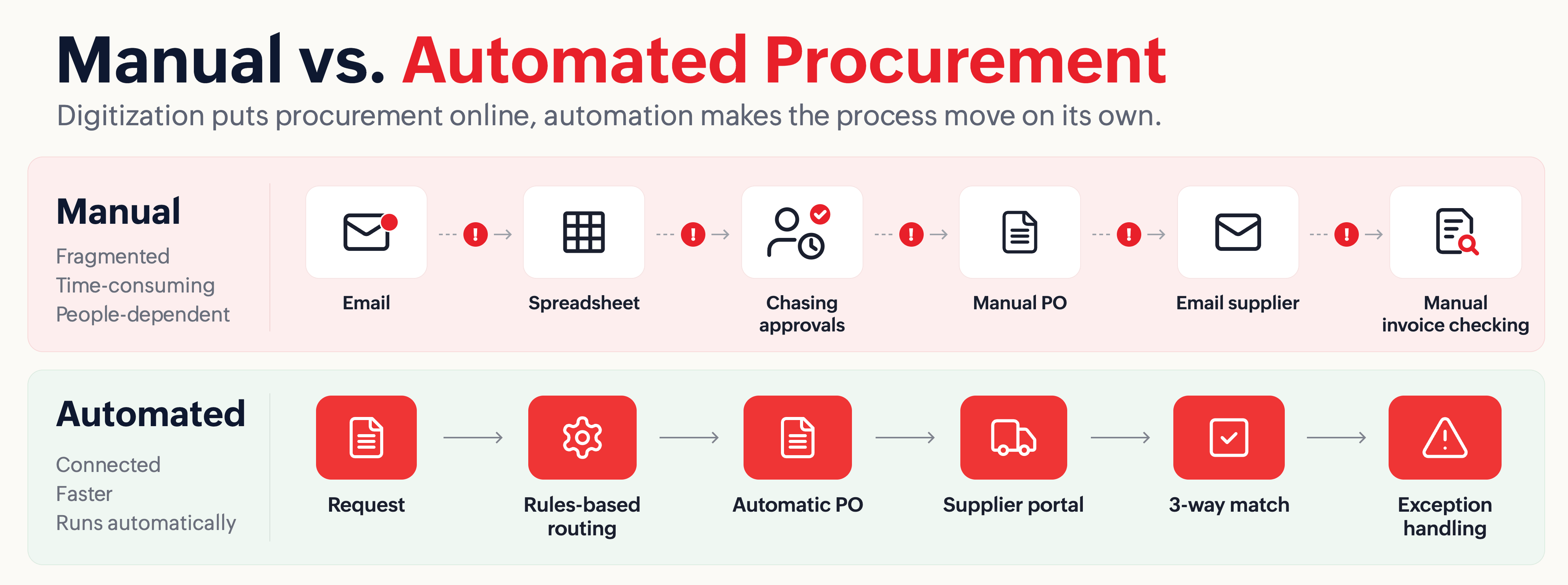
It's useful to make one distinction here. Digitizing procurement means moving a manual process into a digital system. Instead of emailing a purchase request, for example, an employee submits an online form.
That's an improvement. But it doesn't necessarily automate anything. Automation takes the next step.
Once a request is submitted, the system can decide what happens next. A purchase under a certain threshold might follow one approval path, while a larger purchase or a request involving a new supplier could automatically trigger additional reviews. In other words, digitization puts a process online. Automation makes the process move on its own.
Why should you automate procurement activities?
Reduce manual work and errors
Repeated data entry creates opportunities for errors, from mismatched supplier details to incorrect coding or outdated documents. Automation moves information between connected steps and applies the same rules consistently.
Speed up approval cycles
Approval cycles shorten because routing logic replaces someone deciding, case by case, who needs to sign off, so requests move without waiting for someone to remember the chain of command.
The Hackett Group's 2025 Digital World Class Procurement research found top-performing, highly digital organizations complete requisition-to-PO cycles 58% faster than average peers.
Improve policy compliance
Procurement policies don't help much when employees only discover them after making a purchase. Automation moves policy enforcement earlier in the process.
For instance, a procurement workflow can require three supplier quotes whenever a purchase exceeds a defined threshold. It can also direct employees toward approved suppliers and catalogs before they make a purchase. This can help reduce maverick spend, where purchases happen outside approved contracts or channels.
Improve spend visibility
When procurement data is scattered across spreadsheets and emails, getting a reliable picture of spend becomes difficult. A centralized procurement system gives teams a consistent source of information.
Procurement leaders can see what departments are buying, which suppliers they use, how much they're spending, where budgets are being exceeded, and where savings opportunities may exist.
Make supplier management easier
APQC benchmarking shows that top-performing organizations can complete supplier setup in two days or less, compared with four or more days for bottom performers.
Collecting tax documents, bank details, compliance information, and other supplier data through email creates unnecessary back-and-forth. A supplier portal can let vendors submit their own information while the system validates and routes the data for review.
Give procurement teams more time for strategic work
Automation reduces the time procurement teams spend on repetitive tasks such as chasing approvals, processing invoices, and managing routine purchases.
That gives procurement professionals more time to focus on higher-value work such as negotiation, category strategy, supplier relationships, and risk management.
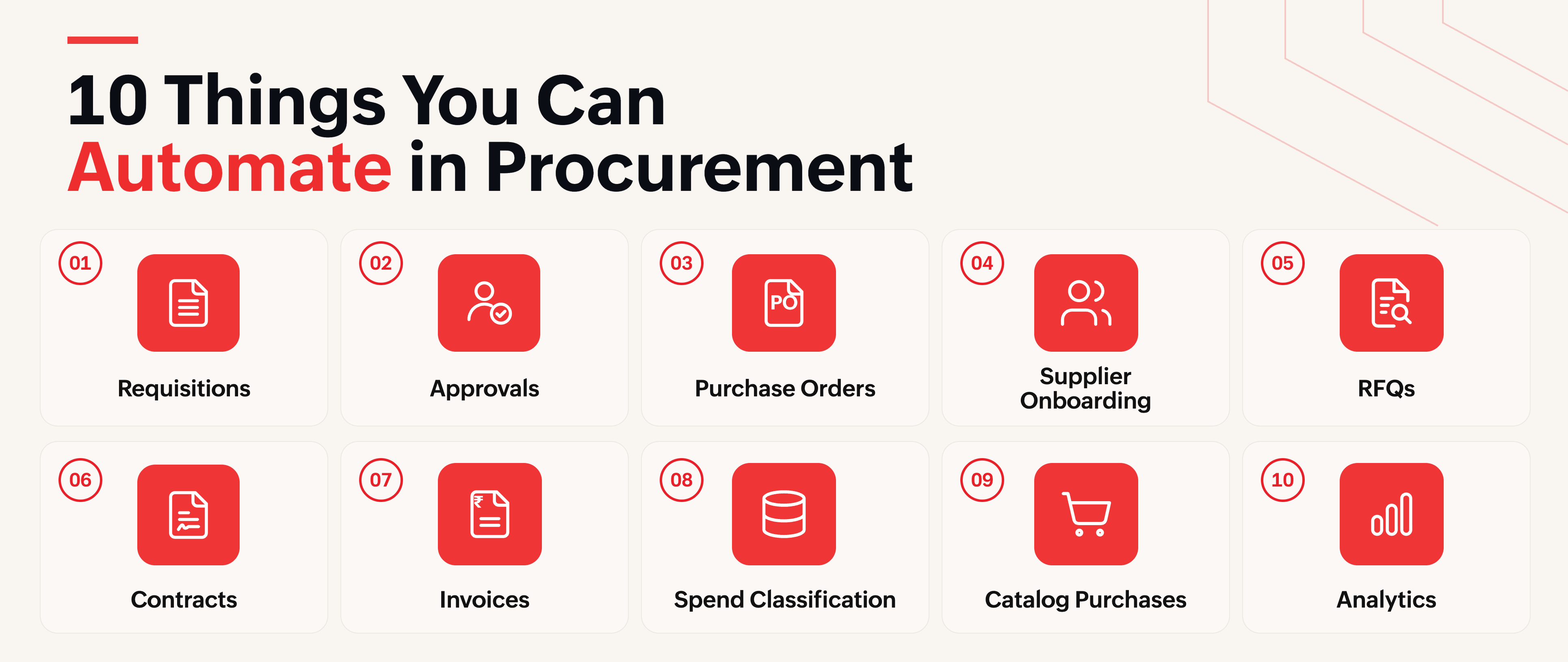
10 Things you can automate in procurement
Not every procurement activity needs to be automated, but repetitive, rules-driven tasks are strong candidates. Here are ten common examples.
1. Purchase requisitions and intake
Instead of asking employees to send an email describing what they need, organizations can use a structured intake form. The form can capture information such as category, amount, supplier, department, justification, and required date. The system can then check the request against budgets, existing contracts, or preferred suppliers.
For example, suppose an employee requests a new project management tool. The system could identify that the company already has an active contract for a similar product and route the request for review before another purchase is made.
2. Approval workflows
Approval chasing is one of those tasks that feels small until you have hundreds of requests moving through the organization. Automation can route each request to the right approver based on predefined rules.
A request under $1,000 might only require manager approval, while a purchase above $25,000 could automatically trigger finance and legal review. Escalations can also happen automatically when an approval sits unanswered for too long.
3. Purchase order generation
Once a requisition has been approved, there is little reason for someone to recreate the same information in a purchase order manually. Procurement software can generate the PO automatically from the approved requisition and send it to the supplier.
This eliminates duplicate data entry and reduces the chance of introducing errors during PO creation.
4. Supplier onboarding
Supplier onboarding often involves collecting tax forms, banking information, compliance documents, and contact details. A supplier portal lets vendors submit this information themselves instead of sending documents back and forth over email.
The system can validate required fields and route information to the appropriate teams for review.
5. RFQs and sourcing events
Running an RFQ manually can mean sending separate emails to several suppliers, answering follow-up questions, and consolidating responses into a spreadsheet. A sourcing platform can centralize the process.
All participating suppliers receive the same requirements, submit their quotes through the system, and can then be compared in a structured view. What might have been five separate email conversations becomes one sourcing event.
6. Contract management and renewal tracking
Contracts don't become less important just because they're stored digitally. The real problem is often finding them when they're needed and remembering what happens next.
A centralized contract repository can make agreements searchable and trigger renewal alerts before deadlines arrive. That gives procurement teams time to renegotiate instead of discovering a renewal after a contract has already rolled over.
7. Invoice processing and three-way matching
Invoice processing is one of the clearest applications for procurement automation. Instead of manually comparing every invoice against a purchase order and receipt, software can perform three-way matching and route only exceptions to a person.
For example, an invoice that matches the PO and receipt exactly can move through automatically. If the invoice contains a $200 discrepancy, the system can flag it for review.
Ardent Partners' 2025 research found that touchless invoice processing averages around 25%, while best-in-class AP teams exceed 35%. Those best-in-class teams also process invoices in about 3.1 days compared with 10.9 days for the broader average.
8. Spend classification and coding
Spend data isn't very useful when categories and GL codes are assigned inconsistently. Automation can apply rules or AI-assisted classification based on factors such as supplier history and previous transactions.
Straightforward cases can be processed automatically, while ambiguous transactions are sent to a person for review. The result is cleaner data for reporting and spend analysis.
9. Recurring and catalog-based purchases
Not every purchase should require a full procurement process. Employees may regularly buy approved items or services that already have negotiated pricing and predefined suppliers.
Catalog-based purchasing can make these transactions much easier. Employees can order from approved catalogs with less friction, while procurement retains visibility and control over where that spend goes.
10. Procurement reporting and spend analytics
Quarterly spreadsheet reports can quickly become outdated. Automated dashboards can provide near real-time visibility into spend, savings, budgets, suppliers, and purchasing activity.
For example, a dashboard might show that a department is trending 15% above its quarterly budget halfway through the quarter. That's actionable information. The team still has time to investigate and make changes.
With Zoho Procurement, you can automate all of these 10 workflows in one place. Sign up for a free 14-day trial and see how procurement automation can work for your team.

What is procurement automation software and why should you use it?
Procurement automation software connects the workflows involved in purchasing and supplier management so information can move from one step to the next without repeated manual intervention.
The scope varies by platform, from core purchasing workflows to sourcing, supplier management, invoicing, analytics, and integrations with ERP, accounting, HR, and identity systems. Many products also add AI for tasks such as invoice data extraction, anomaly detection, classification, and recommendations.
The important question isn't whether a product uses AI. It's how much work the system can complete without human intervention and how well the workflows connect.
There are generally three approaches organizations take.
Disconnected tools automate individual activities. One tool may manage approvals, another may handle contracts, and a spreadsheet may still be used for spend analysis. Each tool solves part of the problem, but employees remain responsible for connecting the pieces.
Procurement-specific software brings core procurement workflows into one system, reducing hand-offs between requisitions, POs, suppliers, and invoices.
An integrated platform connects procurement with other finance and business systems. This can become particularly important for organizations dealing with multiple entities, complex approval structures, or large transaction volumes.
A small company processing only a handful of purchases each month may not need an extensive procurement platform.
But once hundreds of requisitions, suppliers, approvals, and invoices are moving through the business, disconnected tools can start creating more administrative work than they remove.
How to choose procurement automation software
Deloitte's 2025 Global CPO Survey found that digitally mature procurement organizations allocate up to 24% of their budget to procurement technology. When evaluating automation software, teams should therefore consider not just the features available today, but how the platform can support their broader procurement strategy.
Workflow flexibility
Your procurement process won't always follow the same path. Different purchases may require different approvers based on the department, spend amount, category, or exceptions.
When evaluating software, ask vendors to demonstrate these real-world scenarios using your approval workflows. A simple demo may look good, but it won't show whether the software can handle the complexity of your actual process.
Ease of implementation
A system that requires months of configuration and extensive IT involvement may delay the point at which you start seeing value. Ask how long similar customers took to go live and what resources they needed.
Integrations
Procurement rarely operates in isolation. Check whether the software integrates with the ERP, accounting, HR, and SSO systems you already use. A seemingly inexpensive product can become expensive if every important integration requires custom development.
Supplier management and spend visibility
Look for self-service supplier onboarding, supplier portals, centralized supplier data, and reporting that can be filtered by supplier and category.
Automation depth and AI
Don't stop at "yes, that's automated." Ask exactly what happens without human intervention, which steps remain manual, and what the AI actually does.
Controls, compliance, and reporting
The platform should be able to enforce procurement policies at the point of purchase rather than relying entirely on audits afterward. Also check whether it maintains a complete audit trail and gives leadership visibility into bottlenecks, cycle times, and purchasing activity.
Scalability and user experience
Consider where the business will be in three or five years, not just where it is today. Simultaneously, talk to actual employees who will use the system.
A technically powerful procurement platform isn't much help if employees find it difficult to use and start looking for ways around it.
Total cost of ownership
Subscription pricing is only one part of the calculation. Implementation, integrations, training, support, and change management can all affect the real cost.
Looking at the expected three-year total cost gives a more realistic picture than comparing license prices alone.
How to evaluate whether your procurement process is ready for automation
The instinct to automate everything can be tempting. It's also usually the wrong approach. Start with the processes that are both repetitive and predictable.
A useful way to evaluate candidates is to look at factors such as transaction volume, how rules-based the decision is, the amount of manual data entry involved, the consistency of the existing process, approval frequency, error rates, cycle times, compliance risk, and how heavily the process currently relies on email or spreadsheets.
For example, invoice matching may score highly because it happens frequently, follows relatively clear rules, and often involves repetitive data checks.
A highly strategic supplier negotiation may score lower because it relies far more on judgment and business context.
Score your top five or six candidate processes and identify where the strongest opportunities are. Then start small. An automation project that delivers a visible improvement in one area can create the internal confidence and business case needed to tackle the next one.
Conclusion: Automate the work that shouldn't be manual
Procurement automation isn't about replacing procurement professionals. It's about removing repetitive administrative work so teams can focus on negotiation, supplier management, category strategy, and risk management.
Zoho Procurement brings requisitions, approvals, purchase orders, supplier onboarding, sourcing, contracts, invoice matching, and spend analytics into one connected platform, with capabilities such as blanket POs, vendor portals, and AI-assisted invoice data capture.
Start with the repetitive work that takes the most time, measure the impact, and expand from there.