Skip to product menu
close
EXPLORE ALL PRODUCTS

Sales

CRM

Comprehensive CRM platform for customer-facing teams.

CRM
Sign

Digital signature app for businesses.

Sign
Bigin

Simple CRM for small businesses moving from spreadsheets.

Bigin
Forms

Build online forms for every business need.

Forms
SalesIQ

Live chat app to engage and convert website visitors.

SalesIQ
Bookings

Appointment scheduling app for consultations with customers.

Bookings
RouteIQ

Comprehensive sales map visualization and optimal route planning solution.

RouteIQ
Thrive

Loyalty platform to reward, retain, and grow your customer base.

Thrive
Suites
CRM Plus

Unified platform to deliver top-notch customer experience.

CRM Plus

Marketing

Campaigns

Create, send, and track targeted email campaigns that drive sales.

Campaigns
Sign

Digital signature app for businesses.

Sign
Forms

Build online forms for every business need.

Forms
Social

All-in-one social media management software.

Social
SalesIQ

Live chat app to engage and convert website visitors.

SalesIQ
Survey

Design surveys to reach and interact with your audience.

Survey
Backstage

End-to-end event management software.

Backstage
Sites

Online website builder with extensive customisation options.

Sites
PageSense

Website conversion optimization and personalisation platform.

PageSense
Marketing Automation

All-in-one marketing automation software.

Marketing Automation
Webinar

Webinar platform for webcasting online webinars.

Webinar
LandingPage

Smart landing page builder to increase conversion rates

LandingPage
NEW
LeadChain

Sync, manage, and convert leads across channels seamlessly.

LeadChain
NEW
CommunitySpaces

Online community platform for individuals and businesses to grow their network and brand.

CommunitySpaces
Thrive

Loyalty platform to reward, retain, and grow your customer base.

Thrive
Suites
Marketing Plus

Unified marketing platform for marketing teams.

Marketing Plus

Commerce

Commerce

eCommerce platform to manage and market your online store.

Commerce

Service

Desk

Helpdesk software to deliver great customer support.

Desk
Assist

Remote support and unattended remote access software.

Assist
SalesIQ

Live chat app to engage and convert website visitors.

SalesIQ
Bookings

Appointment scheduling app for consultations with customers.

Bookings
FSM

End-to-end field service management platform for service businesses.

FSM
Lens

Interactive remote assistance software with augmented reality.

Lens
Suites
Service Plus

Unified platform for customer service and support teams.

Service Plus

Finance

Books

Powerful accounting platform for growing businesses.

Books
Expense

Effortless expense reporting platform.

Expense
Inventory

Powerful stock management and inventory control software.

Inventory
Sign

Digital signature app for businesses.

Sign
FREE
Invoice

100% Free invoicing solution.

Invoice
Billing

End-to-end billing solution for your business.

Billing
Commerce

eCommerce platform to manage and market your online store.

Commerce
Checkout

Collect payments online with custom branded pages.

Checkout
Practice

Practice management software for accounting firms.

Practice
Suites
Finance Plus

All-in-one suite to manage your operations and finances.

Finance Plus

Email, Storage, and Collaboration

Mail

Secure email service for teams of all sizes.

Mail
Sign

Digital signature app for businesses.

Sign
WorkDrive

Online file management for teams.

WorkDrive
Bookings

Appointment scheduling app for consultations with customers.

Bookings
Cliq

Stay in touch with teams no matter where you are.

Cliq
Connect

Employee experience platform to communicate, engage, and build positive employee relations.

Connect
Meeting

Online meeting software for all your video conferencing & webinar needs.

Meeting
ZeptoMail

Secure and reliable transactional email sending service.

ZeptoMail
Learn

Knowledge and learning management platform.

Learn
Notebook

Beautiful home for all your notes.

Notebook
Office Integrator

Built in document editors for web apps.

Office Integrator
Writer

Word processor for focused writing and discussions.

Writer
TeamInbox

Shared inboxes for teams.

TeamInbox
Show

Create, edit, and share slides with a sleek presentation app.

Show
Sheet

Spreadsheet software for collaborative teams.

Sheet
Office Suite

Powerful collaborative work platform for teams.

Office Suite
Calendar

Online business calendar to manage events and schedule appointments.

Calendar
ToDo

Collaborative task management for individuals and teams.

ToDo
FREE
PDF Editor

Collaborative online PDF editing tool.

PDF Editor
Suites
Workplace

Application suite built to improve team productivity and collaboration.

Workplace

Human Resources

People

Organize, automate, and simplify your HR processes.

People
Recruit

Intuitive recruiting platform built to provide hiring solutions.

Recruit
Expense

Effortless expense reporting platform.

Expense
Sign

Digital signature app for businesses.

Sign
Shifts

Employee scheduling and time tracking app.

Shifts
Workerly

Manage temporary staffing with an employee scheduling solution.

Workerly
Suites
People Plus

Comprehensive HR platform for seamless employee experiences.

People Plus

Security and IT Management

Creator

AI-powered platform to build custom business apps.

Creator
Assist

Remote support and unattended remote access software.

Assist
Vault

Online password manager for teams.

Vault
Directory

Workforce identity and access management solution for cloud businesses.

Directory
NEW
eProtect

Comprehensive email security and archiving for every business.

eProtect
Catalyst

Pro-code platform to build and deploy your apps.

Catalyst
Lens

Interactive remote assistance software with augmented reality.

Lens
FREE
OneAuth

Secure multi-factor authenticator (MFA) for all your online accounts.

OneAuth
Toolkit

Complete resource for any admin-related lookup queries.

Toolkit

BI and Analytics

Analytics

Modern self-service BI and analytics platform.

Analytics
DataPrep

AI-powered ETL tool for effective data integration and movement.

DataPrep
IoT

Harnessing IoT analytics for real-time operational intelligence.

IoT
Embedded BI

Embedded analytics and white label BI solutions, tailored for your needs.

Embedded BI

Project Management

Projects

Manage, track, and collaborate on projects with teams.

Projects
Sprints

Planning and tracking tool for scrum teams.

Sprints
BugTracker

Automatic bug tracking software for managing bugs.

BugTracker
Suites
Projects Plus

Unified project management platform for intelligent, data-driven work.

Projects Plus

Developer Platforms

Creator

AI-powered platform to build custom business apps.

Creator
Flow

Automate business workflows by creating smart integrations.

Flow
ZeptoMail

Secure and reliable transactional email sending service.

ZeptoMail
Office Integrator

Built in document editors for web apps.

Office Integrator
DataPrep

AI-powered ETL tool for effective data integration and movement.

DataPrep
IoT

Build, deploy, and scale IoT solutions for connected businesses.

IoT
Catalyst

Pro-code platform to build and deploy your apps.

Catalyst
Apptics

Application analytics for all apps.

Apptics
Embedded BI

Embedded analytics and white label BI solutions, tailored for your needs.

Embedded BI

IoT

IoT

Low-code IoT platform and solutions for connected businesses.

IoT
CRM Plus

Unified platform to deliver top-notch customer experience.

Try now
CRM Plus
Service Plus

Unified platform for customer service and support teams.

Try now
Service Plus
Finance Plus

All-in-one suite to manage your operations and finances.

Try now
Finance Plus
People Plus

Comprehensive HR platform for seamless employee experiences.

Try now
People Plus
Workplace

Application suite built to improve team productivity and collaboration.

Try now
Workplace
Marketing Plus

Unified marketing platform for marketing teams.

Try now
Marketing Plus
Projects Plus

Unified project management platform for intelligent, data-driven work.

Try now
Projects Plus
All-in-one suite

Zoho One

The Operating System for Business

Run your entire business on Zoho with our unified cloud software, designed to help you break down silos between departments and increase organizational efficiency.

TRY ZOHO ONE
Zoho Marketplace

With over 2000 ready-to-use extensions across 40+ categories, connect your favorite business tools with the Zoho products you already use.

EXPLORE MARKETPLACE
Skip to main content
  • HOME
  • What's new
  • Introducing LiveCast in Zoho Show: Present and interact with your audience face-to-face

Introducing LiveCast in Zoho Show: Present and interact with your audience face-to-face

  • Last Updated : February 25, 2025
  • 627 Views
  • 4 Min Read
Introducing LiveCast in Zoho Show

There are many tools available for supporting real-time communication and collaboration in remote and hybrid work environments. However, one crucial element often missing in remote work is the personal interaction between speakers and their audience in meetings and presentations. This interaction is essential, especially for virtual presentations when it's necessary to address questions or explain complex information that requires the audience's full attention.

Face-to-face interaction fosters personal connections, keeps audiences engaged, and builds credibility. That’s why, at Zoho Show, we provide the LiveCast feature, enabling presenters to interact with their audience in real time.

What is LiveCast in Zoho Show? 

LiveCast is a live streaming feature that allows presenters engage with their audience face-to-face. These are slide-specific and can be used by inserting icons on the slides that require interaction. When the presenter starts the slideshow, the slides with the icons will automatically start the live stream.

Additionally, presenters can customize their stream's appearance by choosing a background and camera shape to ensure a professional and personalized experience.

This feature is available to users with access to Zoho One, Zoho WorkDrive, and ZohoWorkPlace. Learn how to add a LiveCast to your slide.
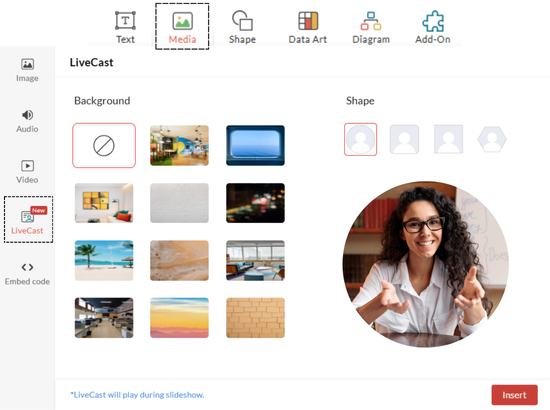
 

Insert LiveCast

 How is it different from video recording? 

Video recording enables presenters to pre-record their video and add it to their slide, facilitating asynchronous communication and allowing the audience to view it at their own convenience.

However, LiveCast requires the presenter and the audience be present in real time, because the purpose is to foster live interaction and dynamic engagement with the audience.

 When should you use LiveCast? 

This feature can be used to create engaging presentations that involve personal interaction. With the LiveCast feature, the presenter can guide participants on a personal level, providing visual cues and expressions that aid understanding. Here are some scenarios of how you can use this feature:

Online training and webinars: One of the key aspects of a successful training session or a webinar is the ability to interact and connect with your audience on a personal level. With the LiveCast feature, presenters can establish rapport with a large virtual audience.

Virtual classrooms: Non-verbal communication plays an important role in virtual classrooms as facial cues, gestures, and expressions enhance student engagement. Educators can use LiveCast to create an immersive learning experiences for their students.

Sales pitches: When you are pitching your product or service to a remote prospect, it is important to maintain a personal connection. This feature enables the sales teams to build trust and credibility by appearing LIVE within the slide and demonstrating the benefits.

Interactive product demos: Product demos often require narration and guidance to help audiences understand the features and benefits. LiveCast allows presenters to walk through demos in real time, answer questions, and resolve queries instantly.

Onboarding sessions: Human Resources teams can personalize interactions with new employees during onboarding and training sessions. Top-level management and senior executives can also address employees directly, creating a stronger connection with teams.

 Benefits of using LiveCast in presentations 

  • Remote-friendly solution: This feature bridges the gap between in-person and virtual presentations, offering a hybrid experience.

  • Enhanced engagement: Audiences are more likely to engage and pay attention to the presenter when presented face-to-face.

  • Builds trust and credibility: Live interactions add authenticity and build credibility, especially in virtual environments.

  • Improved communication: Visual cues and facial expressions humanize the presentation, reinforce the message, and enhance understanding.

  • Increased interactivity: Viewers feel a stronger connection and are more likely to participate in Q&A or discussions.

  • Makes content memorable: Presentations with a live human element make it dynamic and more memorable than static slides.
     

 What are the best practices to use this feature? 

  1. Test your setup: The first and most important step is to test the setup. Ensure your camera, microphone, and internet connection work perfectly. Test the placement of the LiveCast icon on slides to ensure it doesn't obstruct important content.

  2. Optimize lighting and camera angle: Use natural lighting or a ring light to brighten your face evenly. Avoid harsh shadows or back lighting and position the camera at eye level to maintain direct engagement with your audience.

  3. Maintain video quality: Configure your camera settings for optimal clarity and resolution. Optimize your network bandwidth to avoid lag or video freezes.

  4. Design slides with LiveCast in mind: Leave spaces on slides where the LiveCast icon will appear. Remeber to use animations sparingly to avoid cluttering the slide with movement while your face is visible.

  5. Choose an appropriate background: Choose a suitable background image and a camera shape depending on the tone of your presentation and audience.
     

 Wrapping up! 

In today’s hybrid world, where teamwork requires a mix of virtual and in-person communication, tools like LiveCast empower presenters to deliver their slides with impact and authenticity. This feature bridges the gap between static slides and dynamic human interaction, making your presentations more engaging and interactive.

Whether you're training your employees, pitching an idea to clients, or addressing a virtual audience, LiveCast enables you to connect personally, enhance engagement, and build trust. By strategically integrating this feature into your presentations, you can transform ordinary slideshows into memorable and impactful experiences.

Sign up and try out the feature now!
Related Topics

Leave a Reply

Your email address will not be published. Required fields are marked

By submitting this form, you agree to the processing of personal data according to our Privacy Policy.

You may also like