- HOME
- More
- Best Practices
- Email parts with structure and best practices
Email parts with structure and best practices
- Published : June 10, 2026
- Last Updated : June 10, 2026
- 348 Views
- 6 Min Read

Every email you send is a structured digital message made up of different email parts, each with a specific role. If any part is missing or added incorrectly, it can affect email deliverability, user engagement, or even compliance. Whether it's a password reset email, a promotional campaign, or a shipping update, understanding each part of an email helps you create messages that people open, read, and take action on instead of ignoring or missing completely.
What is an email made of?
An email is made up of several technical and visual email components that help messages get delivered, displayed, and understood properly. Some email parts are visible to recipients, while others work behind the scenes to support authentication and formatting.
The main email components include:
- Header
- Pre-header
- Subject line
- Email body
- Footer
Together, these email parts decide how your message appears in inboxes and how users or subscribers interact with it.
The parts of an email address
An email address has two parts separated by the @ symbol:
- Local part: The username before the @ symbol (such as hello).
- Domain: The domain has two sub-parts:
- Second-level domain (SLD): The organization or service name, such as zeptomail. This is the registered name that identifies the mail server.
- Top-level domain (TLD): The suffix after the final dot, like .com. This shows the type or origin of the organization (such as .org for nonprofits, .in for India, .edu for education).
Parts of an email
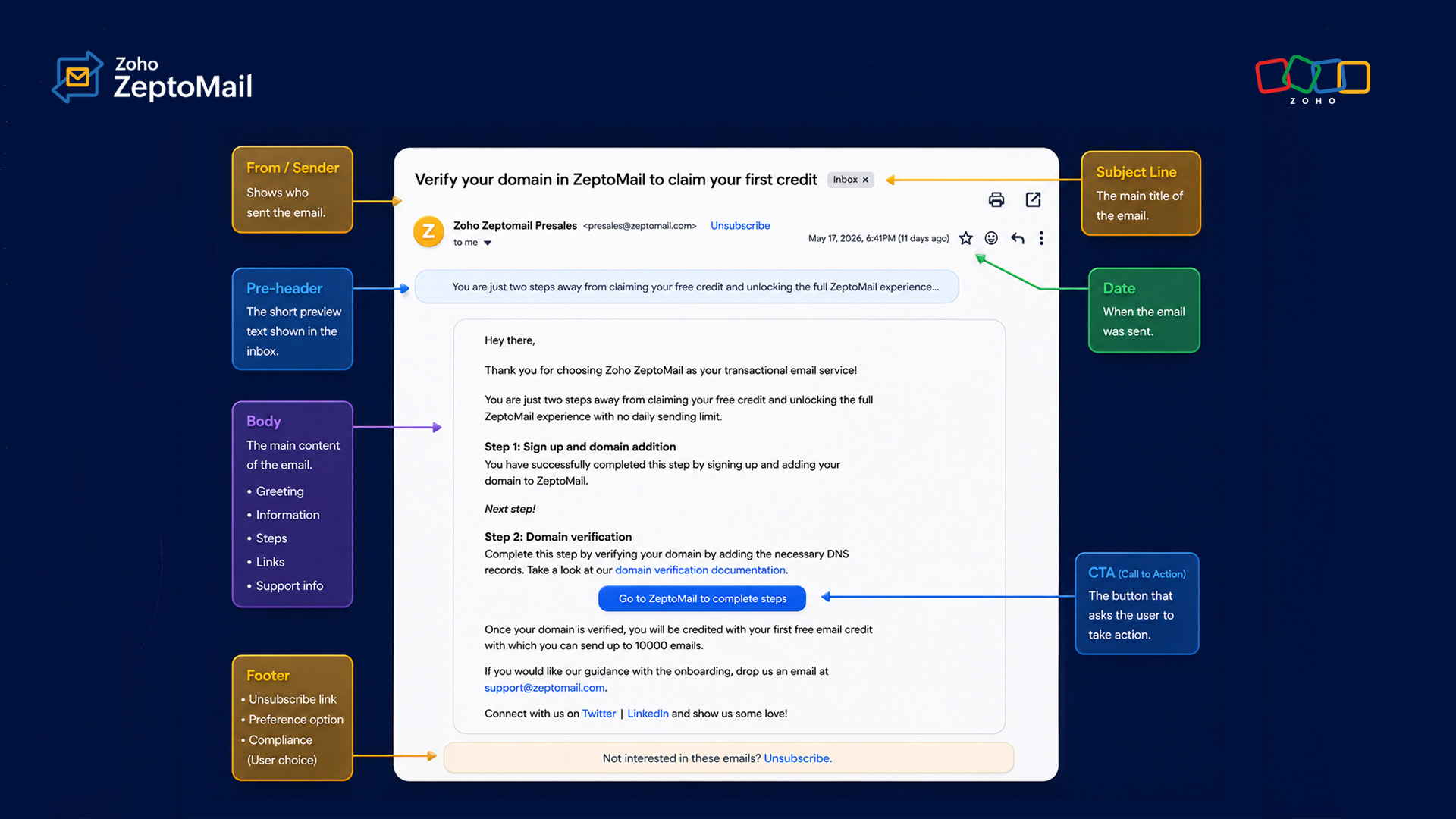
Email header
While it's not visible to recipients, the header is one of the most important email components. It carries all of the information email clients and servers need to deliver and authenticate your email.
Header fields include:
- From: The sender's name and email address. The "From" name is what recipients see in their inbox when the email comes. You should keep it consistent to improve open rates.
- To: The recipient's email address. It seems obvious, but having a correct address is essential for delivery.
- Date: A timestamp that shows when the email was sent. Helps sort your message in the inbox.
- MIME-Version: MIME (Multipurpose Internet Mail Extensions) shows that messages are compliant with the MIME standard, enabling images and attachments.
- Content-Type: It works alongside MIME and tells the email client whether the message is plain text, HTML, or multipart.
- Authentication headers: These include SPF, DKIM, and DMARC records. They prove your email is legitimate and help prevent it from being flagged as spam or spoofed.
Pre-header
The pre-header is one of the most underused email parts. It's the short line of preview text that appears after the subject line in most inbox views. It functions as a second subject line giving additional context to the recipient before they open the email. Most email clients display 40–130 characters of pre-header text.
You should write a pre-header that complements the subject line without repeating it. Use this space to add context or add specific detail. Without a manually set pre-header, the email client pulls the first available text from the body, which isn't relevant most of the time.
Subject line
The subject line is one of the email parts your recipients see first, and they make a split-second decision based on it. A good subject line is clear, specific, and actually relevant to the person reading it. It tells them what to expect in the email. A weak or misleading subject line reduces open rates and can trigger spam filters.
Subject lines should:
- Have 40–60 characters to fit on a mobile screen.
- Start with the most important words.
- Use personalization (name, location, behavior) when contextually appropriate.
- A/B test regularly against your specific audience for marketing emails.
Email body
The email body is the core of all email components. It delivers your message. It has different sub-components, each with its own function.
Salutation: Start with a greeting that aligns with your brand voice. Keep it short because the salutation serves just as a transition, not the main content. "Hi [First Name]" works well for most audiences.
Main body content: Lead with the most important information. Keep your paragraphs short, up to two to four lines. Each line should have a clear point. Use spacing and formatting to make it easy to read.
Call to action (CTA): Every email should ideally have one primary action as the CTA. Make your CTA easy to spot and action-oriented, focusing on what you want people to do. Use a button over a text link when you can because it stands out more. Keep the context clear such as "Download Your Report" is better than "Click Here."
MIME and content types: Most emails today have both an HTML version and a plain text version bundled together as part of these email components. The email client picks whichever one it can handle. HTML works better with images and buttons. Plain text performs better for transactional emails.
Email footer
The footer is the last of the main email parts that your readers see, but it includes important legal obligations and trust signals. Excluding these elements may expose your business to regulatory risk and increase spam complaints.
Use a minimum 12px font size in the footer. All links must be working on mobile screens.
Required footer elements include:
- Signature: For business and transactional emails, a footer signature adds credibility. Add your company name, support contact, and any relevant branding.
- Unsubscribe link: This is legally required for marketing emails under laws like CAN-SPAM, GDPR, and CASL. Make it visible and easy to use.
- Legal information: Add your company's physical mailing address, copyright statement, and any industry-specific disclaimers.
- Social icons: Link to your social profiles and give people a way to reach you beyond inboxes.
- Contact information: A direct way for recipients to reach you reduces friction and builds trust.
How transactional email parts differ from marketing emails
Transactional and marketing emails share almost similar email components and structural email parts, but the way these emails are written and structured is totally different. Transactional emails are informational or action-oriented, so the content is straightforward. Marketing emails, on the other hand, are strategically planned and sent to drive user engagement so the content and structure are richer, promotional, and creative.
Transactional emails (receipts, shipping updates, password resets) are triggered by something the user did. People are actively looking for them, and open rates are high. So:
- Subject line: Keep it direct and specific, such as "Your order has shipped" or "Reset your password."
- Body content: Share the required information in the first line without unnecessary details.
- CTA: Focus on a single clear action such as tracking an order, verifying an account, or resetting a password.
- Personalization: Include relevant customer details to make the email more useful and contextual.
Marketing emails, on the other hand, are designed to capture attention, promote products, and encourage engagement. Because users aren't always actively waiting for these emails, every email part should work toward driving interest.
- Subject line: Use value, curiosity, or urgency to encourage opens.
- Body content: Highlight offers, introduce products/services, or explain benefits in an engaging way.
- CTA: You can include multiple actions, but each should be clear and purposeful.
- Design and branding: Layout, visuals, and brand consistency play a much bigger role in improving engagement.
FAQ
What are the main parts of an email?
An email consists of the header (From/To, date, and authentication records), pre-header text, subject line, body (salutation, main content, CTA), and footer (unsubscribe link, legal information, contact details). These are the core email components every sender should understand.
What is an email pre-header?
An email pre-header is the short preview text that appears next to or below the subject line in the inbox. It gives readers a quick summary of the email before they open it and is one of the most overlooked email parts.
How is the structure of a transactional email different from a marketing email?
Transactional email parts are short, direct, and focused on one important action or update. Marketing email components are designed to grab attention, promote offers, and encourage engagement with more visuals and content.
What is the most important part of an email?
The most important part depends on the goal of the email, but the subject line and CTA are usually the most critical email parts because they drive opens and actions. A strong subject line helps increase open rates by clearly explaining the email or creating interest.
What's the difference between HTML and plain text email?
HTML emails have colors, images, buttons, and styled layouts, while plain text emails have only simple text without design elements or any formatting. Both are key email components. Plain text performs better in deliverability testing and is more trusted in transactional contexts.