- HOME
- Alternatives
- Best Resend alternatives for developers
Best Resend alternatives for developers
- Published : November 28, 2025
- Last Updated : January 12, 2026
- 4.6K Views
- 8 Min Read


What is Resend?
Resend is an email service built for developers to send both transactional and marketing emails. It helps developers build, test, and deliver emails quickly without complex setups. With its clean API and simple configuration, Resend has become a go-to choice for many developers who value speed and minimalism.
However, while many developers love Resend, there are developers who prefer more budget-friendly options that offer the same level of infrastructure and features.
Let’s take a look at some of the reasons why Resend may not be suitable for everyone. We’ll also take you through a list of affordable and reliable Resend alternatives for developers that won’t break your bank.
Why do developers look for Resend alternatives?
While Resend offers a clean, developer-friendly experience, several users have reported concerns that make them consider switching to other platforms. Here are some common reasons why developers look for Resend alternatives.
Delivery delays that hurt user experience
For transactional emails like OTPs, password resets, double opt-in emails and account update notifications, even a few seconds of delay can affect user experience. Some users have noticed inconsistent delivery speeds, especially during peak hours.
Costs that spike as you grow
While Resend’s pricing works well for smaller projects, it can become expensive for businesses that send emails in large volumes. Developers managing high traffic or multiple clients often look for more cost-effective options with similar infrastructure.
Account suspensions without warning
A few users have mentioned unexpected account suspensions without prior alerts or clear explanations. This can be risky for businesses that rely on uninterrupted transactional email flow.
A help desk that is hard to reach
When dealing with critical email delivery issues, responsive customer support is crucial. Some users have expressed that Resend’s support response time could be faster, especially for urgent cases.
Paying more but getting less
Compared to other email API providers, Resend currently offers limited advanced features. It lacks built-in email templates, extensive bounce reports, or storage for the quoted pricing, making users feel they’re not getting enough value for the cost.
Metrics to consider while looking for alternatives
Before switching to a new email provider, developers should evaluate these important factors:
Factors | Why does it matter? |
Deliverability rate | Ensures that emails land in inboxes rather than spam folders. |
Speed | Measures how quickly emails are delivered. |
Scalability | Ensures that the service can handle sudden traffic surges. |
Bounce handling | Identifies undelivered emails and manages hard and soft bounces. |
Analytics and logs | Real-time analytics for opens, clicks, and bounces. Provides detailed insights for debugging and performance tracking. |
Pricing flexibility | Helps teams manage costs as they scale. |
Security and compliance | Encryption and authentication standards protect sensitive data. |
Ease of integration | A clean, reliable API helps developers integrate faster. |
User management | Easily add and manage users with role-based permissions. |
Support | Support via chat, email, and call for users to keep going without getting stuck. |
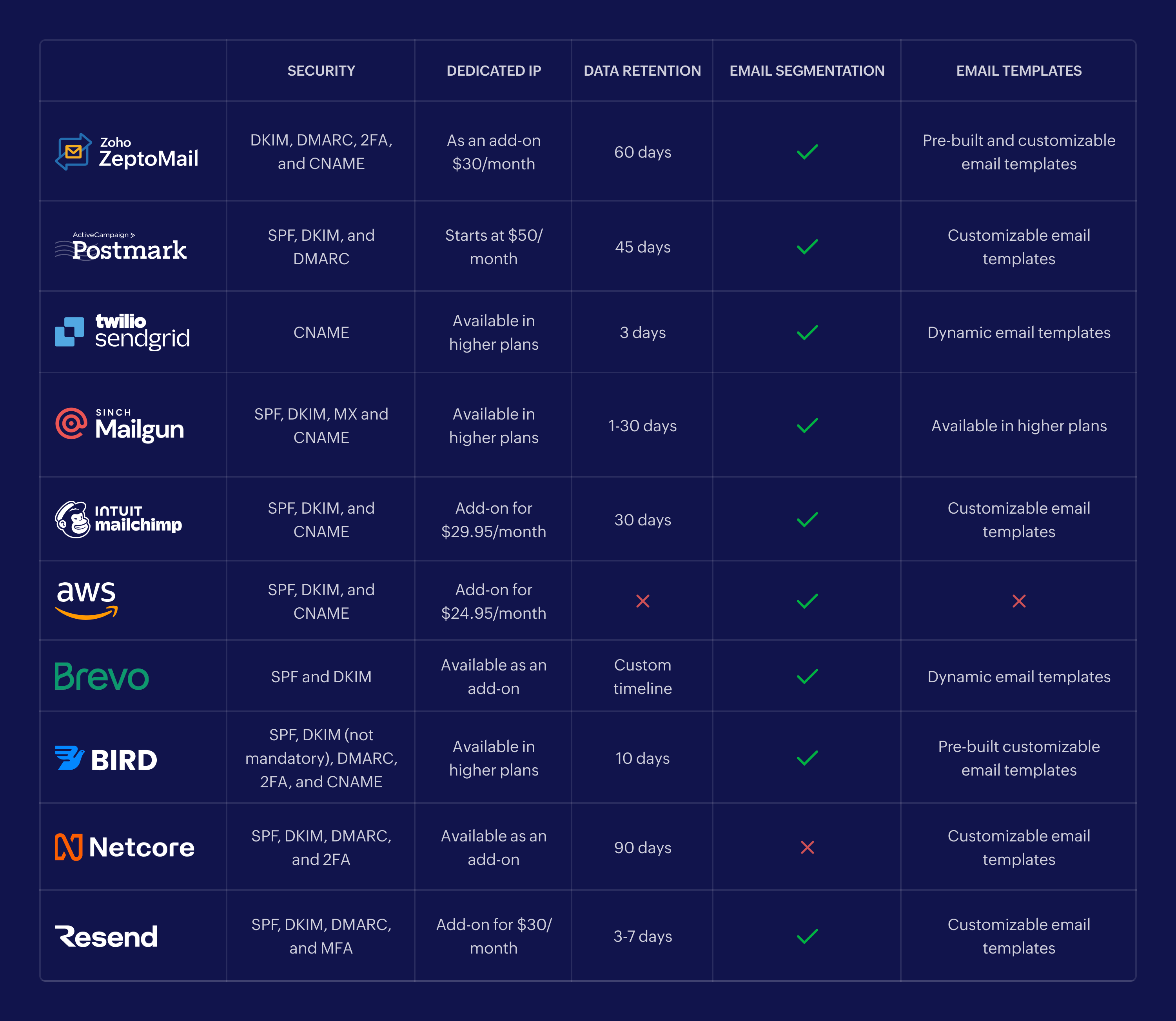
8 Top alternatives to Resend
Zoho ZeptoMail
PostMark
Mailgun
Amazon SES
SendGrid
Brevo
Netcore Cloud
Mailchimp Transactional

1. Zoho ZeptoMail
Zoho ZeptoMail is a developer-friendly transactional email service launched in 2020. It’s built for speed, stability, and affordability. Unlike Resend, which mixes transactional and marketing emails, ZeptoMail uses a dedicated infrastructure. This setup is optimized solely for transactional emails, ensuring peak performance and strong deliverability.
Area of specialization
Experience fast and reliable transactional email delivery for updates, alerts, and notifications. Benefit from powerful, real-time bounce handling for any volume.
Who is it for?
Developers looking for a flexible, API-first email-sending platform.
Developers managing multiple applications who need reliable deliverability, transparency, and control over their emails.
Pros
✅ Dedicated infrastructure: Designed exclusively for transactional emails, helping maintain a clean sender reputation.
✅ Flexible integration: Offers SMTP and a strong API for seamless integration with apps, websites, and backend systems.
✅ Fast email delivery: Optimized to deliver high-volume emails quickly and reliably.
✅ No monthly commitments: Credit-based pricing with credits valid for six months.
✅ 24/7 free support: Available via email, chat, and phone.
✅ Advanced tracking: Real-time insights into opens, clicks, bounces, and delivery metrics.
✅ Strong security: Includes 2FA and domain authentication for safe, verified sending.
Cons
❌ Not for marketing emails: Designed only for transactional use cases.
Key features
Mail Agents: Organize and categorize emails by purpose, application, or type.
Custom reports: Compare performance and track trends across Mail Agents.
Activity logs: Monitor all user actions for transparency and security.
IP restrictions: Allow sending only from authorized IP addresses.
Data retention: Store email content for 60 days and logs for up to one year.
Prebuilt templates: Access ready-to-use templates for common transactional emails.
User management: Quickly manage users and assign role-based permissions.
Auto top-up: Automatically renew credits to prevent interruptions.
Suppression list: Automatically block emails to hard-bounced addresses.
Pricing
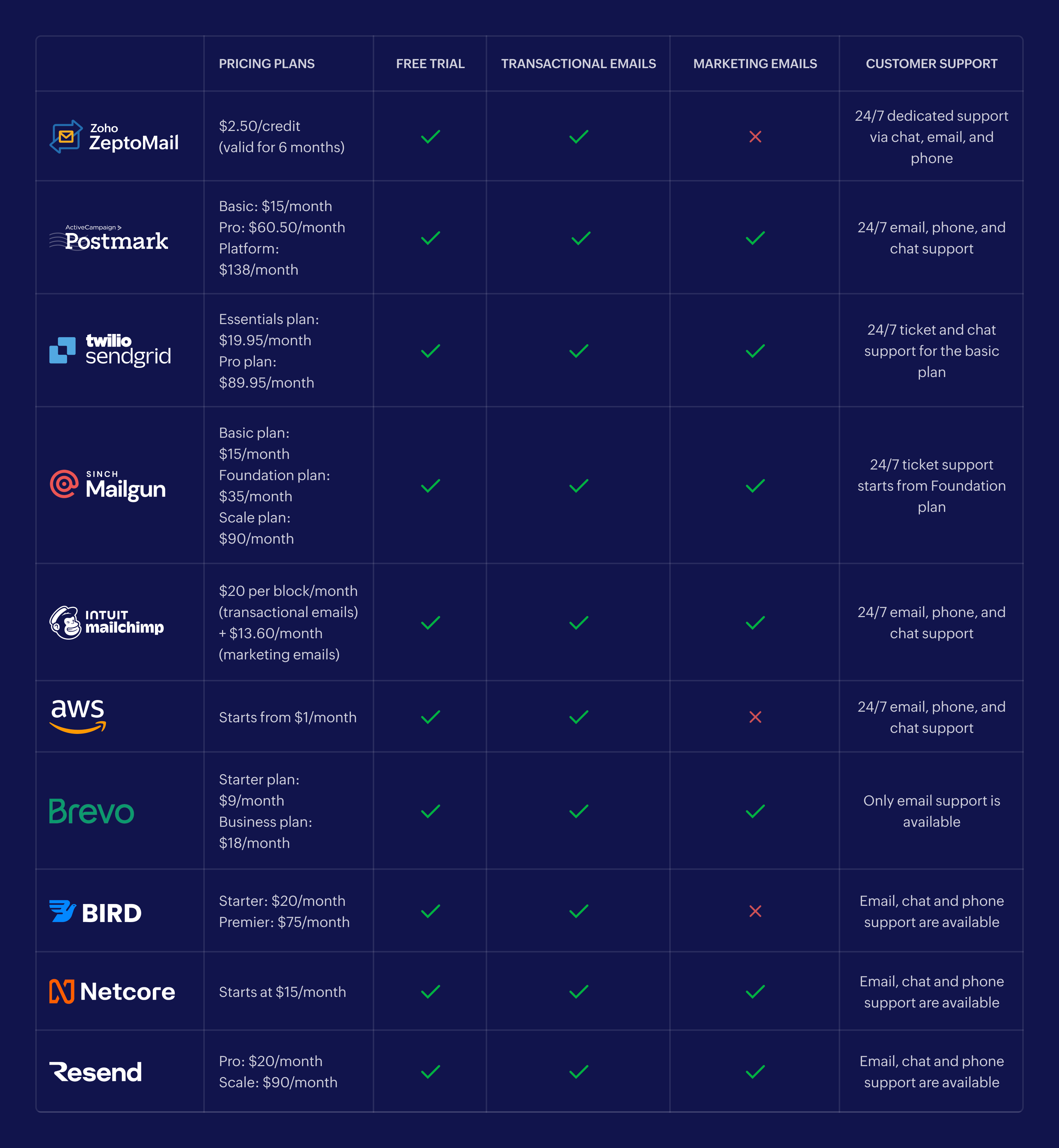
1 credit: $2.50 for 10,000 emails
30 credits: $75 for 300,000 emails
Free plan: 1 credit for 10,000 emails valid for a month
2. Postmark
Postmark began as a transactional-only email service and later added marketing emails to their list. It uses isolated infrastructures for promotional and transactional emails to maintain reliable deliverability.
Area of specialization
Fast delivery for transactional and broadcast emails with separate sending environments.
Who is it for?
Developers and teams who want a single platform for both transactional and marketing emails.
Pros
✅ Separate sending streams: Prevents marketing blasts from affecting transactional deliverability.
✅ Fast and consistent delivery: Highly optimized delivery architecture.
✅ Organized message streams: Clean separation of different email types.
Cons
❌ Expensive at scale: Unused email credits don’t roll over.
❌ Server limits: Basic plan restricts users to 10 servers.
Key features
Separate message streams for transactional vs. broadcast
Detailed activity tracking (45-day retention)
Prebuilt templates
User roles and team permissions
Pricing
Basic: $15/month for 10,000 emails, five servers.
Pro: $60.50/month for 10,000 emails, 10 servers.
Platform: $138/month for unlimited servers and users.
For more than 10 servers, users must be on the Platform plan.
3. Mailgun
Mailgun is a cloud-based email service provider built for developers who need reliable transactional and marketing email delivery. With its powerful API and developer-friendly tools, it integrates seamlessly with applications, websites, and backend systems.
Area of specialization
Mailgun is designed to handle high-volume email sending at scale with strong infrastructure reliability.
Who is it for?
Developers looking for a flexible, API-first email-sending platform.
Enterprises managing large volumes of automated emails.
Pros
✅ Clean, intuitive UI: Easy-to-use dashboard for managing campaigns and monitoring performance.
✅ Highly scalable: Built to support rapid growth and increasing email volumes.
✅ Strong API integration: Developers can automate email workflows and notifications with minimal effort.
Cons
❌ Complex initial setup: Requires technical expertise, making it less suitable for beginners.
❌ Limited support on lower-tier plans: Response times may be slower for free or basic plans.
❌ Deliverability upgrades are costly: Advanced deliverability tools are available only for senders exceeding 500,000 emails per month.
Key features
Blacklist and spam-trap detection: Boosts inbox placement and reduces bounce risks.
Drag-and-drop email builder: Create customizable email templates quickly.
Advanced analytics: Track delivery rates, opens, clicks, and engagement trends.
Pricing
Free plan: 30,000 emails free for the first month.
Basic plan: $15/month for 10,000 emails.
Foundation plan: $35/month for 50,000 emails.
Scale plan: $90/month for 100,000 emails.
Additional deliverability optimization services begin at $49/month.
4. Amazon SES
Amazon SES is a cost-efficient, scalable email-sending service built for anyone inside the AWS ecosystem.
Area of specialization
Budget-friendly email sending at scale.
Who is it for?
Developers using AWS who need a highly scalable, cost-effective option.
Pros
✅ Great deliverability: Backed by Amazon’s filtering and infrastructure.
✅ Flexible pay-per-use pricing: No monthly fee required. Pay only for what you use.
Cons
❌ Complex setup: Requires IAM, SNS, and S3 integrations for full functionality.
❌ Minimal built-in features: No templates or analytics by default.
Key features
Configuration sets.
Automatic suppression handling.
24/7 support.
Pricing
Starts at $5.12 for 50,000 emails.
Final cost varies based on AWS usage.
5. SendGrid
SendGrid (by Twilio) is a developer-friendly cloud email platform built for high-volume transactional and marketing emails, offering extensive APIs and automation features.
Area of specialization
Developer-first email platform with strong APIs for automation, list management, and campaign sending.
Who is it for?
Mid-sized to enterprise teams that need both transactional and marketing automation under one platform.
Pros
✅ Highly scalable: Capable of managing large email volumes efficiently, making it suitable for fast-growing businesses.
✅ Developer-friendly API: Offers smooth integration with applications, enabling custom email workflows and automation.
Cons
❌ Deliverability issues: Sender reputation challenges may affect inbox placement and overall email performance.
❌ Limited customer support: Lower-tier users may face delayed responses during technical issues.
❌ Complicated pricing: Additional fees for dedicated IPs and advanced features can be expensive for small businesses.
Key features
Advanced email analytics: Track opens, clicks, bounces, and recipient engagement to optimize performance.
Automated workflows: Build triggers, autoresponders, and automation sequences for efficient email delivery.
Prebuilt templates: Choose from professionally designed email templates for quick campaign creation.
Pricing
Essentials plan: Starting at $19.95/month for 50,000–100,000 emails.
Pro plan: Starting at $89.95/month for 100,000–2,500,000 emails.
Premier plan: Custom pricing based on email volume and business requirements.
6. Brevo
Brevo (formerly Sendinblue) is a unified marketing platform that includes transactional emails, SMS, CRM, and automation tools.
Area of specialization
All-in-one platform for email, SMS, and CRM automation.
Who is it for?
Medium-sized businesses seeking an affordable, scalable marketing solution.
Marketers, developers and business owners who want to automate and simplify email and SMS campaigns.
Pros
✅ Easy-to-use interface: A beginner-friendly UI that simplifies campaign creation and automation.
✅ Complete marketing toolkit: Includes email marketing, SMS messaging, CRM, automation workflows, and transactional emails.
✅ Multichannel transactional messaging: Send transactional updates through email, SMS, and WhatsApp.
Cons
❌ Not specialized for transactional emails: Brevo’s infrastructure focuses more on marketing than large-scale transactional email delivery.
❌ Free plan limitations: Daily send caps and restricted access to advanced features.
❌ Not ideal for enterprises: Better suited for SMBs; may lack the depth needed for large-scale operations.
Key features
Drag-and-drop workflow builder: Create automation flows and personalized email campaigns with ease.
Smart segmentation: Organize campaigns with folder-based segmentation for better targeting.
Advanced analytics: Track opens, clicks, bounces, and unsubscribes to improve performance.
Pricing
Starter plan: Starts at $9/month.
Business plan: Starts at $18/month.
Enterprise plan: Custom pricing based on business needs.
7. Netcore Cloud
Netcore Cloud is a comprehensive marketing automation platform that helps businesses streamline customer communication across multiple channels—email, SMS, push notifications, WhatsApp, and in-app messaging. It’s designed to improve customer engagement and support high-volume email sending with ease.
Area of specialization
Netcore Cloud excels in AI-driven email delivery, advanced marketing automation, customer segmentation, and omnichannel engagement strategies.
Who is it for?
Developers and businesses looking for a scalable solution for both transactional and marketing emails.
Enterprises needing reliable API or SMTP integration to support high-volume communication.
Pros
✅ Omnichannel communication: Reach customers through email, SMS, WhatsApp, push notifications, and in-app messages.
✅ Highly scalable: Built to manage large messaging volumes, ideal for growing companies and enterprises.
✅ Easy integration: Offers seamless API and SMTP connections for smooth implementation.
Cons
❌ Slow support response: Customer support may take longer during urgent technical issues.
❌ Limited free plan: Many essential features require upgrading to paid tiers.
Key features
AI-powered email delivery: Improves deliverability and inbox placement with machine learning optimization.
Send-time optimization: Ensures that emails are delivered when users are most likely to engage.
Pricing
Netcore offers Startup, Growth, and Enterprise plans.
Pricing is customized based on email volume and feature needs and is available through a demo with the sales team.
8. Mailchimp Transactional
Mailchimp Transactional (formerly Mandrill) is an add-on that lets Mailchimp users send automated and transactional emails alongside their marketing campaigns.
Area of specialization
Automated transactional and promotional emails inside the Mailchimp ecosystem.
Who is it for?
Businesses already using Mailchimp for email marketing.
Organizations that want a single platform for managing both marketing and transactional emails.
Pros
✅ Unified marketing and transactional email platform: Create, automate, and send all email types from one place.
✅ Advanced analytics: Access detailed reports, smart insights, and real-time performance data to optimize campaigns.
Cons
❌ High pricing for growing businesses: Costs increase with sending volume, making it expensive for startups and small companies.
❌ Limited availability: Transactional emails are accessible only as an add-on for existing Mailchimp users with a marketing plan.
Key features
Comprehensive reporting: Track transactional email performance with real-time analytics.
Webhooks for real-time monitoring: Measure opens, clicks, bounces, and unsubscribes instantly.
Drag-and-drop editor: Build and customize emails without writing code.
Pricing
$20/month: 10,000 emails (1 block) along with the cost of Mailchimp marketing plan
$40/month: 50,000 emails (2 blocks) along with Mailchimp marketing plan.
Wrapping up
While Resend works well for many use cases, it may not meet the needs of businesses that require advanced deliverability, higher scalability, or a dedicated transactional email infrastructure. The best transactional email service for your business depends on your sending volume, budget, infrastructure needs, and the level of control you want over email performance. Evaluate each provider and pick the right transactional email service that best supports your website's requirements.