


Why do some employees show “migration failed” after I apply the revised EPF wage ceiling, and how do I fix it?

After you apply the revised EPF wage ceiling of ₹25,000, Zoho Payroll updates the salary details of all affected employees to the new ceiling. For most employees, this update completes automatically. For a few, it may not, and their salary details stay unchanged until you fix them.
You’ll see an Attention Required notice on your Dashboard. Click View Employees to see each affected employee.
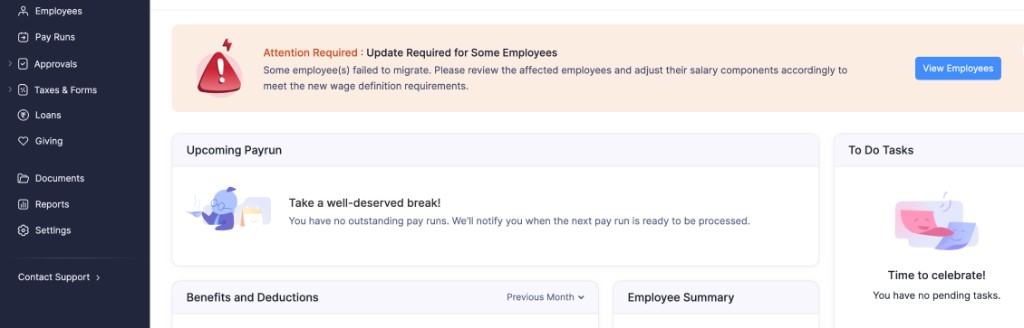
This happens when the employee’s EPF contribution goes up, but their salary structure cannot accommodate the higher amount. Under the old ₹15,000 ceiling, the EPF contribution was lower. Under the new ₹25,000 ceiling, it is higher. During migration, Zoho Payroll takes the extra amount from the employee’s Fixed Allowance. If the Fixed Allowance is too small, the migration fails, and the employee is marked as failed.
To fix this, open the employee’s salary structure, lower one of the salary components, and save.
Step 1: Open the employee’s salary structure
- Go to Dashboard and click View Employees in the Attention Required notice. This opens the Migration Failed Employees list.
- Next to the employee’s message, click the Edit icon. This opens their salary structure.

Step 2: Lower a salary component
Lower the amount of any salary component, such as Basic. Then scroll down and click Preview.
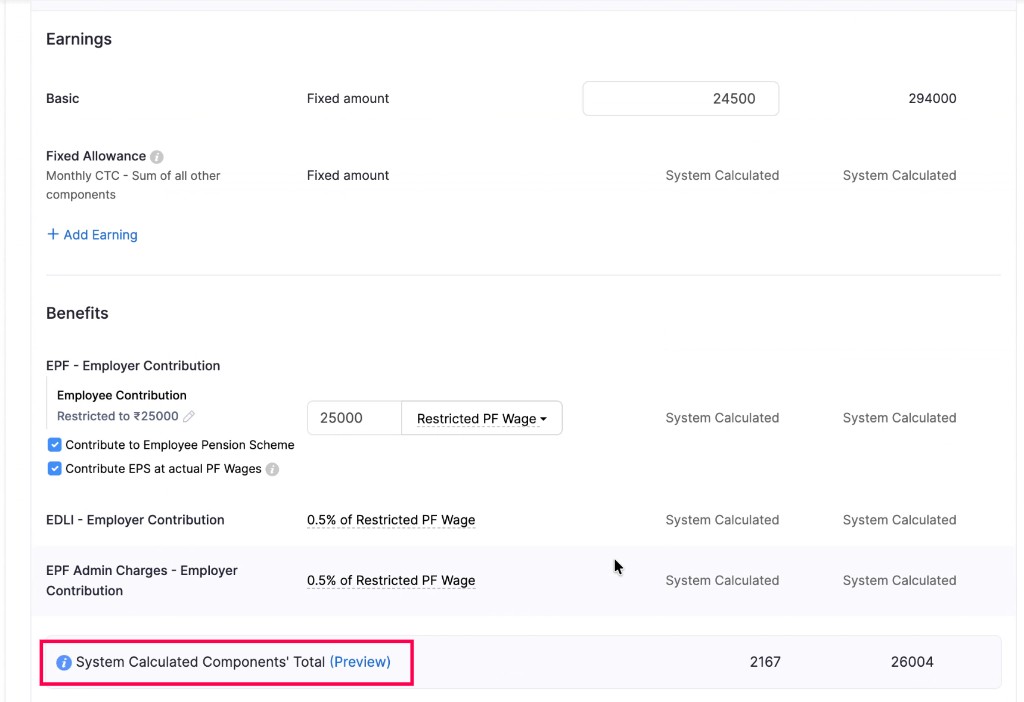
If you see an error after you click Preview, lower the amount a little more and click Preview again. Repeat this until Preview works without an error.
Step 3: Keep lowering until you can preview without any error
When you can preview without any error, the salary structure can accommodate the revised EPF contribution.
- Click Save.
Then complete the remaining steps below.
Step 4: Mark the employee as resolved
After you save, go back and mark the employee as done:
- Go to Dashboard and click View Employees in the Attention Required notice.
- Select the checkbox next to the employee you updated.
- Click Mark as Resolved.
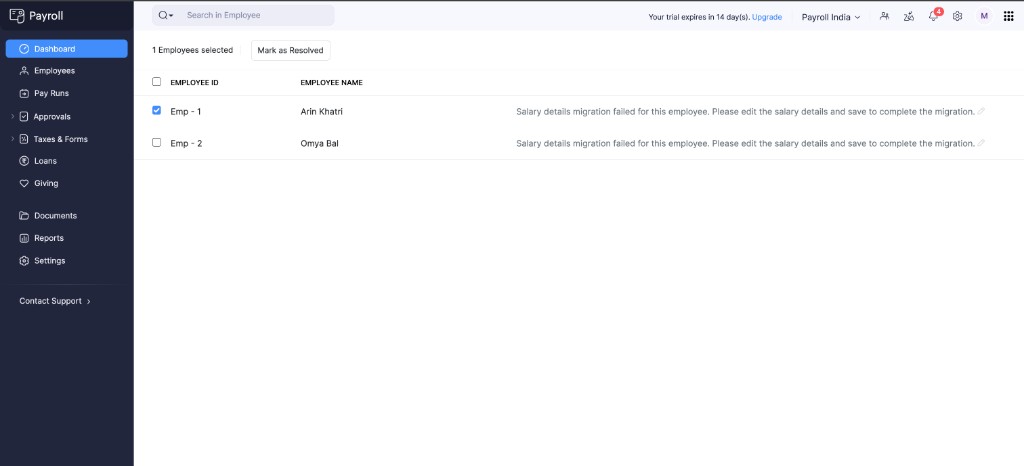
Do this for every employee in the list. Once you mark all of them as resolved, the Attention Required notice will disappear.
Scenario: Suppose an employee has this salary structure before migration:
- Basic: ₹24,500
- Fixed Allowance: ₹0
- Employee EPF (old ceiling): ₹1,800
Under the new ceiling, the EPF contribution needs to go up to ₹3,000. The Fixed Allowance is ₹0, so there is no amount for Zoho Payroll to take the extra from. The migration fails.
To fix this, lower a salary component and click Preview. If an error still appears, lower it a little more, and keep going until Preview works. Then save the salary structure and mark the employee as resolved.