- HOME
- What's New
- Zoho Writer Android app updates for Q2 2026
Zoho Writer Android app updates for Q2 2026
- Last Updated : September 21, 2026
- 111 Views
- 2 Min Read

We have to be honest: Even though Writer on Android could always get the job done, there were times when it made you wish you were back at your desk.
We heard you. So this cycle, we focused on closing that gap—not with anything flashy, just with the stuff you've actually been asking for.
If you haven't updated yet, get the latest version of Zoho Writer for Android on Google Play.
Formatting that finally matches the web app
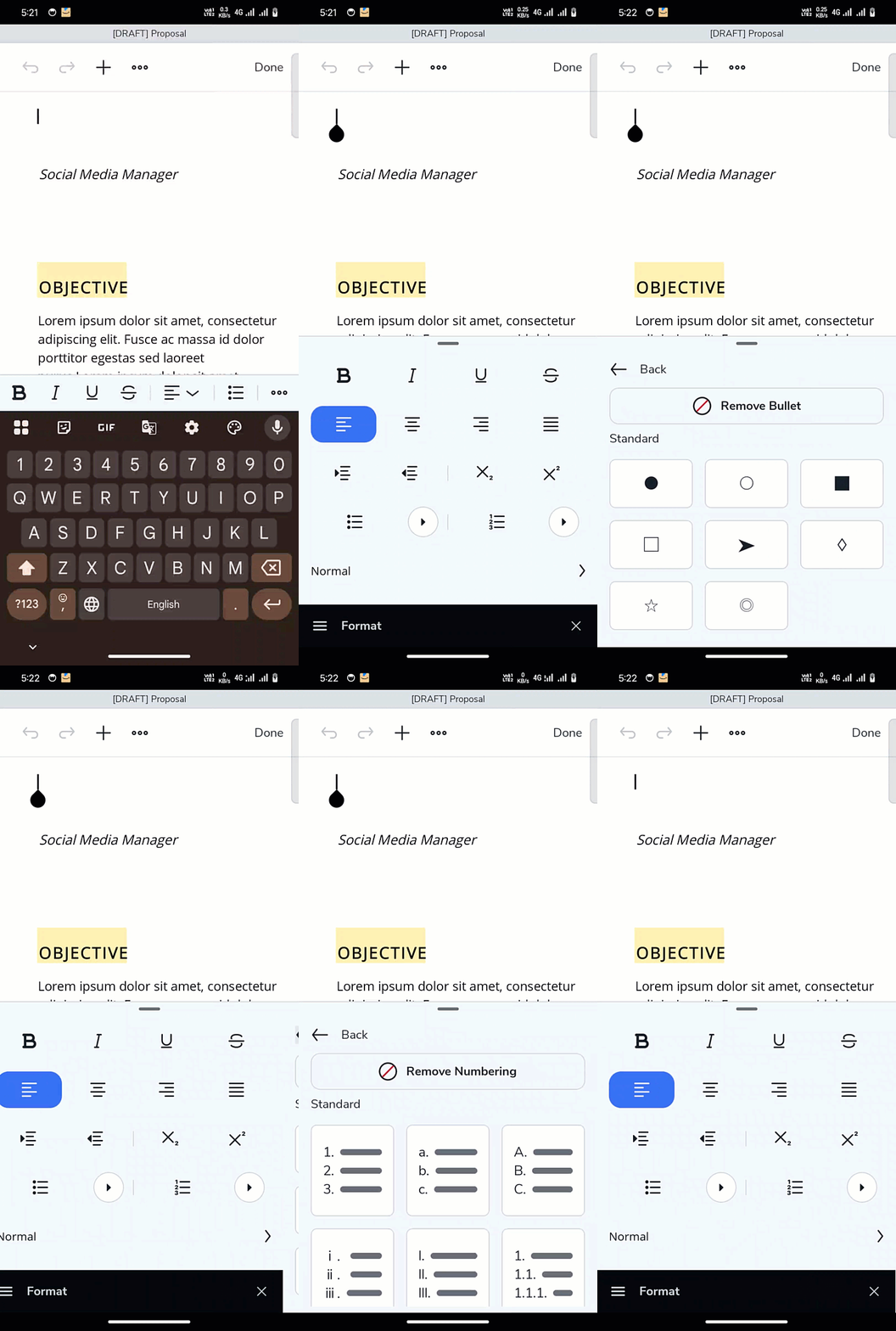
List types: Ordered and unordered lists now come with a choice of styles, matching what’s available on the web.
Line spacing: Adjustable right in the editor, useful when a document needs to look less cramped or fit a specific format.
Custom paragraph styles: Styles you’ve built and saved in the web app now show up and apply on Android.
Change case: Need a heading in title case? Re-title it in just two taps.
Text direction: so right-to-left content works naturally in the mobile editor.
Sub- and superscript: For footnotes, citations, chemical formulas, and all the other small things that needed a laptop for fixing.
Two additions we think you'll reach for constantly
Use Bookmarks to drop a marker anywhere in a long document and jump back to it instantly, instead of scrolling through twenty pages trying to remember where "that one section" was.
Scan Text by directly pointing your camera at a printed page, a whiteboard, or a signed form, and pull the text straight into your document. No retyping or exporting a photo to some other app first. It stays inside Writer, start to finish.
Editing controls that make mobile collaboration easier
Reviewing and finalizing documents no longer requires a bigger screen.
Track Changes: Attribute insertions, deletions, and formatting edits to the person who made them, using the same review workflow from the web and desktop.
Pause Collaboration: Temporarily freeze a document when things get busy, or when you need a moment to make changes without new edits coming in.
Mark As Final: Lock a document right from your phone once it’s complete, instead of waiting until you’re back at your desk.
Browsing your dashboard is now easier.
We've added a Big Grid view, with larger thumbnails alongside the views you already use. We've all seen a document list that's turned into a wall of near-identical titles—“Final draft,” “Final Draft (1),” “Final v3”—when that happens, the grid view lets you spot the right document at a glance.
This update is all about making Zoho Writer on Android work the way you expect it to, wherever you’re working. That’s the whole idea.
Need help? Write to us at support@zohowriter.com or support@eu.zohowriter.com.
See you in Q3!