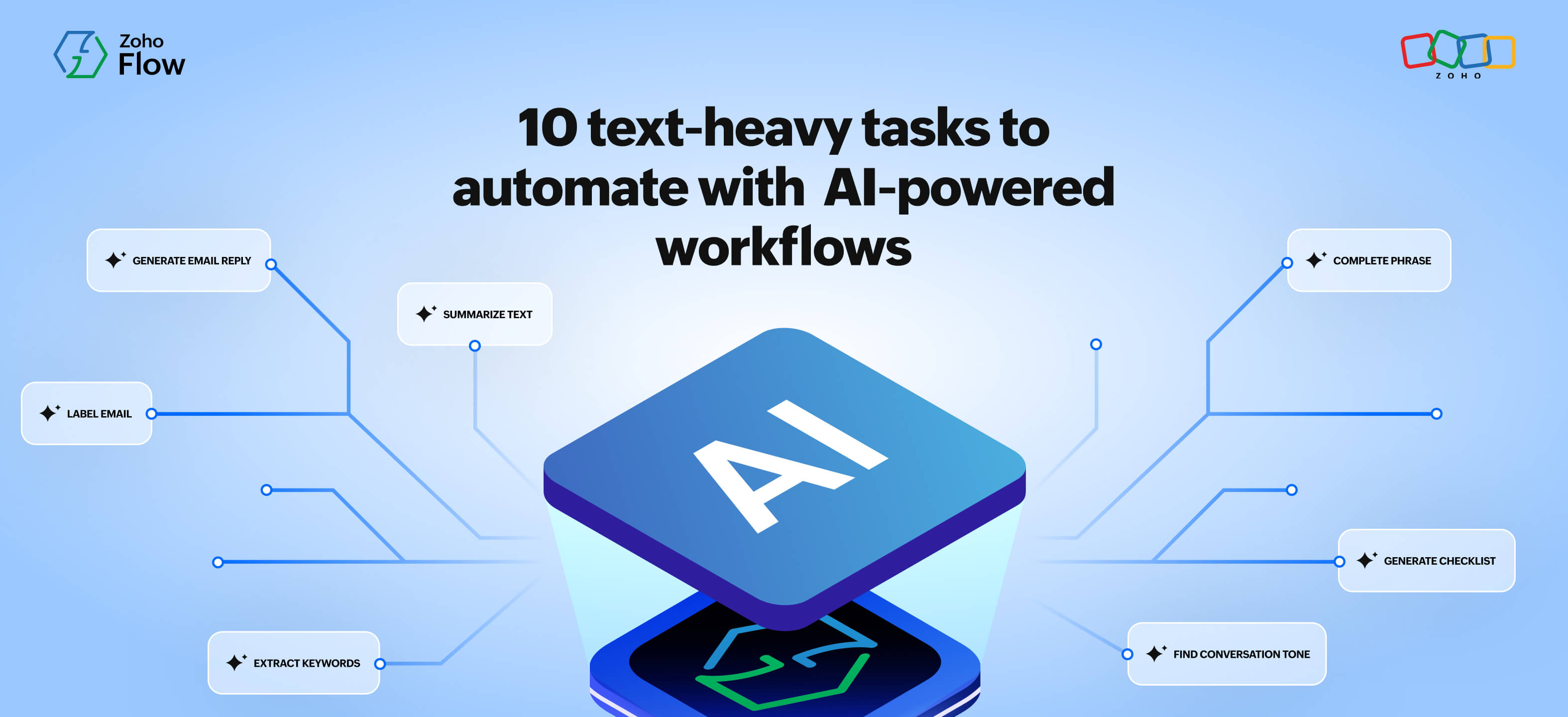
10 text-heavy tasks you can finally automate with AI-powered workflows
- Last Updated : February 27, 2026
- 678 Views
- 7 Min Read
Summary
- AI-powered workflows in Zoho Flow combine app automation with built-in text intelligence to eliminate small but time-consuming human tasks like summarizing, rephrasing, classifying, and drafting responses.
- Some common text-heavy tasks that can now run automatically includes summarizing meeting transcripts, rewriting messages for tone, detecting sentiment in support tickets, organizing inboxes, generating draft replies, extracting messy data, analyzing reviews, and creating product descriptions.
- By embedding AI into workflows, teams move beyond simple data transfer between apps and automate complete stretches of work, freeing up time for higher-impact thinking and execution.
Even with the best integration and workflow automation tools, a lot of our everyday work still depends on small, low-impact human tasks across work like reading and rewriting content. Your integrations may automate data movement from one app to another, but somewhere in the process, there's often a task or moment that requires you, a human.
Someone has to read a customer email to understand its tone.
Someone has to summarize meeting notes before posting them to a team channel.
Someone has to rephrase a blunt message before sending it to a client.
AI tools like ChatGPT and Gemini have made it easier for you to do these tasks on your own, and they usually only take a few minutes individually; but they also quietly add up to hours of lost productivity every week. That's why you need AI to be part of your automated workflows—so you don't have to intervene every time there's a low-impact task that has text to be analyzed or rewritten.
Zoho Flow solves this for you with built-in text utilities (powered by Zia) that let you add steps to your workflows that can understand and process text like a human, helping you automate decisions, summaries, rewriting, and responses.
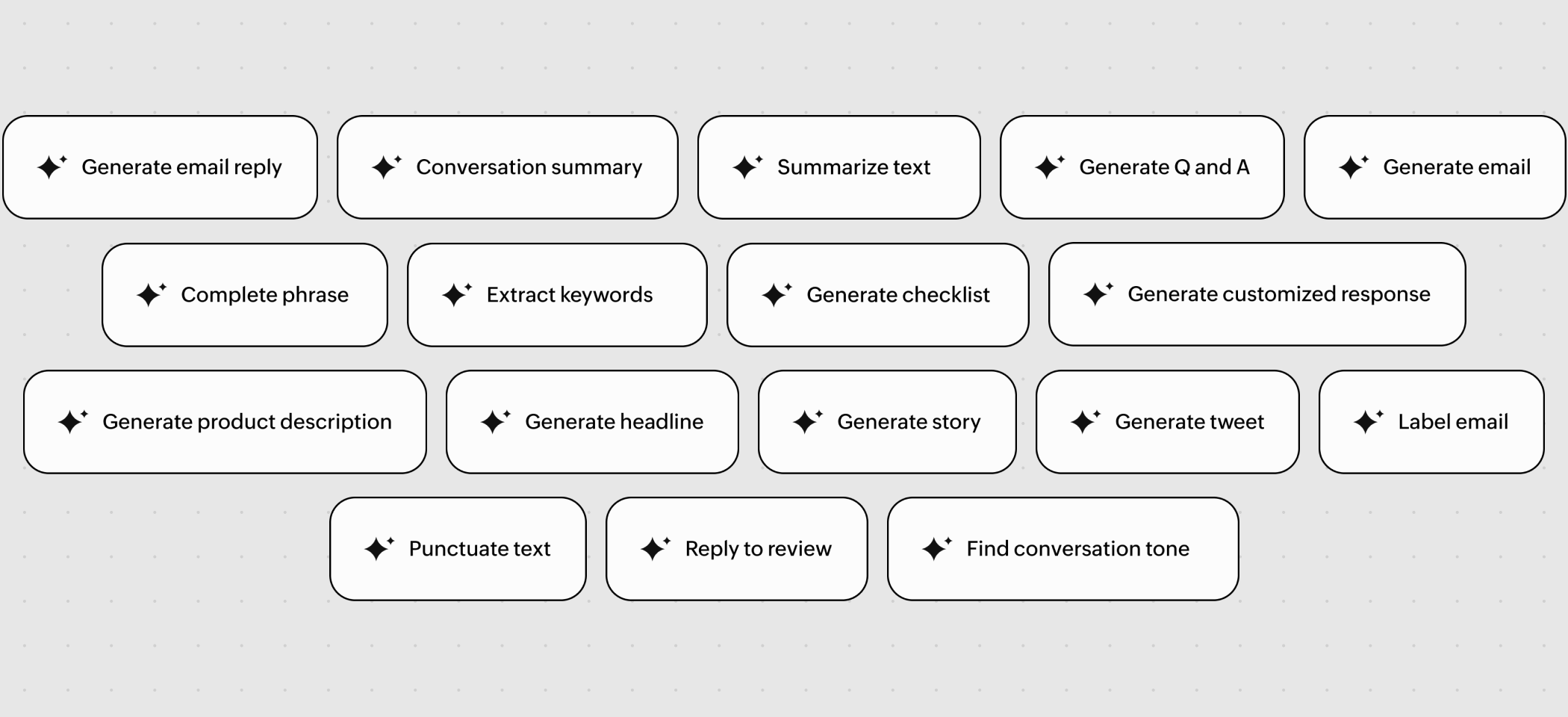
Here are 10 everyday tasks you can now hand over to intelligent workflows:
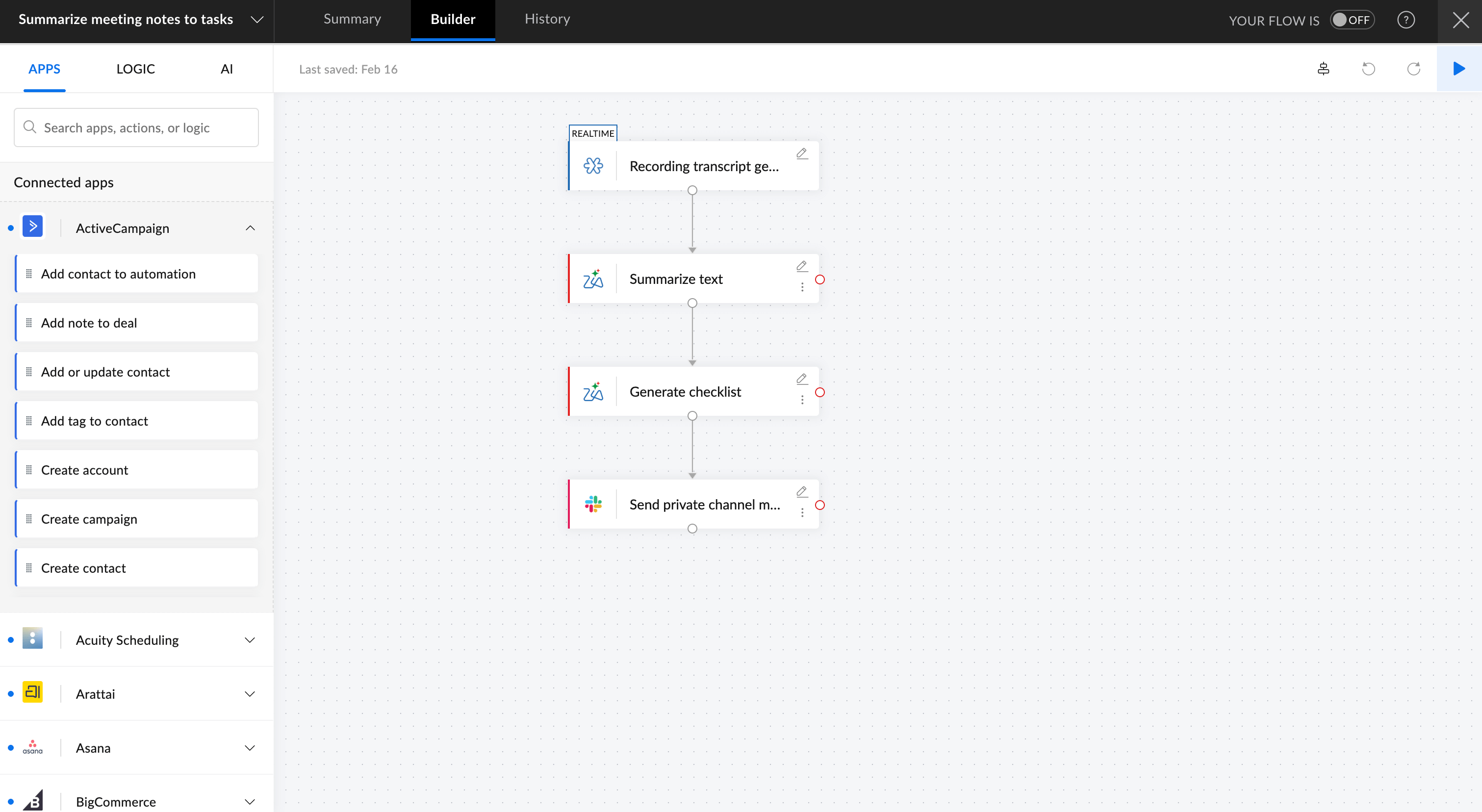
Summarizing meeting notes into tasks
After every meeting, someone sits down to clean up the official minutes, highlighting key points and decisions, then summarizing and posting them on a team communication platform.
But now a workflow can:
- Capture the transcript from Zoho Meeting when a meeting is completed.
- Use Zia's Summarize Text utility to analyze the transcript and condense key points.
- Run the Generate Checklist utility to extract actionable items.
- Post both the summary and checklist directly to your team's Slack or Cliq channel.
Rewriting internal or customer messages for tone
Before adding project notes or sending a follow-up email to a lead, someone usually has to reword it to sound more formal or empathetic.
With Rephrase Text, your workflow can automatically reword incoming messages in the desired tone before storing or sending them. This way, notes, notifications, and interactions stay polished and consistent, without anyone having to rewrite the same sentences.
Detecting sentiment in customer emails
Support agents often scan through multiple customer emails and tickets to understand tone and urgency, and then pick the ones that need an immediate reply.
A smarter workflow can:
- Trigger when a support ticket lands on a helpdesk platform like Zoho Desk.
- Use Find Conversation Tone to detect emotion (negative, neutral, or positive).
- Route tickets that show frustration or anger to a priority support team or notify a senior support executive.
- For less urgent cases, use Generate Email Reply to draft a polite, empathetic response as a first-level acknowledgment.
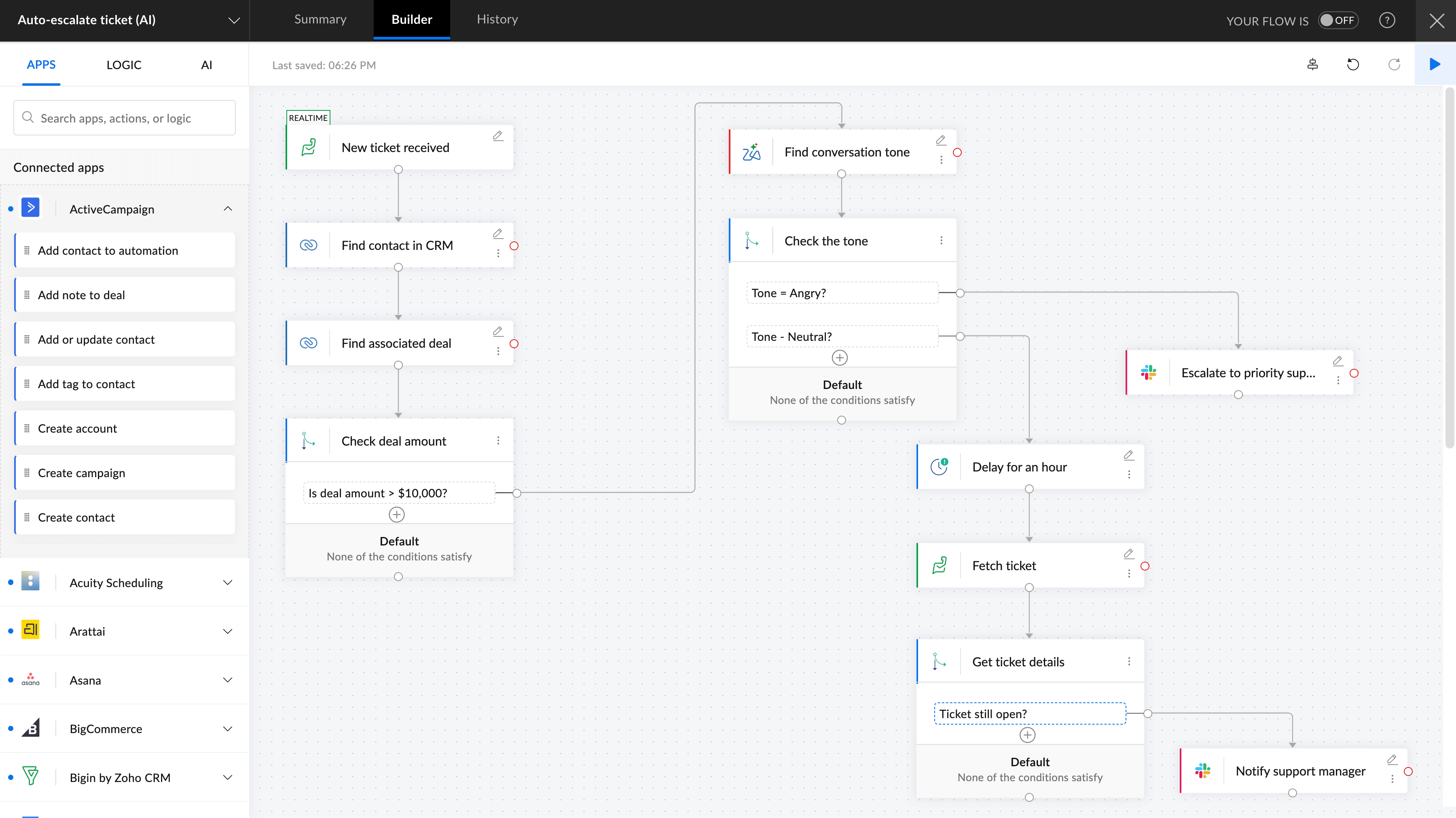
Your team can now take care of urgent requirements on priority while the other tickets get timely acknowledgements.
Cleaning and categorizing inbound emails
Whether you're in sales or marketing, sorting through a shared inbox manually is no longer necessary.
- When an email is received in Zoho Mail, let Label Email classify messages as “Sales”, “Support”, or “Urgent”.
- Use Extract Keywords to capture relevant terms from the email.
- Add the extracted keywords and use Summarize Text to add them as notes in Zoho CRM or Google Sheets.
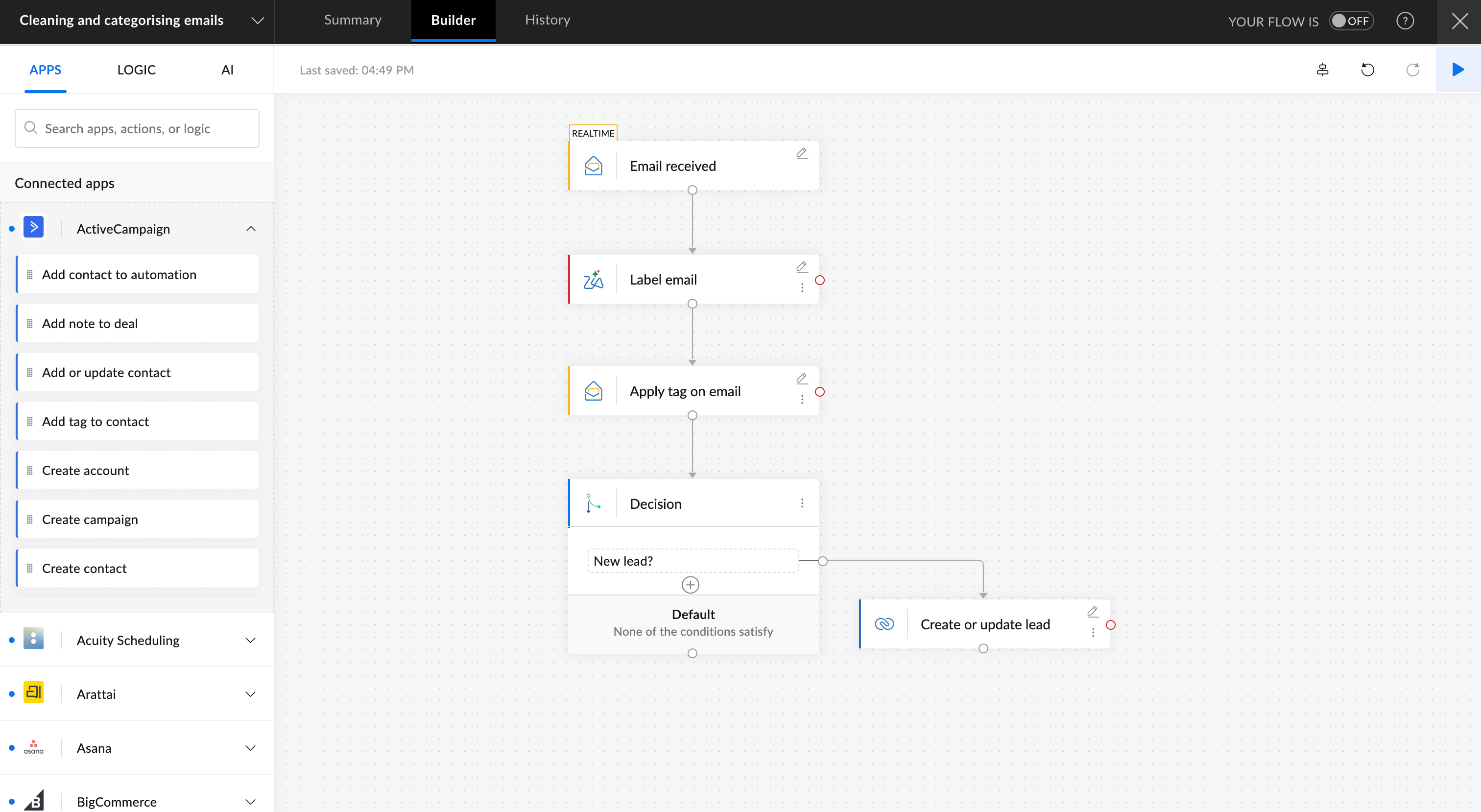
The result: a cleaner, more organized pipeline and faster response times.
Turning chat discussions into project updates
If you're working on a project, chances are that the entire team is discussing plenty of ideas across groups in your team communication app. But, in reality, many of those ideas or key points will go missing or end up buried deep in the conversations.
With AI, now you can:
- Use Schedule Trigger to run the workflow on a particular day every week.
- Fetch the messages from a specific project-related channel on Slack or Zoho Cliq.
- Use Summarize Conversation to get a short summary with every important point.
- Post the summary to a project management app like Asana, or send it as an email to your team members.
This way your project stays transparent without anyone manually compiling updates.
Generating short summaries from long documents
Reading through long documents or contracts is time-consuming, but it's critical that a human goes through them in detail before moving forward. However, a second set of eyes always helps.
With AI in your workflow, you can:
- Trigger it when a new file is uploaded to Zoho WorkDrive or Google Drive.
- Use Summarize Text to condense them into short and scannable summaries.
- Then post them in a bot channel in your Slack or Zoho Cliq for future reference.
Now you can continue doing your best work, but with a bit of help from AI before you even start working on your tasks.
Auto-generating first-draft replies for repetitive queries
If you work in customer support or social media, you often get questions like “What’s the status of my order?”, or you may need to send acknowledgement emails for filling in forms or taking surveys. These often just require a quick status check or templated reply.
But with AI, you can now:
- Capture these messages from Zoho Desk or Typeform.
- If it's a status update request on an order, fetch the details of it from Shopify or WooCommerce.
- Use Generate Email Reply to draft a personalized response.
- Use the generated content to send a reply from Zoho Mail or Outlook.
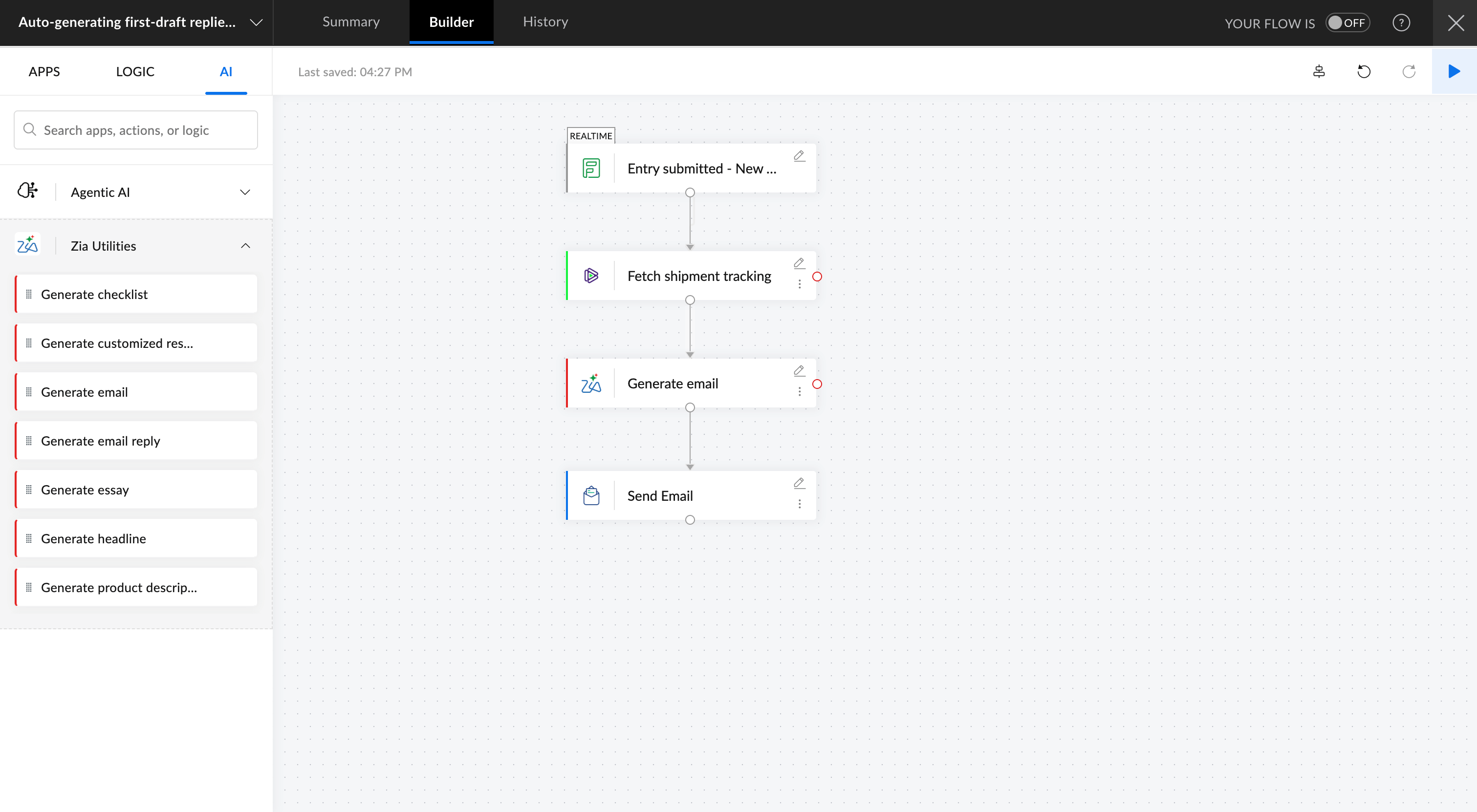
Now your customers get faster responses, and your team can focus on higher-impact work.
Extracting fields and punctuating messy text
People enter dates and data in all kinds of formats. “10th Oct,” “tmrw evening,” “Rs. 1.2k" are just a few examples. Before adding them to your business apps, you need to make sure that the data and text are cleaned up.
- Trigger the workflow when you receive notes, emails, or chat messages.
- Use Punctuate Text to clean up the text.
- Push the cleaned data into your CRM or calendar.
No more manual corrections, and the data in your systems stays clean automatically.
Mining reviews or feedback for insights
Reading every customer review to identify themes or complaints isn't practical when you have to deal with hundreds of them.
But an AI workflow can:
- Trigger when you receive a review from Zoho Survey, Zendesk, or Zomato.
- Use Find Conversation Tone and Extract Keywords to get the most relevant information from them.
- Send an automated reply if found irrelevant, and notify you in a chat if a review seems to need human attention.
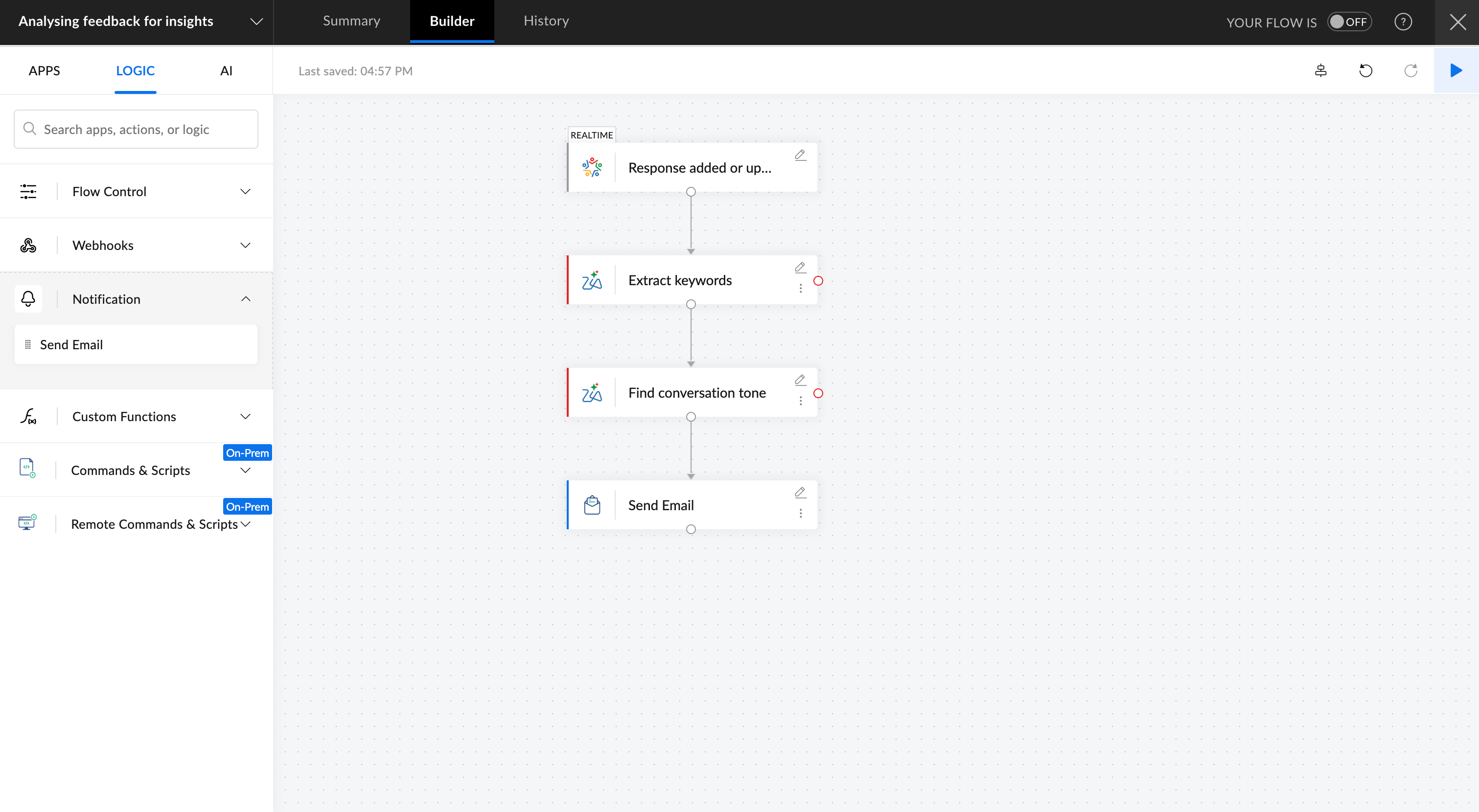
Now your team gets real-time visibility into customer sentiment and emerging trends without all the manual work.
Creating quick content snippets for listings and updates
When new product data or announcements go live, writing short blurbs and titles takes time. You may already have all the right data and key points available in your apps, but you still have to sit down to create polished descriptions and captions.
But with a workflow, you can:
- Fetch product details from Zoho Creator or Sheet.
- Use Generate Product Description or Generate Headline to create crisp but informative descriptions.
- Update them in your ecommerce app or send drafts for review in Zoho Cliq.
When your team has to work on hundreds of these tasks, you'll now already have a draft to start working on instead of starting from scratch. Your creative team gets to focus on strategy while the repetitive writing gets handled behind the scenes.
These are just a few of the hundreds of ways you can automate content-level tasks in your workflows. With the right mix of app-level automation (moving data) and content-level intelligence (understanding and rewriting text), you can finally automate complete stretches of work—not just fragments of it. And the result? Your team has much more bandwidth to take care of work that actually matters, and your automated workflows stay truly automated.
Explore AI-powered workflow automation
If you need help setting up AI-powered workflows, or if you'd like to explore how your team or business can automate busywork better, contact us at support@zohoflow.com and we'll be happy to help!
Frequently asked questions
How does Zia impact workflow automation in Zoho Flow?
Zoho Flow's new AI features powered by Zia, can help you with every step of building and automating workflows. You can use it as a starting point to generate whole workflows and add intelligent steps to your workflows or include agentic actions to analyze the context of your workflows and decide subsequent actions.
Is my data secure when using AI features in Zoho Flow?
Yes, we adhere to a strict privacy policy when handling your data, and you can choose to deny access to your data at any time.
Will my data be used to train Zia?
No, Zia only analyzes your prompts and app connections within your Zoho Flow workspace. Your data always remains private.
Do I need technical or AI expertise to use these features?
No. AI utilities like Summarize Text, Rephrase Text, Generate Email Reply, and Extract Keywords are available as ready-to-use steps inside your workflow builder. You simply configure them like any other action.
How accurate are AI-generated summaries and replies?
AI-generated outputs are designed to be context-aware and useful as first drafts. While they are highly effective for routine tasks, we recommend human review for sensitive communications, legal content, or high-stakes decisions.
How can I get started with Zoho Flow's AI features?
You can sign up with Zoho Flow and start accessing its AI features immediately.
 Arjun
ArjunProduct Marketer at Zoho Flow: Passionately curious, with a love for thinking, writing, and exploring creative ways to connect people with science and technology.