

OAuth 2.0 workflow
AI Tools
Open in ChatGPT
Open in ChatGPT to ask questions about this page
Open in Claude
Open in Claude to ask questions about this page
Copy as Markdown
Copy this page as markdown to use with AI assistants
View as Markdown
Open this page as markdown in a new tab
Open in ChatGPT
Open in ChatGPT to ask questions about this page
Open in Claude
Open in Claude to ask questions about this page
Copy as Markdown
Copy this page as markdown to use with AI assistants
View as Markdown
Open this page as markdown in a new tab
Step 1: Register your app and get OAuth credentials
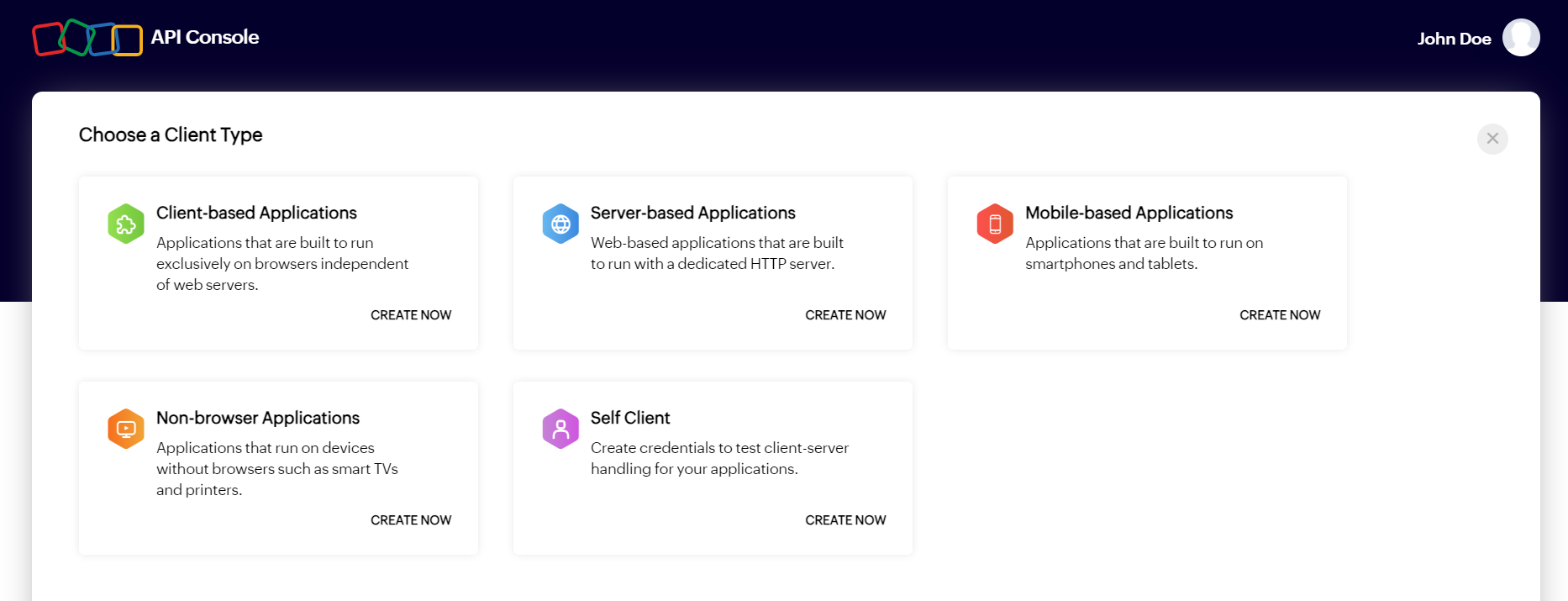
The first step in using OAuth authentication is registering your app with the Zoho API console. Once you register your client, you will get a Client ID and Client secret for your application. This Client ID and Client secret are used to authorize your app's OAuth requests. Ensure the redirect URI used in OAuth requests exactly matches the one configured in the API Console.
Step 2: Obtain an access token
An access token is an OAuth token that allows access to Zoho's protected resources. The method for generating an access token depends on the type of application. For instance, server-based applications can use the authorization code flow, while client-based applications can utilize the implicit flow. However, in all cases, the access token is provided only after the user grants permission through consent. Access tokens are always assigned specific scopes, which are outlined in the request, and these scopes will be presented to the user during the permission request process.
Auth, access token, and refresh token URLs
- Authorization URL (get auth code): https://accounts.zoho.{dc}/oauth/v2/auth
- Access token URL: https://accounts.zoho.{dc}/oauth/v2/token
- Refresh token URL: https://accounts.zoho.{dc}/oauth/v2/token
- Example (India DC): https://accounts.zoho.in/oauth/v2/token
Generate auth code (required once)
GET https://accounts.zoho.{dc}/oauth/v2/auth \
  ?scope=ZohoCliq.Channels.READ \
  &client_id={client_id} \
  &response_type=code \
    &state={csrf_token} \
  &access_type=offline \
  &prompt=consent \
  &redirect_uri={redirect_uri}
Use a unique state value per authorization request and validate the same value in the callback response to prevent CSRF attacks.
Generate access token + refresh token
curl --request POST \
  --url 'https://accounts.zoho.{dc}/oauth/v2/token' \
  --data 'grant_type=authorization_code' \
  --data 'client_id={client_id}' \
  --data 'client_secret={client_secret}' \
  --data 'redirect_uri={redirect_uri}' \
  --data 'code={authorization_code}'
Response fields to store: access_token, refresh_token, expires_in, api_domain. Use api_domain when constructing Zoho service API requests.
Step 3: Access the resource using the access token
After your app has the access token, it can access Zoho's protected resources. Upon providing the access token to the resource server, your app will be granted access according to the scopes defined in the request. Zoho's OAuth implementation uses the Bearer authentication scheme; hence, when making API calls, the access token must be passed in the Authorization header with the prefix "Zoho-oauthtoken".
Step 4: Refresh the access token when it expires
Access tokens are valid for 1 hour. Use the stored refresh token to generate a new access token.
curl --request POST \
  --url 'https://accounts.zoho.{dc}/oauth/v2/token' \
  --data 'grant_type=refresh_token' \
  --data 'client_id={client_id}' \
  --data 'client_secret={client_secret}' \
  --data 'refresh_token={refresh_token}'
Step 5: Revoke unwanted tokens
If a refresh token is no longer needed or seems to be compromised, it can be revoked and rendered invalid. This is done by making an API request to https://accounts.zoho.{dc}/oauth/v2/token/revoke (endpoint path: /oauth/v2/token/revoke). Once the revocation is successful, the refresh token can no longer be used to generate access tokens, and any existing access tokens that were created using this refresh token will also become invalid.
curl --request POST \
  --url 'https://accounts.zoho.{dc}/oauth/v2/token/revoke' \
  --data 'token={refresh_token}'
🔑 OAuth 2.0 Terminologies
The following are the terms you need to know before you start using the Zoho Cliq APIs.
| Term | Description |
|---|---|
| Protected Resources | A protected resource is any data or functionality within Zoho Cliq that requires authorized access. For example, when a client application needs to retrieve channel information through the Zoho Cliq API, the channels module serves as a protected resource. These resources are secured through OAuth authentication, ensuring that only authorized clients can access sensitive data and perform operations on behalf of users. |
| Resource Server | The server where the protected resources are stored, and to where the client must make API calls is called the resource server. In our case, the Zoho Cliq app which has the resource the client wants to access represents the resource server. |
| Resource Owner | Resource owner is the user who can grant permission to the client and in turn access to the protected resource of their Zoho Cliq account. |
| Client | The application that needs access to the protected resource is called the client. The client can be a server-based application, a single page JavaScript application, a mobile/desktop application, or a non-browser limited input application. The client can make API requests to the resource server after successful authorization by the authorization server on behalf of the user. |
| Client ID | A unique identifier for your application which you can receive when registering your application in the Zoho API console. |
| Client Secret | A unique secret key for your application which you can receive when registering your application in the Zoho API console. Client secret is known only between your application and Zoho, therefore, must be kept confidential. (Client secret is not needed for client-based applications and will not be provided). |
| Authentication Server | The server which grants access tokens and refresh tokens on behalf of the resource owner (i.e., the user), for the client to access protected resources is called the authorization server. In our case, Zoho Accounts is the authorization server. |
| Authentication Code | For server-based applications and mobile-based applications, access tokens cannot be generated directly. Instead, the client must first get an authorization code from the authorization server (Zoho Accounts), and then exchange it for an access token. The lifetime of authorization code is only two minutes and can be used only once. |
| Tokens | Description |
|---|---|
| Access Token | Access tokens are granted by the authorization server (Zoho Accounts) and are used by the client to access the protected resources. It contains information about the user and the scopes. It essentially tells the resource owner that the bearer of this token has been authorized by the user to access the protected resource as per the scope defined. The validity of an access token is 1 hour and can be used only once. |
| Refresh Token | Refresh tokens are used to generate a new access token after the old one expires. Refresh tokens are granted by the authorization server (Zoho Accounts) and can be stored by the client to generate access tokens whenever required. |
Note : Access tokens are sensitive and must be kept confidential because they determine your level of access to APIs. Never share your access tokens in public forums, public repositories, or in your website's client-side code, such as HTML or JavaScript. Exposing your access tokens can lead to data theft, loss, or corruption.
Scopes
Scope determines which protected resource of an end-user a client has requested access to. A scope has three parameters: service name, scope name, and operation type.
The format to define a scope is
scope = service_name.scope_name.operation_type
Operation type: CREATE, READ, UPDATE, DELETE, ALL
List of scopes available in Zoho :
| Scope | Description | Available Operation Types |
|---|---|---|
| Channels | Grants permission to create, read, update, and delete channels in Zoho Cliq. | ZohoCliq.Channels.CREATE, ZohoCliq.Channels.READ, ZohoCliq.Channels.UPDATE, ZohoCliq.Channels.DELETE |
| Chats | Grants permission to create, read, modify, and delete chats in Zoho Cliq. | ZohoCliq.Chats.CREATE, ZohoCliq.Chats.READ, ZohoCliq.Chats.UPDATE, ZohoCliq.Chats.DELETE |
| Messages | Grants permission to create, read, update, and delete messages across conversations in Zoho Cliq. | ZohoCliq.Messages.CREATE, ZohoCliq.Messages.READ, ZohoCliq.Messages.UPDATE, ZohoCliq.Messages.DELETE |
| Attachments | Grants permission to read attachments shared within chats and channels. | ZohoCliq.Attachments.READ |
| Reminders | Grants permission to create, read, update, delete, and manage reminders in Zoho Cliq. | ZohoCliq.Reminders.CREATE, ZohoCliq.Reminders.READ, ZohoCliq.Reminders.UPDATE, ZohoCliq.Reminders.DELETE, ZohoCliq.Reminders.ALL |
| Bots | Grants permission to create, read, update, and delete bots configured in Zoho Cliq. | ZohoCliq.Bots.CREATE, ZohoCliq.Bots.READ, ZohoCliq.Bots.UPDATE, ZohoCliq.Bots.DELETE |
| Bot Messages | Grants permission to send messages via bots in Zoho Cliq. | ZohoCliq.BotMessages.CREATE |
| Webhooks | Grants permission to post messages directly to conversations using incoming webhooks. | ZohoCliq.Webhooks.CREATE |
| Message Actions | Grants permission to create, read, update, and delete custom message actions in Zoho Cliq. | ZohoCliq.messageactions.CREATE, ZohoCliq.messageactions.READ, ZohoCliq.messageactions.UPDATE, ZohoCliq.messageactions.DELETE |
| Organization | Grants permission to create roles and manage organization-level settings in Zoho Cliq. | ZohoCliq.Organisation.CREATE, ZohoCliq.Organisation.READ, ZohoCliq.Organisation.UPDATE, ZohoCliq.Organisation.DELETE |
| Teams | Grants permission to create, read, update, and delete teams within Zoho Cliq. | ZohoCliq.Teams.CREATE, ZohoCliq.Teams.READ, ZohoCliq.Teams.UPDATE, ZohoCliq.Teams.DELETE |
| Departments | Grants permission to create, read, update, and delete departments. | ZohoCliq.Departments.CREATE, ZohoCliq.Departments.READ, ZohoCliq.Departments.UPDATE, ZohoCliq.Departments.DELETE |
| Designations | Grants permission to create, read, update, and delete designations in the organization. | ZohoCliq.Designations.CREATE, ZohoCliq.Designations.READ, ZohoCliq.Designations.UPDATE, ZohoCliq.Designations.DELETE |
| Users | Grants permission to create, read, and update users in Zoho Cliq. | ZohoCliq.Users.CREATE, ZohoCliq.Users.READ, ZohoCliq.Users.UPDATE |
| User Fields | Grants permission to manage custom user fields including create, update, and delete operations. | ZohoCliq.UserFields.CREATE, ZohoCliq.Userfields.UPDATE, ZohoCliq.Userfields.DELETE |
| Profile | Grants permission to create, read, update, and delete user profile information. | ZohoCliq.Profile.CREATE, ZohoCliq.Profile.READ, ZohoCliq.Profile.UPDATE, ZohoCliq.Profile.DELETE |
| Storage Data | Grants permission to read, update, and delete application database storage in Zoho Cliq. | ZohoCliq.StorageData.ALL, ZohoCliq.StorageData.READ, ZohoCliq.StorageData.UPDATE, ZohoCliq.StorageData.DELETE |
| Datastores | Grants permission to create, read, update, and delete datastores in Zoho Cliq. | ZohoCliq.Datastores.ALL, ZohoCliq.Datastores.CREATE, ZohoCliq.Datastores.READ, ZohoCliq.Datastores.UPDATE, ZohoCliq.Datastores.DELETE |
| Datastore Records | Grants permission to create, read, update, and delete records within datastores in Zoho Cliq. | ZohoCliq.DatastoreRecords.ALL, ZohoCliq.DatastoreRecords.CREATE, ZohoCliq.DatastoreRecords.READ, ZohoCliq.DatastoreRecords.UPDATE, ZohoCliq.DatastoreRecords.DELETE |
| Media Sessions | Grants permission to read information about calls and meetings conducted in Zoho Cliq. | ZohoCliq.MediaSession.READ |
| Applications | Grants permission to update application configuration and metadata. | ZohoCliq.Applications.UPDATE |
| Extensions | Grants permission to create, read, and update extensions installed in Zoho Cliq. | ZohoCliq.Extensions.CREATE, ZohoCliq.Extensions.READ, ZohoCliq.Extensions.UPDATE |
| Functions | Grants permission to create, read, update, and delete functions in Zoho Cliq. | ZohoCliq.Functions.CREATE, ZohoCliq.Functions.READ, ZohoCliq.Functions.UPDATE, ZohoCliq.Functions.DELETE |
| Calendar Events | Grants permission to create, read, update, manage, and search calendar events in Zoho Calendar. | ZohoCliq.CalendarEvents.ALL, ZohoCalendar.calendar.ALL, ZohoCalendar.event.ALL, ZohoCalendar.search.READ |
| Zoho People | Grants permission to read employee forms, employee information, and manage attendance records. | ZohoPeople.forms.READ, ZohoPeople.employee.READ, ZohoPeople.attendance.READ, ZohoPeople.attendance.UPDATE |