
How to add Earnings Arrestment Order (Scotland)?

An Earnings Arrestment Order (Scotland) is a Scottish order that requires you to deduct money from an employee’s earnings and send it to the creditor or collecting authority named on the order.
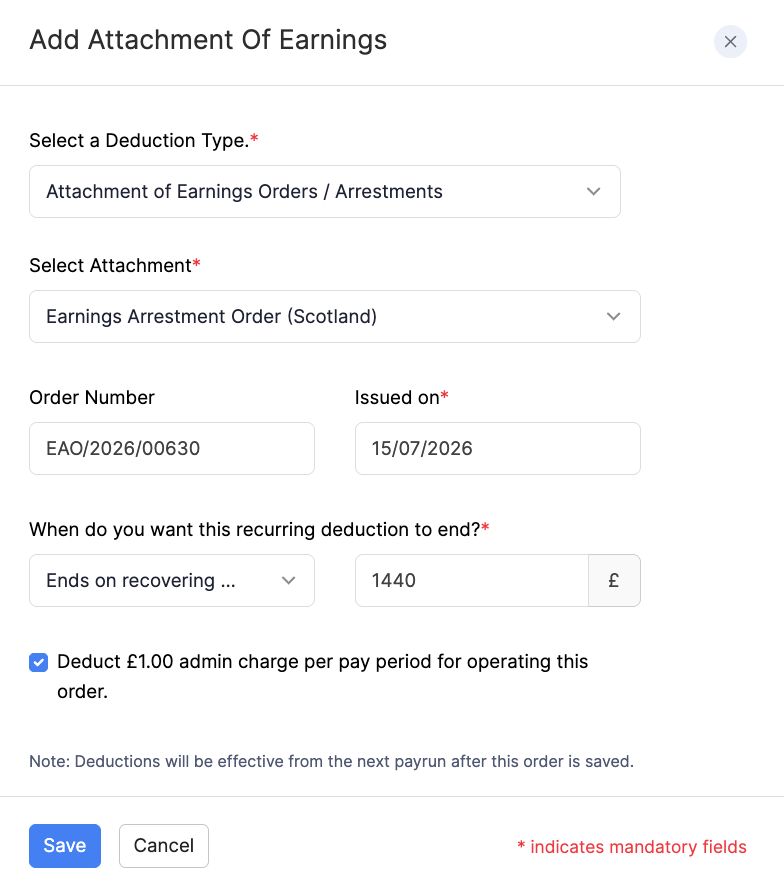
To add Earnings Arrestment Order (Scotland) for an employee:
- Go to Employees and open the employee, or stay on the Salary step while adding an employee.
- Under Deductions, click + Add New, or click Deductions on the Salary step.
- Select Attachment of Earnings Orders / Arrestments as the deduction type.
- Select Earnings Arrestment Order (Scotland) as the attachment.
- Enter the order details, such as the Order Number, Issued on date, Amount (fixed amount or percentage where shown), Protected Earnings if applicable, whether to deduct the admin charge, and when the order ends.
- Click Save.
Protected earnings is the amount of pay the employee must be left with after the deduction. If the deduction is reduced to the protected earnings rate, any shortfall can carry forward to the next pay period. For a worked example, refer to protected earnings in Add Employees.
For an overview of deductions when you add an employee, refer to Add Employees. You can also add or edit deductions later from the employee’s Salary tab.