
How to add Other Items (Class 1A) as a Benefit in Kind?

Other Items (Class 1A) is a Benefit in Kind used for other taxable benefits that attract Class 1A National Insurance. Use this when the benefit does not fit a more specific type in the list.
To add Other Items (Class 1A) as a Benefit in Kind for an employee:
- Go to Employees and open the employee.
- Open the Salary tab.
- Under Benefits in Kind, click + Add New. If you are still adding the employee, click Benefits in Kind on the Salary step.
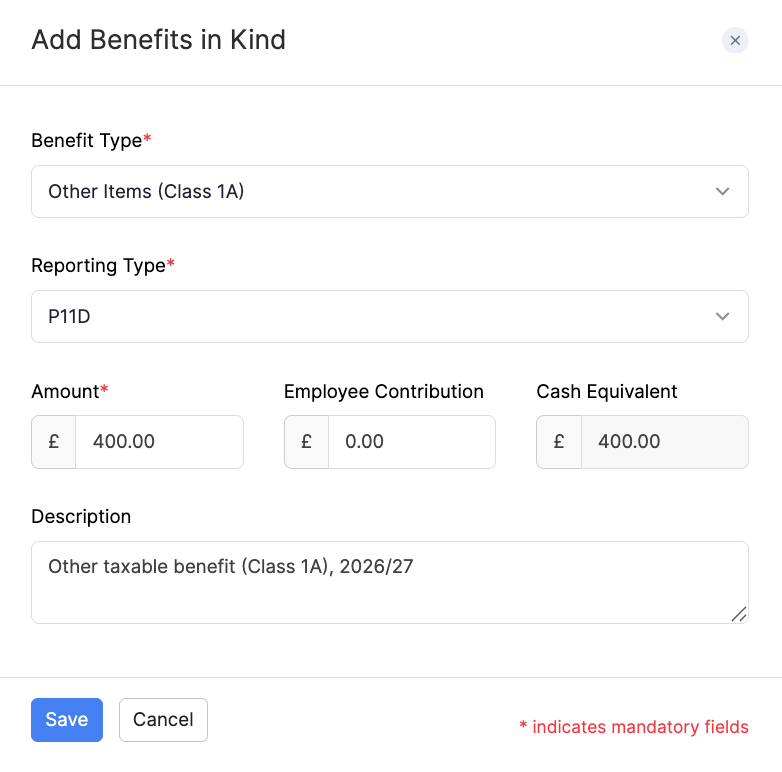
- Select Other Items (Class 1A) as the Benefit Type.
- Select the Reporting Type (P11D or PAYE).
- Enter the Amount and any Employee Contribution. Zoho Payroll shows the Cash Equivalent.
- Enter an optional Description, then click Save.
For an overview of Benefits in Kind and when to use P11D or PAYE, refer to Add Employees. You can also add or edit benefits later from the employee’s Salary tab.