
How to add Vouchers as a Benefit in Kind?

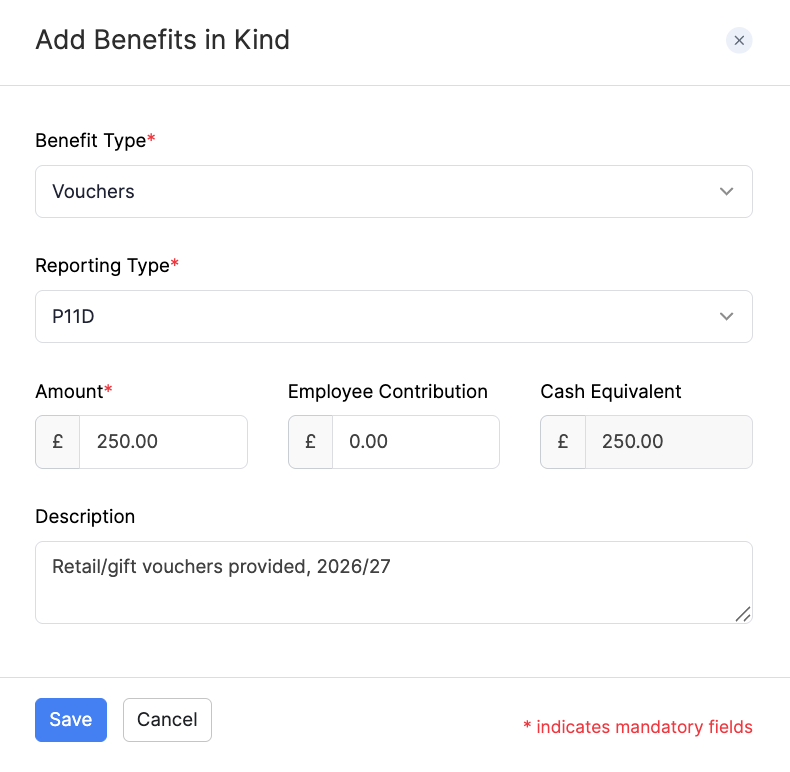
Vouchers is a Benefit in Kind used when you give an employee retail or gift vouchers that can be exchanged for goods or services. The cash equivalent is usually the cost of the vouchers less any employee contribution.
To add Vouchers as a Benefit in Kind for an employee:
- Go to Employees and open the employee.
- Open the Salary tab.
- Under Benefits in Kind, click + Add New. If you are still adding the employee, click Benefits in Kind on the Salary step.
- Select Vouchers as the Benefit Type.
- Select the Reporting Type (P11D or PAYE).
- Enter the Amount and any Employee Contribution. Zoho Payroll shows the Cash Equivalent.
- Enter an optional Description, then click Save.
For an overview of Benefits in Kind and when to use P11D or PAYE, refer to Add Employees. You can also add or edit benefits later from the employee’s Salary tab.