
How to add Car and Fuel Benefit as a Benefit in Kind?

Car and Fuel Benefit is a Benefit in Kind used when you provide a company car for private use, and optionally free fuel. Zoho Payroll uses the vehicle details you enter to record the benefit for reporting to HMRC.
To add Car and Fuel Benefit as a Benefit in Kind for an employee:
- Go to Employees and open the employee.
- Open the Salary tab.
- Under Benefits in Kind, click + Add New. If you are still adding the employee, click Benefits in Kind on the Salary step.
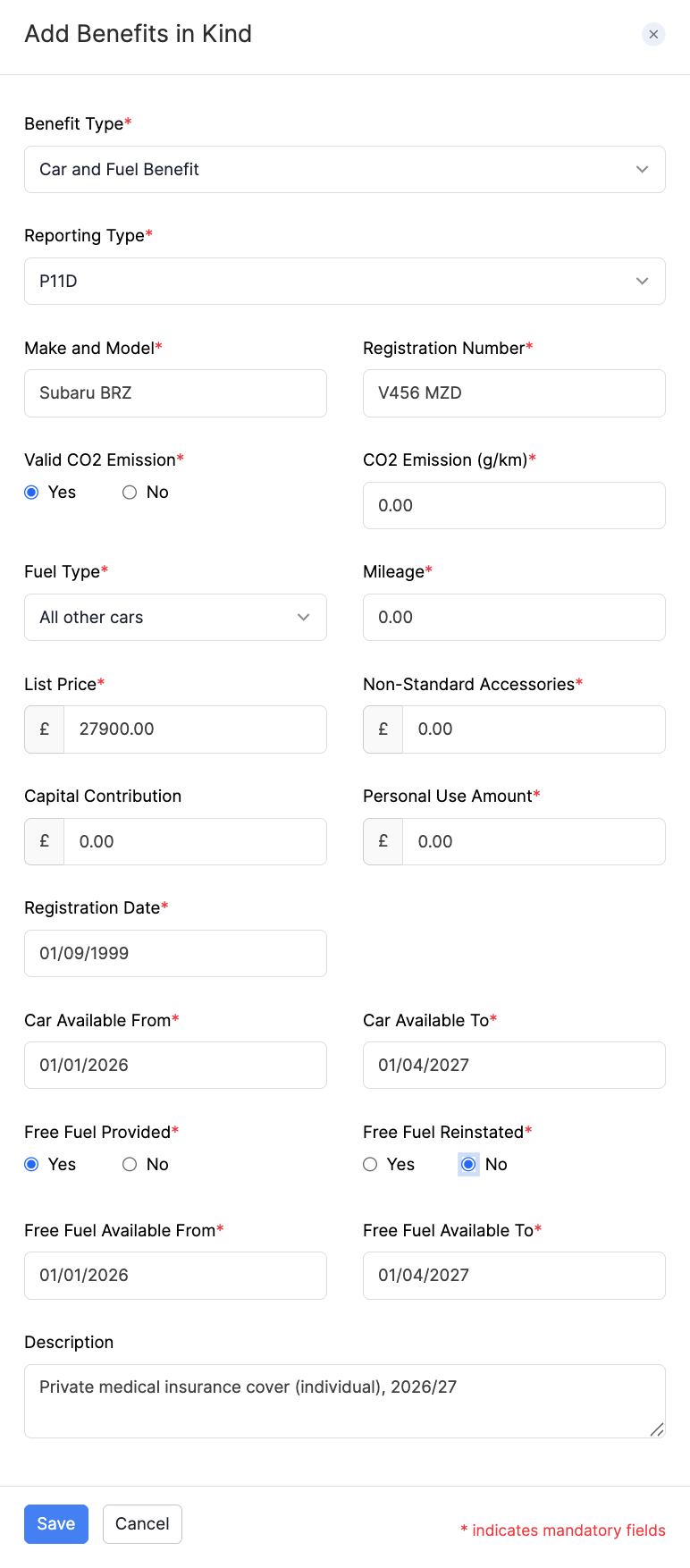
- Select Car and Fuel Benefit as the Benefit Type.
- Select the Reporting Type (P11D or PAYE).
- Enter the vehicle details, including:
- Make and Model and Registration Number
- Valid CO2 Emission, and either CO2 Emission (g/km) or Engine Capacity (cc) as prompted
- Fuel Type, Mileage, and Registration Date
- List Price, Non-Standard Accessories, Capital Contribution, and Personal Use Amount
- Car Available From and Car Available To
- Whether Free Fuel is provided or reinstated, and the free fuel availability dates if applicable
- Enter an optional Description, then click Save.
For an overview of Benefits in Kind and when to use P11D or PAYE, refer to Add Employees. You can also add or edit benefits later from the employee’s Salary tab.