
Pensions

Pensions shows your workplace pension: who your provider is, how much has been contributed for the tax year, and the contributions made each month. Open it from the left sidebar.
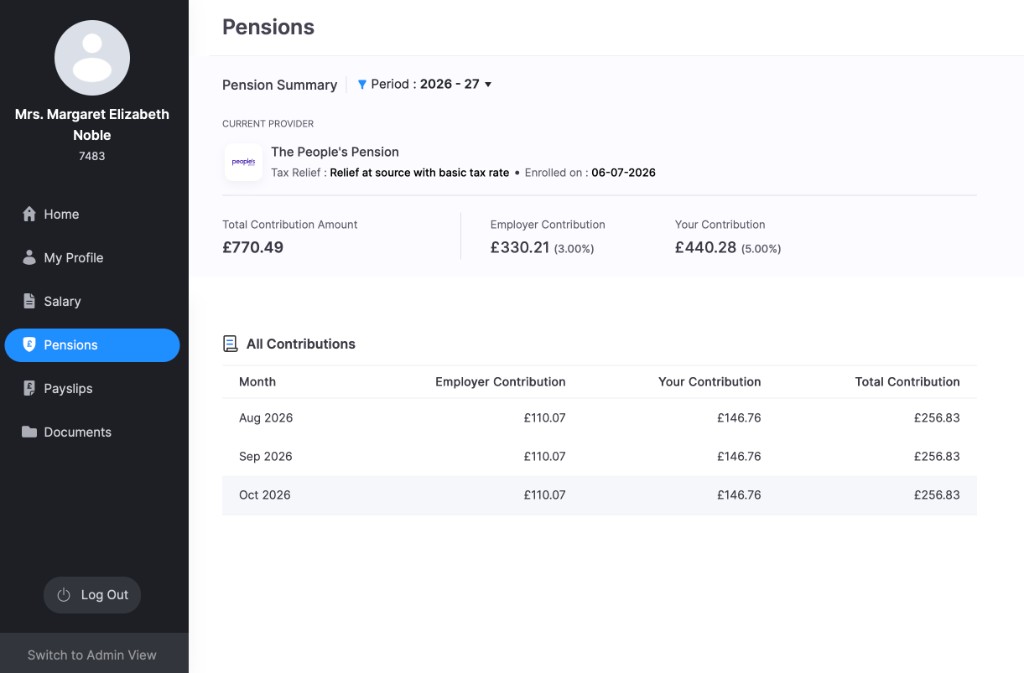
Note: You only see contributions if you are enrolled in a workplace pension. If you think you should be enrolled, contact your payroll admin.
Pension Summary
The summary covers the tax year selected in Period, for example 2026 - 27. Click Period to choose another tax year.
Current Provider
This section shows the pension scheme you are enrolled in.
| What you see | What it means |
|---|---|
| Provider name | The pension provider, for example The People’s Pension. |
| Tax Relief | How tax relief is applied to your contributions, for example relief at source with basic tax rate. |
| Enrolled on | The date you were enrolled in the scheme. |
Contribution totals
| What you see | What it means |
|---|---|
| Total Contribution Amount | Everything paid into your pension for the selected tax year, by you and your employer. |
| Employer Contribution | What your employer has paid, with their contribution rate as a percentage. |
| Your Contribution | What you have paid from your pay, with your contribution rate as a percentage. |
All Contributions
All Contributions lists the contributions made in each month of the selected tax year.
| Column | What it shows |
|---|---|
| Month | The month the contribution was made. |
| Employer Contribution | What your employer paid that month. |
| Your Contribution | What you paid that month. |
| Total Contribution | The employer and employee contributions for that month added together. |
Insight: To see how your contributions are calculated, such as which earnings count toward them, go to Salary.