
Contribution History

Contribution History shows the pension contributions calculated for each employee during past pay runs. Export the file to submit these to your provider so they can update each employee’s pension record.
View Contribution History
- Go to Pensions.
- Open the provider.
- Switch to Payments.
- Under Contribution History, review each period’s amount and Employees Included.
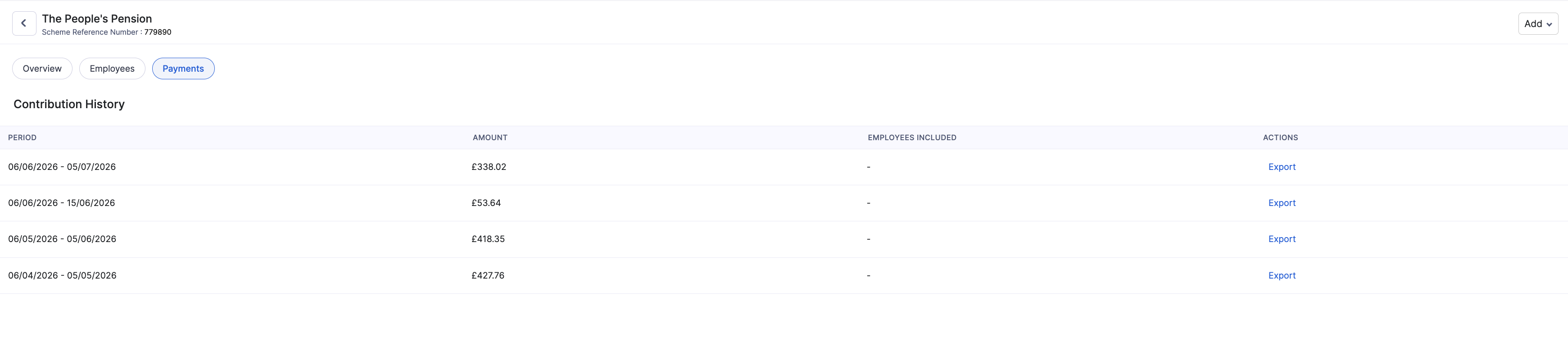
If you haven’t processed a pay run with pension contributions yet, the page shows that there are no contributions yet. They’ll appear here after your first pay run.
Export Contributions for Your Provider
- Open Contribution History for the provider.
- Find the pay period you want to send.
- Click Export.
- Upload or send the file to your pension provider using their preferred method.
Note: For Nest and SimplyInsured, Zoho Payroll generates the export file in the provider’s format, so you can upload it as is. For other providers, check your provider’s guidance before you upload, as you may need to adjust the file to match their format.